Loading
Get Cctv Inspection Report Template
How it works
-

Open form follow the instructions
-

Easily sign the form with your finger
-

Send filled & signed form or save
How to fill out the CCTV Inspection Report Template online
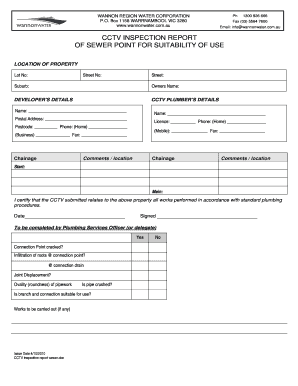
The CCTV Inspection Report Template is designed to document the suitability of sewer points for use. This guide will provide you with clear, step-by-step instructions to efficiently fill out the form online, ensuring a comprehensive inspection report.
Follow the steps to complete the CCTV Inspection Report Template online.
- Click ‘Get Form’ button to retrieve the form and open it in the online editor.
- Begin by filling in the 'Location of Property' section. Provide the 'Lot No', 'Street No', 'Street', and 'Suburb'. Ensure that these details accurately reflect the property being inspected.
- Enter the name of the property owner in the 'Owners Name' field for proper identification.
- Next, complete the 'Developer’s Details' section. Input the name, postal address, and postcode of the developer associated with the inspection.
- In the 'CCTV Plumber’s Details' section, fill in the name, address, license number, and contact information of the plumber conducting the CCTV inspection.
- Under 'Chainage', specify the start and main chainage locations relevant to the inspection. Add any comments or location details if necessary.
- Acknowledge the certification statement by entering the date and signing in the 'Signed' field, confirming that the CCTV submitted relates to the aforementioned property.
- The final section should be completed by a Plumbing Services Officer or their delegate. They should check the various conditions outlined, such as connection point cracked or suitable for use, and indicate their findings.
- After filling in all necessary sections, review the form for accuracy. You can then save changes, download, print, or share the completed form as needed.
Complete your CCTV Inspection Report Template online today for effective documentation.
Reporting a CCTV camera typically involves explaining its location and purpose. You may need to document any issues observed with the camera's functionality or recorded footage. Using a CCTV Inspection Report Template makes it easier to compile all relevant details systematically, helping improve the overall security operations.