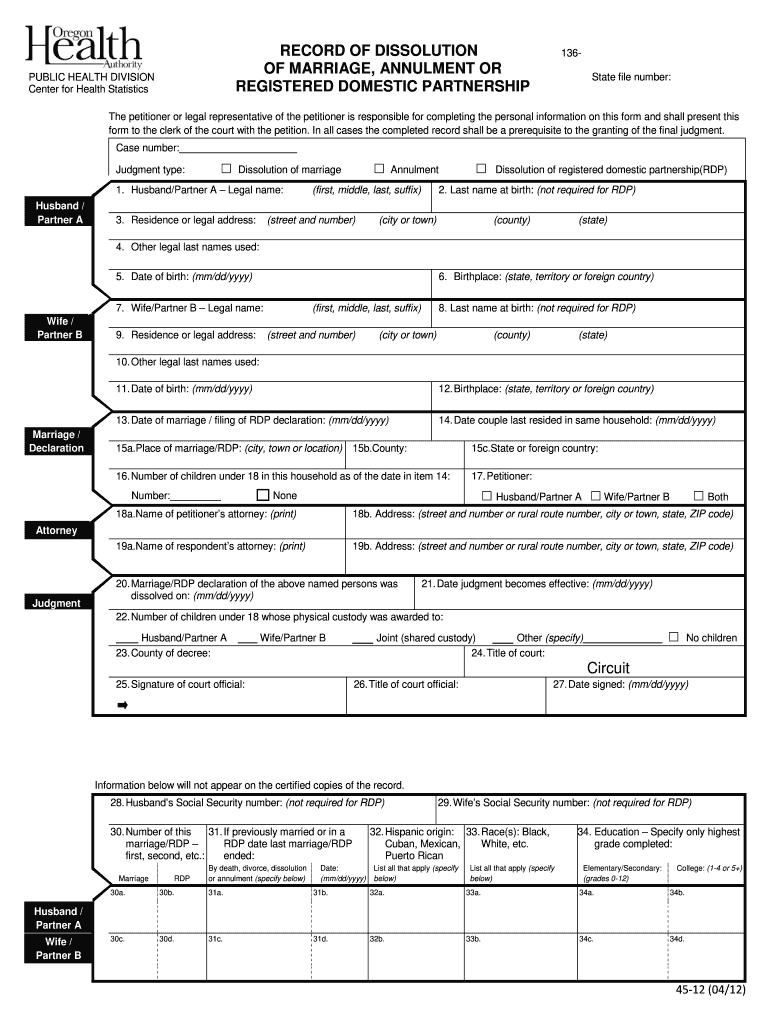
Te file number: The petitioner or legal representative of the petitioner is responsible for completing the personal information on this form and shall present this form to the clerk of the court with the petition. In all cases the completed record shall be a prerequisite to the granting of the final judgment. Case number: Judgment type: Dissolution of marriage 1. Husband/Partner A Legal name: Husband / Partner A 3. Residence or legal address: Annulment (first, middle, last, suf.
Loading

Open form follow the instructions

Easily sign the form with your finger

Send filled & signed form or save
How to fill out the Printable Annulment Papers online
Filling out the Printable Annulment Papers can be a straightforward process when guided properly. This document is essential for formalizing the annulment of a marriage or registered domestic partnership, and understanding each component will help ensure accuracy and compliance with court requirements.
Follow the steps to fill out your annulment papers online.
- Press the ‘Get Form’ button to download the Printable Annulment Papers and access the document in the appropriate editing software.
- Begin with the section labeled 'Petitioner or legal representative information.' Enter the petitioner’s legal name, ensuring to fill in the first, middle, last names, and any applicable suffix.
- Provide the residence or legal address of the petitioner, including the street address, city, county, and state.
- For 'Last name at birth', only fill this in if applicable (this is not required for registered domestic partnerships). Proceed to list any other legal names used by the petitioner.
- Next, record the date of birth of the petitioner in the format mm/dd/yyyy, followed by the birthplace.
- Repeat similar steps for the second partner ('Wife/Partner B'), entering their legal name, address, last name at birth, other legal names, date of birth, and birthplace.
- Continue filling in the date of marriage or the date of filing for the registered domestic partnership, as well as the date the couple last resided in the same household.
- Indicate the place of marriage or RDP, including city, county, and state or foreign country.
- Specify the number of children under 18 residing in the household as of the date last resided together.
- Select who the petitioner is by marking the appropriate box for either 'Husband/Partner A', 'Wife/Partner B', or 'Both'.
- If applicable, provide names and addresses of both the petitioner’s and respondent’s attorneys.
- Enter the date on which the marriage or registered domestic partnership was dissolved, followed by the effective date of the judgment.
- If children are involved, note who has physical custody by completing the appropriate fields.
- Indicate the title of the court, and ensure to sign where indicated, including the date signed.
- Finally, save your completed form. You can choose to download, print, or share the document as needed.
Complete your Printable Annulment Papers online today to ensure a smooth filing process.
Experience a faster way to fill out and sign forms on the web. Access the most extensive library of templates available.
Related content
After printing form, please cut on dashed line to create a form with the dimensions of 8.5...
The website offers free assistance to those who cannot afford to hire a private attorney...
Apr 23, 2025 — concerned applications for annulment against an urgent binding decision...
Get answers to your most pressing questions about US Legal Forms API.
How to get a copy of annulment paper in the Philippines?
To obtain a copy of annulment papers in the Philippines, you need to visit the local civil registrar's office where the marriage was recorded. You may also request documents online through various platforms that offer printable annulment papers, making it easier to manage the process. Ensure you provide necessary details like names and dates, which will help expedite your request. Using online services can streamline the process, saving you both time and effort.
What are the canonical grounds for annulment?
Canonical grounds for annulment generally include issues such as lack of consent, mental incapacity, or deceitful behavior that affects the marriage's validity. These grounds are grounded in church law and can lead to a declaration that the marriage was never valid. If you're considering annulment, Printable Annulment Papers can help you gather your thoughts and documents to approach this sensitive subject.
What is the most common reason for annulment?
The most common reason for annulment is typically mental incapacity. If one party was not mentally fit to make a marriage commitment at the time of the ceremony, this could lead to annulment. Acquiring Printable Annulment Papers helps streamline the legal procedures you need to follow.
What is an example of an annulment?
An example of an annulment is when a couple discovers that they are closely related by blood after getting married. This kind of circumstance can invalidate the marriage from the start. If you find yourself in such a situation, using Printable Annulment Papers will provide you with the necessary legal tools to make your case.
What is the most acceptable ground for annulment?
The most acceptable ground for annulment often revolves around either fraud or incapacity. Fraud can involve deceit about previous relationships or intentions, while incapacity may relate to mental disorders. By identifying the grounds accurately, you can use Printable Annulment Papers to efficiently navigate the legal process.
Which criterion is allowed in order to seek an annulment?
To seek an annulment, you must demonstrate specific criteria such as lack of capacity or that the marriage was never valid in the first place. These criteria vary by state, but generally include factors like mental incapacity or age. It's essential to have the right documents on hand, such as Printable Annulment Papers, to support your claim.
What is the best ground for annulment?
The best ground for annulment is typically fraud, meaning one party misrepresented crucial information before the marriage. This can affect the validity of the marriage. Understanding the grounds for annulment can simplify the process, and you can easily find Printable Annulment Papers to get started.
What qualifies for an annulment in New York?
You must ask for the annulment within the first five years of the marriage. Consent for the marriage obtained by force, duress, or fraud – If you entered into the marriage due to pressure, force, or fraud, you may be able to obtain an annulment.
How do I annul a marriage in FL?
How to get an annulment? To begin, you will need to file and serve a petition for annulment. (Annulment papers must be filed in Florida's circuit courts.) ... If the other party disagrees with the petition, they have the right to file and serve a counterclaim for dissolution of marriage.
What is the latest you can get an annulment?
In general, you have four years from the date of the marriage to file for an annulment, but there are exceptions depending on the reason for the annulment.
Use professional pre-built templates to fill in and sign documents online faster. Get access to thousands of forms.
If you believe that this page should be taken down, please follow our DMCA take down process here.
This form is available in several versions. Select the version you need from the drop-down list below.