Loading
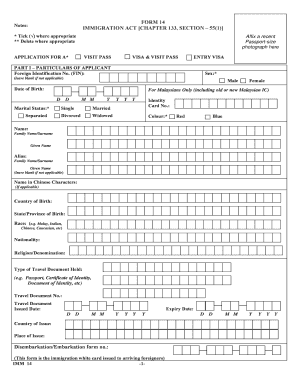
Get Ica Form 14
How it works
-

Open form follow the instructions
-

Easily sign the form with your finger
-

Send filled & signed form or save
How to fill out the Ica Form 14 online
Filling out the Ica Form 14 online is a straightforward process that allows users to apply for a visa and visit pass efficiently. This guide will provide clear, step-by-step instructions to ensure you complete the form accurately and thoroughly.
Follow the steps to complete the Ica Form 14 online successfully.
- Press the ‘Get Form’ button to access the form and open it in your preferred editor.
- In Part I, enter your particulars. Start with your foreign identification number (FIN), followed by your date of birth and sex. If applicable, provide information about your marital status, including options such as single, married, divorced, or widowed.
- Input your identity card number (if you have one) and choose the color associated with it. Fill in your name by providing your family name and given name. If relevant, include an alias and your name in Chinese characters.
- Fill in your country and state/province of birth. Indicate your race and nationality, and state your religion or denomination, as required.
- Specify the type of travel document you hold, followed by its number, issued date, and expiry date. Make sure to list the country and place of issue.
- Complete the address fields, providing your residential address in Singapore, along with your contact number and postal code. Also, include your address in your country of origin.
- In Part II, indicate your occupation and list your highest academic or professional qualifications. Clearly state the purpose of your visit and the period for which you are applying for the visa or visit pass.
- Mention the nationality of your spouse if applicable. Provide details of countries where you have resided for more than one year in the last five years, including addresses and periods of stay.
- In Part III, answer the antecedent questions regarding previous refusals of entry, convictions, or prohibitions relating to Singapore. If any answer is 'yes', ensure you provide detailed information on a separate sheet.
- In Part IV, read and complete the declaration by confirming that the information provided is true. Sign and date the declaration.
- If applicable, fill out Part V with the details of your local sponsor. Complete either section A or B based on whether your sponsor is a company or an individual.
- Finally, review your completed form for accuracy. You can then save your changes, download a copy, print, or share the form as needed.
Complete your Ica Form 14 online today for a seamless application process.
You should fill out the ICA as soon as you have determined your travel plans to Singapore. Completing the Ica Form 14 early will give you ample time to gather any additional documents you may need. This proactive approach helps mitigate last-minute issues and ensures a smoother application process.