Loading
Get Peepo Template
How it works
-

Open form follow the instructions
-

Easily sign the form with your finger
-

Send filled & signed form or save
How to fill out the Peepo Template online
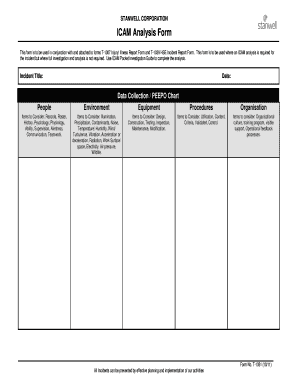
Welcome to the guide on filling out the Peepo Template online. This document is essential for conducting an ICAM analysis in connection with injury or incident reports. Follow the steps outlined here to ensure accurate and efficient completion of the form.
Follow the steps to successfully complete the Peepo Template online.
- Click ‘Get Form’ button to obtain the Peepo Template and open it in your preferred online editor.
- Begin by entering the incident title in the designated field. Be concise and specific to convey the nature of the incident.
- In the date field, select the appropriate date the incident occurred. This is crucial for accurate record-keeping.
- Proceed to the Data Collection / PEEPO Chart section. Here, you will need to identify various factors related to the incident. Segment the information into the categories of Equipment, People, Environment, Procedures, Organisation, and Organisational Factors.
- Under the Equipment category, list any equipment involved in the incident. Ensure to consider factors like maintenance history.
- In the People section, detail the individuals involved. Reflect on their roles and what impact they may have had on the incident.
- For the Environment category, examine external conditions that could have influenced the incident. This includes illumination, weather, and possible environmental hazards.
- Fill out the Procedures and Organisation sections by evaluating operational protocols and cultural aspects within the organization that might contribute to the incident.
- Next, assess any absent or failed defences that may have led to the incident. This critical analysis will help identify underlying issues.
- Craft a Corrective Action Plan, listing each recommended action, the responsible department, and a designated person. Set a completion date for each recommendation.
- Finally, review your completed form for accuracy. Save any changes, and if required, download, print, or share the form as needed.
Start filling out your Peepo Template online today for effective incident analysis.

While Peepo is often recognized as an acronym or terminology within the safety and incident reporting space, its full form can vary by organization. Essentially, it represents a commitment to improving safety through detailed reporting and analysis. Utilizing a Peepo Template helps clarify this commitment and enhance your organization's reporting capabilities.