Loading
Form preview
  • US Legal Forms
  • Other Templates
  • More Forms
  • More Multi-State Forms
  • Fs 1 Form Progressive

Get Fs 1 Form Progressive

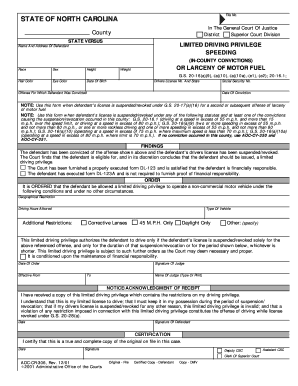
TIONS) Race Sex Height Hair Color Eye Color Date Of Birth OR LARCENY OF MOTOR FUEL Weight G.S. 20-16(a)(9),-(a)(10),-(a)(10a),-(e1),-(e2); 20-16.1; Drivers License No. And State Social Security No. Offense For Which Defendant Was Convicted Date Of Conviction NOTE: Use this form when defendant's license is suspended/revoked under G.S. 20-17(a)(16) for a second or subsequent offense of larceny of motor fuel. NOTE: Use this form when defendant's license is suspended/revoked under any o.

How it works

  1. Open form

    Open form follow the instructions

  2. Easily sign form

    Easily sign the form with your finger

  3. Share form

    Send filled & signed form or save

How to fill out the Fs 1 Form Progressive online

Filling out the Fs 1 Form Progressive can be a straightforward process when you follow the right steps. This guide will walk you through each section of the form, ensuring you provide all necessary information accurately and efficiently.

Follow the steps to complete the Fs 1 Form Progressive online.

  1. Click ‘Get Form’ button to obtain the form and open it in the editor.
  2. Begin by entering the defendant's name and address in the designated fields. Make sure that the information is current and correctly spelled.
  3. Fill in the race, sex, height, hair color, eye color, and date of birth of the defendant. This information is crucial for identification purposes.
  4. Enter the driver's license number and the state of issuance. If the defendant does not possess a driver's license, leave this field blank.
  5. Provide the social security number of the defendant. It may be required for verification during the processing of the form.
  6. Specify the offense for which the defendant was convicted, selecting between speeding or larceny of motor fuel, as applicable.
  7. Indicate the date of conviction to ensure that all information is up to date and reflects the legal status of the defendant.
  8. In the 'FINDINGS' section, review the statements regarding eligibility for limited driving privilege. Ensure all conditions are met before proceeding.
  9. Complete the 'ORDER' section by detailing any restrictions, including geographical limitations, allowed driving hours, and any additional conditions.
  10. After reviewing the entire form for accuracy, you can save changes, download, print, or share the form as needed. Ensure you retain a copy for your records.

Start completing the Fs 1 Form Progressive online today to ensure compliance and avoid complications.

Get form

Experience a faster way to fill out and sign forms on the web. Access the most extensive library of templates available.
Get form

Related content

Official NCDMV: Liability Insurance Help
Jul 9, 2023 — To prove liability coverage, the vehicle owner may request their insurance...
Learn more
A PROGRESSIVE COMPOSITE DAMAGE MODEL FOR ...
by BZG Haque · 2014 · Cited by 28 — These are Material Types 161 and 162. These...
Learn more
Instruction Manual
1 Insert a memory card that contains no video recordings into the card slot of the memory...
Learn more

Related links form

Marine Corps League Library AHPE Announcement & Membership Form SpinaLogic - KBI Medical Action Sewing Machine Service Request Form -

Questions & Answers

Get answers to your most pressing questions about US Legal Forms API.

Contact support

The NC FS 1 is a form related to the reporting of traffic violation convictions. It helps record a driver's compliance with traffic laws and insurance mandates. Knowing the specifics of the FS 1 Form Progressive will empower you to navigate these regulations with confidence.

Progressive's small accident forgiveness policy allows drivers to avoid premium increases after their first at-fault accident, provided certain conditions are met. This benefit can provide peace of mind for policyholders. Understanding how this plays into your insurance can enhance your overall experience with the FS 1 Form Progressive.

To submit the FS 1 form to the NC DMV, you need to fill out the form correctly and provide any required documentation. You can then mail it to the DMV or submit it in person at a local office. For added convenience, consider using the resources available on USLegalForms to ensure your FS 1 Form Progressive is completed accurately.

A North Carolina temporary driving certificate allows individuals to drive legally while they await a permanent license. This certificate is often issued to new drivers or those who are renewing their licenses. Understanding the relationship between this permit and the FS 1 Form Progressive can enhance your driving experience in NC.

The MVR-1 form in North Carolina is required for obtaining motor vehicle records. It acts as a request for your personal driving history and can be crucial for insurance purposes or legal matters. If you're involved in a transaction concerning the FS 1 Form Progressive, having your MVR-1 ready will be beneficial.

Submitting a Progressive form typically involves completing the necessary paperwork and delivering it to the appropriate department. For seamless submission, you may want to access the FS 1 Form Progressive on the USLegalForms platform, which provides clear instructions and guidelines for each step of the process.

The FS-4 form in North Carolina is a certificate for financial responsibility. It serves to verify that a driver holds sufficient insurance coverage as required by state regulations. Understanding the FS 1 Form Progressive can help clarify documentation related to financial responsibilities in North Carolina.

An FS1 form in North Carolina serves as the official documentation related to vehicle registrations, ensuring compliance with state regulations. It often includes details about the vehicle and its owner, and it's crucial for verifying coverage and liability with the DMV. Familiarizing yourself with the Fs 1 Form Progressive helps streamline your vehicle registration process.

Filling out the MVR 1 form in NC requires you to provide specific information about your vehicle, including details about its ownership and identification. Take your time to ensure all fields are correctly completed to avoid processing delays. For assistance, consider using platforms like UsLegalForms to guide you through the form-filling process.

Yes, North Carolina accepts electronic proof of insurance, making it easier for you to carry your documents. You can show this proof using your mobile device or print it out. Just ensure it meets the required criteria to be accepted by authorities during vehicle registration or traffic stops.

Get This Form Now!

Use professional pre-built templates to fill in and sign documents online faster. Get access to thousands of forms.
Get form
If you believe that this page should be taken down, please follow our DMCA take down processhere.
Get Fs 1 Form Progressive
Get form
  • Adoption
  • Bankruptcy
  • Contractors
  • Divorce
  • Home Sales
  • Employment
  • Identity Theft
  • Incorporation
  • Landlord Tenant
  • Living Trust
  • Name Change
  • Personal Planning
  • Small Business
  • Wills & Estates
  • Packages A-Z
  • Affidavits
  • Bankruptcy
  • Bill of Sale
  • Corporate - LLC
  • Divorce
  • Employment
  • Identity Theft
  • Internet Technology
  • Landlord Tenant
  • Living Wills
  • Name Change
  • Power of Attorney
  • Real Estate
  • Small Estates
  • Wills
  • All Forms
  • Forms A-Z
  • Other Templates
  • Legal Hub
  • About Us
  • Help Portal
  • Legal Resources
  • Blog
  • Affiliates
  • Contact Us
  • Delete My Account
  • Site Map
  • Industries
  • Forms in Spanish
  • Localized Forms
  • State-specific Forms
  • Forms Kit
  • Real Estate Handbook
  • All Guides
  • Notarize
  • Incorporation services
  • For Consumers
  • For Small Business
  • For Attorneys
  • USLegal
  • FormsPass
  • pdfFiller
  • signNow
  • altaFlow
  • DocHub
  • Instapage
Form Packages
  • Adoption
  • Bankruptcy
  • Contractors
  • Divorce
  • Home Sales
  • Employment
  • Identity Theft
  • Incorporation
  • Landlord Tenant
  • Living Trust
  • Name Change
  • Personal Planning
  • Small Business
  • Wills & Estates
  • Packages A-Z
Form Categories
  • Affidavits
  • Bankruptcy
  • Bill of Sale
  • Corporate - LLC
  • Divorce
  • Employment
  • Identity Theft
  • Internet Technology
  • Landlord Tenant
  • Living Wills
  • Name Change
  • Power of Attorney
  • Real Estate
  • Small Estates
  • Wills
  • All Forms
  • Forms A-Z
  • Other Templates
Customer Service
  • Legal Hub
  • About Us
  • Help Portal
  • Legal Resources
  • Blog
  • Affiliates
  • Contact Us
  • Delete My Account
  • Site Map
  • Industries
  • Forms in Spanish
  • Localized Forms
  • State-specific Forms
  • Forms Kit
Legal Guides
  • Real Estate Handbook
  • All Guides
Prepared for you
  • Notarize
  • Incorporation services
Our Customers
  • For Consumers
  • For Small Business
  • For Attorneys
Our Sites
  • USLegal
  • FormsPass
  • pdfFiller
  • signNow
  • altaFlow
  • DocHub
  • Instapage
Social Media
Call us now toll free:
+1 833 426 79 33
As seen in:
© Copyright 1999-2026 airSlate Legal Forms, Inc. 17 Station Street, Suite 303, Brookline, MA 02445
  • Your Privacy Choices
  • Terms of Service
  • Privacy Notice
  • Content Takedown Policy
  • Bug Bounty Program