Loading
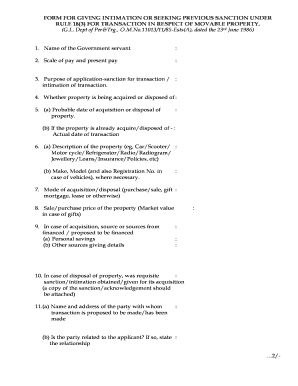
Get Movable Property Intimation Form
How it works
-

Open form follow the instructions
-

Easily sign the form with your finger
-

Send filled & signed form or save
How to fill out the Movable Property Intimation Form online
This guide provides a clear and step-by-step approach to completing the Movable Property Intimation Form online. Designed for users with varying experience levels, this resource ensures that all necessary information is accurately conveyed to facilitate your transactions involving movable property.
Follow the steps to complete the form accurately and efficiently.
- Press the ‘Get Form’ button to access the Movable Property Intimation Form and open it in your digital editor.
- Enter the name of the government servant in the designated field.
- Provide your scale of pay and current pay in the respective section.
- Indicate the purpose of the application by selecting whether it is for sanction for a transaction or intimation of a transaction.
- Specify if the property is being acquired or disposed of.
- In section 5(a), state the probable date of acquisition or disposal of the property. In section 5(b), if applicable, provide the actual date of the transaction.
- Detail the description of the property in section 6(a), including the type (e.g., car, jewelry) and in section 6(b), include specifications such as make, model, and registration number for vehicles.
- Indicate the mode of acquisition or disposal in section 7, selecting from options like purchase, sale, gift, mortgage, lease, or other.
- In section 8, provide the sale or purchase price of the property, or the market value in the case of gifts.
- If you are acquiring property, specify the sources of financing in section 9, detailing personal savings and any other sources.
- For disposal of property in section 10, confirm whether requisite sanction or intimation was previously obtained, and attach the necessary documentation.
- In section 11(a), provide the name and address of the party involved in the transaction and confirm any relationship in section 11(b). In section 11(c), indicate if you have had any official dealings with this party.
- Outline the nature of official dealings in section 11(d) and describe how the transaction was arranged in section 11(e).
- If applicable, confirm whether sanction under Rule 13 of CCS (Conduct) Rules 1964 is required for gifts in section 12.
- Use section 13 to mention any additional relevant facts you may wish to include.
- Finally, complete the declaration portion, sign, and date the form. Ensure to include your designation before submission.
Begin your online form completion today to ensure a smooth transaction process.
Rule 18 in court typically details the procedural aspects that guide how cases are managed and adjudicated. It covers various elements related to the administration of justice. When submitting crucial documents such as the Movable Property Intimation Form, understanding court rules, including Rule 18, can assist in avoiding errors and ensuring a smooth legal process.
Industry-leading security and compliance
US Legal Forms protects your data by complying with industry-specific security standards.
-
In businnes since 199725+ years providing professional legal documents.
-
Accredited businessGuarantees that a business meets BBB accreditation standards in the US and Canada.
-
Secured by BraintreeValidated Level 1 PCI DSS compliant payment gateway that accepts most major credit and debit card brands from across the globe.