We use cookies to improve security, personalize the user experience, enhance our marketing activities (including cooperating with our marketing partners) and for other business use.
Click "here" to read our Cookie Policy. By clicking "Accept" you agree to the use of cookies. Read less
Read more
Accept
Loading
Form preview
  • US Legal Forms
  • Form Library
  • More Forms
  • More Multi-State Forms
  • Celhs

Get Celhs

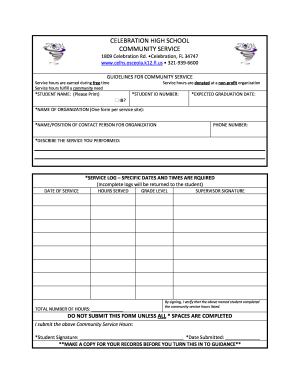
Free time Service hours fulfill a community need Service hours are donated at a non-profit organization *STUDENT NAME: (Please Print) *STUDENT ID NUMBER: *EXPECTED GRADUATION DATE: IB? *NAME OF ORGANIZATION (One form per service site): *NAME/POSITION OF CONTACT PERSON FOR ORGANIZATION PHONE NUMBER: *DESCRIBE THE SERVICE YOU PERFORMED: *SERVICE LOG SPECIFIC DATES AND TIMES ARE RQUIRED (Incomplete logs will be returned to the student) DATE OF SERVICE HOURS SERVED TOTAL NUMBER OF H.

How it works

  1. Open form

    Open form follow the instructions

  2. Easily sign form

    Easily sign the form with your finger

  3. Share form

    Send filled & signed form or save

How to fill out the Celhs online

Completing the Celhs form efficiently is essential for documenting your community service hours. This guide provides clear instructions designed to help you navigate each section of the form online, ensuring accurate and complete submissions.

Follow the steps to fill out the Celhs form correctly

  1. Click ‘Get Form’ button to access the Celhs form and open it in the editor.
  2. Begin by entering your information at the top of the form. Fill in your full name, student ID number, and expected graduation date. Make sure all required fields are clearly completed.
  3. Provide the name of the organization where the community service was performed. Remember to use one form per service site to maintain clarity.
  4. Identify the contact person from the organization and include their name and position. Additionally, write down their phone number for verification purposes.
  5. Describe the nature of the service you performed in detail. Ensure this section is comprehensive to reflect the work done.
  6. Complete the service log by documenting the specific dates and times of your service. Incomplete logs will be returned, so accuracy is critical.
  7. Calculate the total number of hours served and clearly write this number on the form.
  8. Include your grade level in the appropriate field, which helps categorize your submission.
  9. Obtain a supervisor's signature to validate the completed service hours. Their signature is a crucial component of verification.
  10. Finally, read through the form to ensure all required fields marked with an asterisk are completed. Sign and date the form in the respective spaces, then consider making a copy for your records before submission.

Start filling out your Celhs form online today to ensure your community service hours are recognized!

Get form

Experience a faster way to fill out and sign forms on the web. Access the most extensive library of templates available.
Get form

Related content

Section 1 - TWRI 3-C3
This format permits flexibility in revision and publication as the need arises ... CeLhS...
Learn more
CELLS—WHAT THEY ARE AND WHAT THEY MAY TELL ...
To be sure, you cannot see the celhs of the skin, nerves, brain, bone and other tissues...
Learn more
#psicosintesi hasgtag on Instagram post photo and...
#celhs #centrodeestudosdalinguagemhumanaesemiótica #consciênciasígnica #psicossintese...
Learn more

Related links form

Sepak Takraw Books & DVD 's Sepak Takraw Association Of Canada Skorsit Sepak Takraw Regu Activity Indemnity Form - SANParks TTRN - Bristol City Council

Questions & Answers

Get answers to your most pressing questions about US Legal Forms API.

Contact support

Several factors might contribute to CELH stock dropping, including market fluctuations and changes in consumer behavior. Economic conditions and competitive pressures can also impact stock performance. Keeping an eye on company news and industry trends will provide insights into such fluctuations.

Celsius energy drinks are gaining popularity, making them a potentially good investment in the beverage sector. As health-conscious choices increase among consumers, the demand for such products may drive growth for the company. If considering investment in CELH, evaluate the wider health and wellness market trends.

While predictions can vary, many analysts see CELH stock reaching new heights by 2025 due to emerging market opportunities. Factors such as new product launches and expanding retail partnerships could significantly impact the stock’s value. Staying informed about market developments will help you gauge these forecasts better.

The future of Celsius stock looks bright, especially as trends show increasing demand for healthier energy alternatives. The company’s continued expansion in product offerings and market reach can contribute positively to stock performance. Monitoring market trends and consumer preferences will be essential in evaluating CELH's future.

CELH specializes in energy drinks designed to boost energy and aid fitness performance. Their product line includes various flavors of Celsius energy drinks, which are popular for their unique blends of natural ingredients. Understanding those products can help you appreciate the value of investing in CELH.

Investing in CELH stock can be a strategic choice if you believe in the company's growth potential. The beverage market shows promising trends, especially with increased consumer interest in energy drinks. Always consider your financial situation and do thorough research before making any decisions about CELH.

To auto fill a sequence like 1, 2, 3, 4 in Excel with Celhs, start by entering '1' in the first cell and '2' in the second cell. Then, select these two cells and drag the fill handle down or across to extend the series. This feature streamlines your data entry process, enabling efficient input.

In Excel, using the F4 key is a shortcut for locking cell references, especially when working with Celhs formulas. While editing a formula, select the cell reference you want to lock and press F4. This action adds dollar signs to your reference, allowing you to maintain consistent calculations across your spreadsheet.

Formatting many cells efficiently can enhance your workflow using Celhs. First, select a range of cells you want to format. After that, apply your desired formatting options through the 'Format Cells' menu. This approach saves time and ensures your entire dataset visually aligns.

To format cells in Excel using Celhs, start by selecting the cells you want to modify. Then, right-click and choose 'Format Cells' from the dropdown menu. You can change various settings, including number format, font style, and alignment. This functionality helps you present your data more clearly and effectively.

Get This Form Now!

Use professional pre-built templates to fill in and sign documents online faster. Get access to thousands of forms.
Get form
If you believe that this page should be taken down, please follow our DMCA take down processhere.

Industry-leading security and compliance

US Legal Forms protects your data by complying with industry-specific security standards.
  • In businnes since 1997
    25+ years providing professional legal documents.
  • Accredited business
    Guarantees that a business meets BBB accreditation standards in the US and Canada.
  • Secured by Braintree
    Validated Level 1 PCI DSS compliant payment gateway that accepts most major credit and debit card brands from across the globe.
Get Celhs
Get form
Form Packages
Adoption
Bankruptcy
Contractors
Divorce
Home Sales
Employment
Identity Theft
Incorporation
Landlord Tenant
Living Trust
Name Change
Personal Planning
Small Business
Wills & Estates
Packages A-Z
Form Categories
Affidavits
Bankruptcy
Bill of Sale
Corporate - LLC
Divorce
Employment
Identity Theft
Internet Technology
Landlord Tenant
Living Wills
Name Change
Power of Attorney
Real Estate
Small Estates
Wills
All Forms
Forms A-Z
Form Library
Customer Service
Terms of Service
Privacy Notice
Legal Hub
Content Takedown Policy
Bug Bounty Program
About Us
Help Portal
Legal Resources
Blog
Affiliates
Contact Us
Delete My Account
Site Map
Industries
Forms in Spanish
Localized Forms
State-specific Forms
Forms Kit
Legal Guides
Real Estate Handbook
All Guides
Prepared for You
Notarize
Incorporation services
Our Customers
For Consumers
For Small Business
For Attorneys
Our Sites
US Legal Forms
USLegal
FormsPass
pdfFiller
signNow
airSlate WorkFlow
DocHub
Instapage
Social Media
Call us now toll free:
+1 833 426 79 33
As seen in:
  • USA Today logo picture
  • CBC News logo picture
  • LA Times logo picture
  • The Washington Post logo picture
  • AP logo picture
  • Forbes logo picture
© Copyright 1997-2025
airSlate Legal Forms, Inc.
3720 Flowood Dr, Flowood, Mississippi 39232
Form Packages
Adoption
Bankruptcy
Contractors
Divorce
Home Sales
Employment
Identity Theft
Incorporation
Landlord Tenant
Living Trust
Name Change
Personal Planning
Small Business
Wills & Estates
Packages A-Z
Form Categories
Affidavits
Bankruptcy
Bill of Sale
Corporate - LLC
Divorce
Employment
Identity Theft
Internet Technology
Landlord Tenant
Living Wills
Name Change
Power of Attorney
Real Estate
Small Estates
Wills
All Forms
Forms A-Z
Form Library
Customer Service
Terms of Service
Privacy Notice
Legal Hub
Content Takedown Policy
Bug Bounty Program
About Us
Help Portal
Legal Resources
Blog
Affiliates
Contact Us
Delete My Account
Site Map
Industries
Forms in Spanish
Localized Forms
State-specific Forms
Forms Kit
Legal Guides
Real Estate Handbook
All Guides
Prepared for You
Notarize
Incorporation services
Our Customers
For Consumers
For Small Business
For Attorneys
Our Sites
US Legal Forms
USLegal
FormsPass
pdfFiller
signNow
airSlate WorkFlow
DocHub
Instapage
Social Media
Call us now toll free:
+1 833 426 79 33
As seen in:
  • USA Today logo picture
  • CBC News logo picture
  • LA Times logo picture
  • The Washington Post logo picture
  • AP logo picture
  • Forbes logo picture
© Copyright 1997-2025
airSlate Legal Forms, Inc.
3720 Flowood Dr, Flowood, Mississippi 39232