Loading
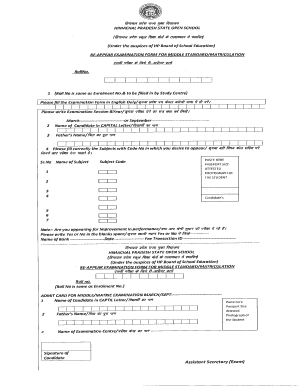
Get Hp Board Sos Form Last Date 2020
How it works
-

Open form follow the instructions
-

Easily sign the form with your finger
-

Send filled & signed form or save
How to fill out the Hp Board Sos Form Last Date 2020 online
Filling out the Hp Board Sos Form Last Date 2020 can be a straightforward process when you have the right guidance. This guide will walk you through the essential steps to ensure your form is completed accurately and submitted on time.
Follow the steps to fill out your form correctly.
- Click ‘Get Form’ button to obtain the form and open it in the editor.
- Begin by entering your roll number, which is the same as your enrolment number. This information must be filled in by the study centre.
- Fill in the examination session and year. Make sure to write the session clearly, indicating either March or September.
- Provide your name in capital letters to ensure clarity.
- Enter your father's name accurately. Use capital letters for consistency.
- List the subjects you wish to appear for, including the corresponding subject code numbers. Be precise with your choices.
- Paste your passport-sized photograph in the designated area, ensuring it is attested.
- Indicate whether you are appearing for improvement in performance by selecting 'Yes' or 'No' in the provided space.
- Provide your fee transaction ID, the date of the transaction, and the name of the bank where the transaction occurred.
- Once all fields are filled out correctly, review the entire form for accuracy before final submission.
Complete your Hp Board Sos Form Last Date 2020 online today!
The full form of SOS in HP Board stands for 'Save Our Souls.' It is a crucial part of various educational frameworks and initiatives. Understanding this term not only aids in academic contexts but also emphasizes the importance of timely submissions like the HP Board Sos Form Last Date 2020, allowing students to apply for programs or exams without any issues.