Loading
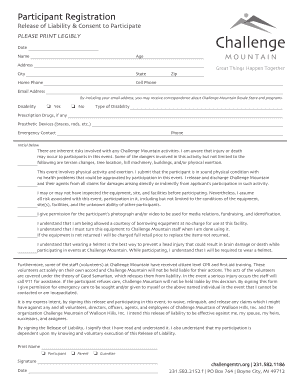
Get Mi Challenge Mountain Participant Registration 2016-2026
How it works
-

Open form follow the instructions
-

Easily sign the form with your finger
-

Send filled & signed form or save
How to fill out the MI Challenge Mountain Participant Registration online
Completing the MI Challenge Mountain Participant Registration is essential for ensuring a smooth experience during the event. This guide provides clear, step-by-step instructions to assist users in filling out the form accurately and efficiently online.
Follow the steps to complete your registration easily.
- Press the ‘Get Form’ button to access the registration form and open it for editing.
- Begin filling out the form by printing clearly. Start by entering the date of registration.
- Provide your full name and age in the designated fields to ensure accurate identification.
- Input your complete address, including city, state, and zip code, so that organizers can reach you if needed.
- Enter both your home and cell phone numbers; having multiple contact points is helpful in case of emergencies.
- Include your email address to receive updates regarding the Challenge Mountain Resale Store and programs.
- Indicate whether you have a disability by checking 'Yes' or 'No' and specify the type of disability if applicable.
- List any prescription drugs you may be taking and detail any prosthetic devices you use, such as braces or rods.
- Provide the name and phone number of an emergency contact person who can be reached during the event.
- Read the Release of Liability & Consent to Participate section carefully, then initial to acknowledge your understanding and acceptance of the risks.
- Sign and print your name at the end of the document to finalize your consent, and specify whether you are a participant, parent, or guardian.
- Once all sections are completed, you may save the changes, download the form, print it out, or share it as required.
Complete your registration online today to secure your spot for the MI Challenge Mountain event!