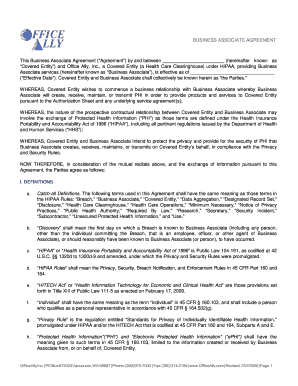
Clearinghouse) under HIPAA, providing Business Associate services (hereinafter known as Business Associate ), is effective as of ( Effective Date ). Covered Entity and Business Associate shall collectively be known herein as the Parties. WHEREAS, Covered Entity wishes to commence a business relationship with Business Associate whereby Business Associate will create, receive, maintain, or transmit PHI in order to provide products and services to Cov.

How it works
  • Open form

    Open form follow the instructions

  • Easily sign form

    Easily sign the form with your finger

  • Share form

    Send filled & signed form or save

How to fill out the WA Office Ally Business Associate Agreement online

Completing the WA Office Ally Business Associate Agreement online is a straightforward process. This guide provides clear and supportive steps to help you navigate each section and field of the form with confidence.

Follow the steps to successfully complete the form.

  1. Press the ‘Get Form’ button to access the Business Associate Agreement. This will allow you to open the document in an editable format.
  2. Fill in the ‘Covered Entity’ section by providing the official name of the person or entity you represent. Make sure to include any applicable business titles.
  3. Enter the ‘Effective Date’, which is the date this agreement will take effect. Ensure that this date is accurate to avoid any future confusion.
  4. Review and complete the definitions section, ensuring that you understand the key terms like ‘Protected Health Information’ (PHI) and ‘Business Associate’ as they apply to your agreement.
  5. Proceed to indicate the ‘Obligations of Business Associate’ and ensure that you comprehend your responsibilities, including limitations on the use and disclosure of PHI.
  6. Ensure the section regarding ‘Obligations of Covered Entity’ is completed, as this outlines the expectations and requirements from the entity receiving the services.
  7. Read through the ‘Termination’ clauses carefully. Clarify the conditions under which either party can terminate the agreement.
  8. Finalize by including the necessary contact information for both parties, which includes names, titles, and addresses. This information is crucial for any necessary correspondence.
  9. Sign and date the agreement in the space provided. This step indicates you have read and accepted the terms outlined in the document.
  10. Once completed, you can save your changes, download a copy for your records, print the document, or share it as necessary.

Start completing the Business Associate Agreement online now to ensure your organization's compliance and protection.

Get form

Experience a faster way to fill out and sign forms on the web. Access the most extensive library of templates available.

Related content

HCA Contract #K-1807

This BUSINESS ASSOCIATE AGREEMENT is made between [ENTER BUSINESS. ASSOCIATE NAME]...

Learn more
InfoSec Allies: Office of Resource Management

May 25, 2022 — ... Business Associate Agreement (BAA) in addition to the contract....

Learn more
A Detailed Compliance Guide to HIPAA (Health...

Jul 4, 2023 — Business Associate Agreements: Covered entities must have contracts with...

Learn more
Questions & Answers

Get answers to your most pressing questions about US Legal Forms API.

Contact support

How do I transfer ownership of Microsoft Office?

Transferring ownership of a Microsoft Office subscription involves logging into your Microsoft account and locating the subscription management section. Select the option to change the account holder, and follow the guided steps. This process is important to ensure that all associated documents, including those related to your WA Office Ally Business Associate Agreement, remain in compliance.

The BAA agreement, or Business Associate Agreement, is a legal contract that outlines how a business associate handles protected health information. This agreement is crucial for compliance with HIPAA regulations and ensures that all parties understand their responsibilities. Engaging with a WA Office Ally Business Associate Agreement provides clarity and security for everyone involved.

To transfer ownership of your Office Ally account, go to your account settings and identify the current owner's details. Follow the provided instructions to designate a new owner. This transition is necessary to maintain access to important agreements, such as the WA Office Ally Business Associate Agreement.

disclosure agreement protects confidential information between parties, while a business associate agreement specifically addresses the handling of protected health information per HIPAA guidelines. When dealing with sensitive data, a WA Office Ally Business Associate Agreement is essential for compliance and security.

Transferring ownership starts by logging into your account and going to the settings section. Here, find the ownership details and follow the prompts to designate a new owner. This straightforward action is crucial for keeping your WA Office Ally Business Associate Agreement valid and up to date.

Changing the owner of your Ally account involves navigating to account settings and selecting the current account owner. Once identified, you can choose to transfer ownership to another authorized user. This process is vital for maintaining access to your WA Office Ally Business Associate Agreement and ensuring compliance.

To transfer workspace ownership, you need to access your account settings where you manage users. Identify the current owner and select the option to transfer ownership to another user. This simple process ensures that your team continues to have access to the WA Office Ally Business Associate Agreement and other important documents.

A business associate agreement, or BAA, outlines the responsibilities of both parties regarding the handling of protected health information. It is essential to include the scope of work, security measures, and compliance with HIPAA regulations. When entering a WA Office Ally Business Associate Agreement, ensure all parties understand their obligations to protect sensitive information.

BAA documentation refers to the formal record of the WA Office Ally Business Associate Agreement, which outlines the responsibilities and obligations of both parties related to protected health information. This documentation is vital for demonstrating compliance with HIPAA regulations and serves as legal evidence in case of disputes or breaches. Maintaining thorough BAA documentation also facilitates accountability and trust between involved parties.

Key elements of a WA Office Ally Business Associate Agreement include definitions of PHI, permitted uses of the data, and requirements for safeguarding information. Additionally, the agreement should stipulate processes for breach notifications and the conditions under which PHI can be shared with subcontractors. Ensuring these components are addressed fosters a robust framework for compliance and protection of sensitive information.

Get This Form Now!

Use professional pre-built templates to fill in and sign documents online faster. Get access to thousands of forms.

If you believe that this page should be taken down, please follow our DMCA take down process here.

Get WA Office Ally Business Associate Agreement