Loading
Get Ca Elarc Request For Payment - Transportation 2017-2026
How it works
-

Open form follow the instructions
-

Easily sign the form with your finger
-

Send filled & signed form or save
How to fill out the CA ELARC Request For Payment - Transportation online
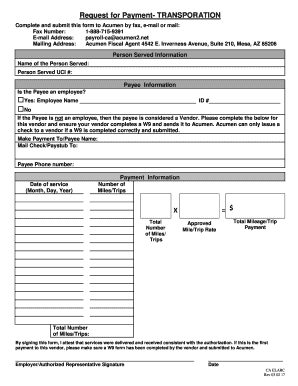
The CA ELARC Request For Payment - Transportation form is a crucial document for individuals seeking reimbursement for transportation services. This guide provides clear and detailed instructions on how to complete the form online, ensuring a smooth submission process.
Follow the steps to successfully complete the payment request form online.
- Click 'Get Form' button to obtain the form and open it in your preferred editor.
- Enter the name of the person served along with their Unique Client Identifier (UCI) number in the designated fields. This identifies who the services were rendered for.
- Indicate whether the payee is an employee by checking 'Yes' or 'No'. If 'Yes', fill in the employee's name and identification number. If 'No', treat the payee as a vendor and ensure a W9 form is completed and submitted.
- For a vendor payee, enter 'Make Payment To' with the payee name and provide the mailing address for the check or paystub.
- Provide the payee's phone number for any necessary follow-up regarding the payment.
- Fill in the date of service using the format Month, Day, Year to specify when the transportation service occurred.
- Input the total number of miles or trips for which reimbursement is being requested.
- Multiply the total number of miles or trips by the approved mile/trip rate to calculate the total payment amount. Ensure this is clearly documented on the form.
- Sign and date the form to attest that services were delivered and received according to authorization. If this is the first payment to the vendor, confirm that a W9 has been submitted.
- After completing all fields accurately, save your changes, and choose to download, print, or share the form as necessary for submission.
Complete and submit the CA ELARC Request For Payment - Transportation form online for efficient processing.