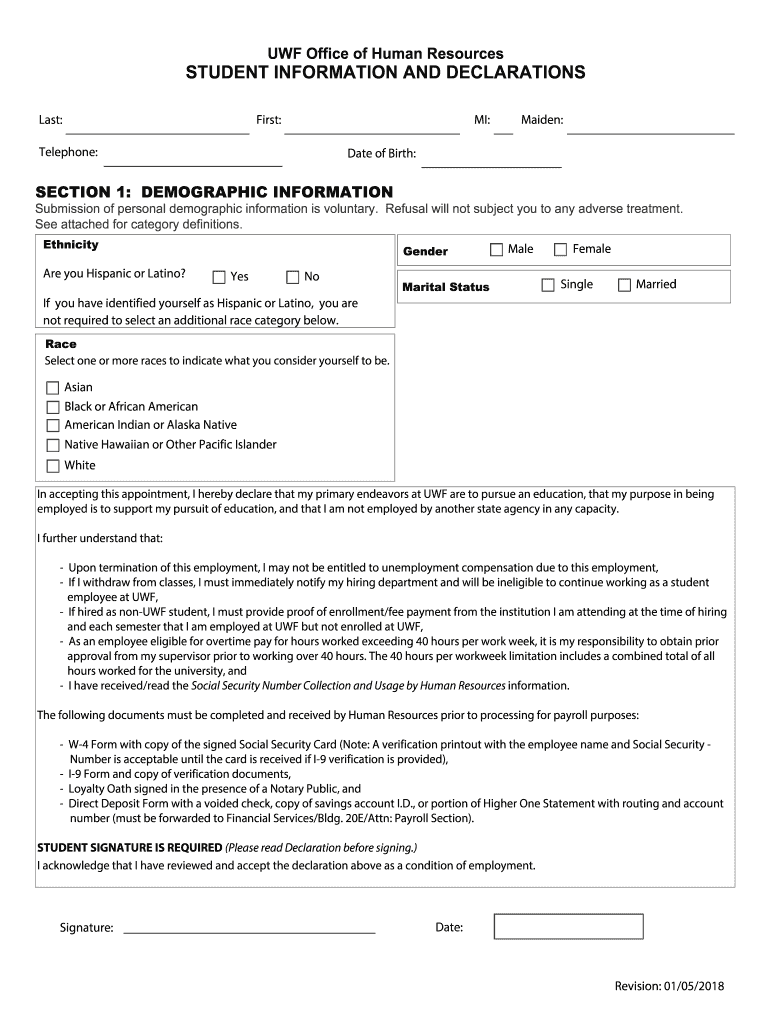
Ormation is voluntary. Refusal will not subject you to any adverse treatment. See attached for category definitions. Ethnicity Are you Hispanic or Latino? Gender Yes No Male Marital Status Female Single Married If you have identified yourself as Hispanic or Latino, you are not required to select an additional race category below. Race Select one or more races to indicate what you consider yourself to be. Asian Black or African American American Indian or Alaska Native Native Hawaiian.
Loading

Open form follow the instructions

Easily sign the form with your finger

Send filled & signed form or save
How to fill out the UWF Student Information And Declarations Form online
Filling out the UWF Student Information And Declarations Form online is a crucial step in managing your student employment and benefits effectively. This guide will provide you with clear instructions on how to complete each section of the form accurately.
Follow the steps to fill out the form correctly
- Click 'Get Form' button to obtain the form and open it in the editor.
- Begin by entering your last name, middle initial, and first name in the designated fields. Ensure the spelling is correct to avoid processing delays.
- Next, provide your telephone number and maiden name, if applicable. This information helps in maintaining communication with you.
- Enter your date of birth in the format requested. This information is used for identification purposes.
- In the demographic information section, you will voluntarily provide your ethnicity. Indicate whether you identify as Hispanic or Latino by selecting 'Yes' or 'No'.
- Specify your gender by selecting the appropriate option: Male or Female.
- Choose your marital status from the given options: Single or Married.
- For the race category, select one or more races that you identify with, such as Asian, Black or African American, American Indian or Alaska Native, Native Hawaiian or Other Pacific Islander, or White.
- Read the declaration regarding your employment and educational intentions carefully. This declaration is important for your employment status at UWF.
- Sign and date the form to confirm your agreement with the information and declaration provided. Ensure your signature is clear.
- Once you have filled out all the required sections, you can save your changes, download, print, or share the completed form as needed.
Complete your documentation online to ensure a smooth process with your student employment at UWF.
Experience a faster way to fill out and sign forms on the web. Access the most extensive library of templates available.
Related content
In 2013-2014, UWF continued to document the success of its academic programs through...
There are a variety of useful forms for graduate students here. For more information, go...
A professional wrestler belonging to NOAH, a Japanese professional wrestling club. As a...
Get answers to your most pressing questions about US Legal Forms API.
Does UWF use SSAR?
Yes, UWF uses the Self-reported Student Academic Record (SSAR) as part of their admissions process. This tool allows prospective students to provide their academic history easily. When filling out your UWF Student Information And Declarations Form, you can reference the SSAR to present your academic credentials efficiently.
Where to send transcripts to Western Washington University?
Transcripts for Western Washington University should be sent to their admissions office, as specified on the university website. It's crucial to follow their guidelines closely to avoid delays. If you are also applying to UWF, make sure to keep track of your transcript submissions alongside your UWF Student Information And Declarations Form.
What email do I send my transcripts to for UF?
To send transcripts to the University of Florida, you will need to check their admissions website for the correct email address. This process is essential to ensure your documents reach the right department. If you are also interested in UWF, remember to take note of the requirements for the UWF Student Information And Declarations Form.
How do I email UWF admissions?
To email UWF admissions, you can use the address listed on their official website. They are responsive and provide guidance on admission-related queries. Be sure to include your inquiries and any relevant details from your UWF Student Information And Declarations Form that relate to your question.
Where do I send my transcripts to UWF?
You should send your transcripts to the UWF admissions office. It's best to check UWF’s official website for the exact mailing address. As a helpful tip, include the information from your UWF Student Information And Declarations Form to ensure your application is complete and processed promptly.
Is UWF a prestigious school?
UWF is recognized for its quality education and student support services, making it a respected institution. Many students find that attending UWF enhances their career prospects significantly. This prestige can be an element to highlight in your UWF Student Information And Declarations Form.
How to send transcripts to Western University?
Sending transcripts to Western University is straightforward. You can request your school to send them directly to the admissions office. If you are also applying to UWF, remember to include the necessary documents with your UWF Student Information And Declarations Form for a complete application.
What is the average GPA for UWF?
The average GPA for students at UWF is around 3.5, reflecting the commitment of the university to academic excellence. High school students should aim for good grades, as this will strengthen their applications. When completing the UWF Student Information And Declarations Form, ensure you provide accurate academic details to align with this standard.
How to declare a minor at uwf?
To declare a minor at UWF, you should first meet with an academic advisor who will guide you through the process. You'll likely need to complete a form, which can often be found on the UWF website. This is also a great time to ensure all your documents, including the UWF Student Information And Declarations Form, are in order.
How long does it take for uwf to accept you?
The acceptance process at UWF varies based on the volume of applications. Typically, you can expect to hear back within a few weeks after submission. While you await your acceptance, consider preparing your UWF Student Information And Declarations Form, so you are ready to take the next steps once you are accepted.
Use professional pre-built templates to fill in and sign documents online faster. Get access to thousands of forms.
If you believe that this page should be taken down, please follow our DMCA take down process here.