Loading
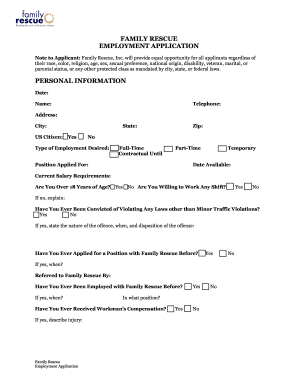
Get Family Rescue Employment Application
How it works
-

Open form follow the instructions
-

Easily sign the form with your finger
-

Send filled & signed form or save
How to fill out the Family Rescue Employment Application online
Completing the Family Rescue Employment Application online can be a straightforward process when you understand each section. This guide will provide detailed, step-by-step instructions to help you accurately fill out the application for employment.
Follow the steps to successfully complete your application.
- Click ‘Get Form’ button to obtain the application form and open it in your designated editor.
- Begin by filling out the personal information section. Provide your date, telephone number, full name, and address, including the city, state, and zip code. Indicate your citizenship status and the type of employment desired (full-time, part-time, contractual, or temporary).
- In this section, specify your expected salary and confirm whether you are over 18 years of age. Indicate your willingness to work any shift and explain if you are unable.
- Respond to the questions regarding your employment history with Family Rescue and any previous criminal convictions, providing details where necessary.
- Move to the education section, where you will list your educational qualifications, including the name and address of schools attended, course of study, years completed, and diploma earned.
- Describe any specialized training, skills, or extra-curricular activities relevant to the position you are applying for.
- Provide a brief personal description that includes your short and long-term occupational objectives and financial goals.
- In the employment experience section, list your most recent jobs, including part-time work. Be sure to include the employer's name, address, job title, duties performed, dates of employment, and whether they can be contacted.
- As a final step, include three references. Two should be from previous employers and one personal reference, ensuring not to list family members.
- Authorize Family Rescue to contact the references and certify that all information provided is accurate. Sign the application digitally by writing your name.
- Once completed, you may save the application, download it, print a copy, or share it as required.
Take action today and complete your Family Rescue Employment Application online for your opportunity to join the team.