Loading
Form preview
  • US Legal Forms
  • Other Templates
  • Industry Forms
  • Industry Academic Forms
  • Uc Davis Travel Visa Card Application Supplement 2018

Get Uc Davis Travel Visa Card Application Supplement 2018-2026

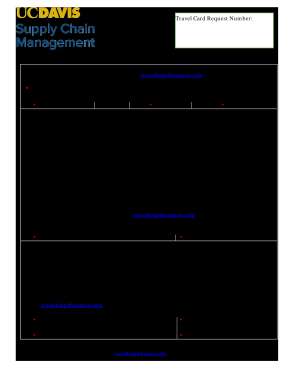
Help ucdavis.edu, Subject Line: Travel Card Application for insert applicant name . * Required Field *Cardholder Last Name M.I. *First Name *Employee ID Cardholder Agreement My signature below verifies that I understand and agree to all of the following: Eligibility is based on employment status, not personal credit card history. The Travel card is to be used for approved University of California business travel and entertainment, in accordance with UCOP Policies G-28 and BUS-79.

How it works

  1. Open form

    Open form follow the instructions

  2. Easily sign form

    Easily sign the form with your finger

  3. Share form

    Send filled & signed form or save

How to fill out the UC Davis Travel Visa Card Application Supplement online

Filling out the UC Davis Travel Visa Card Application Supplement online is a crucial step for users who need to complete their travel card request. This guide will walk you through each section and field of the form, ensuring that you understand the necessary information to provide and the processes to follow.

Follow the steps to successfully complete your application.

  1. Click the ‘Get Form’ button to access the UC Davis Travel Visa Card Application Supplement and open it in your preferred online editor.
  2. Begin with the 'Cardholder Information' section. Fill out the required fields labeled with an asterisk (*). Enter your last name, middle initial, first name, and employee ID accurately to avoid processing delays.
  3. Review the 'Cardholder Agreement' section carefully. By signing, you acknowledge your understanding of the eligibility criteria and the responsibilities associated with the Travel Visa Card. Be sure to read fiscal responsibilities and compliance, including timely payment procedures.
  4. Sign and date the 'Cardholder Signature' field, confirming your agreement to the terms outlined in the document. Ensure that the date signed is accurate to reflect your current application.
  5. Proceed to the 'Department Agreement' section, where the sponsoring department must also provide information. The department head should fill in their name, chart, account number, and sign to certify their agreement to the terms of usage.
  6. Once all required fields are completed, review the form for accuracy. After confirming that all information is entered correctly, you can save your changes. Options to download, print, or share the form are available for your convenience.

Complete the UC Davis Travel Visa Card Application Supplement online today to ensure your travel needs are met.

Get form

Experience a faster way to fill out and sign forms on the web. Access the most extensive library of templates available.
Get form

Related content

Task ID 3379 Improving Access and Efficiency to...
Solutions to this issue include using external subsidies like Mobility. Wallets that allow...
Learn more
Travel Visa Card Application Supplement
Use this form if you experienced an error during the online application process. Print...
Learn more
association of - american medical
make application only to this institution for admission. As a rule ... of credit cards for...
Learn more

Related links form

Elevator Speech Worksheet The Positioning Manual For Technical Safe In The City Grant On August 20, 2003 Sanjiv Gupta, President And CEO Of Coca-Cola India, Sat In His Office

Questions & Answers

Get answers to your most pressing questions about US Legal Forms API.

Contact support

Check your admission status at MyAdmissions in mid-March for freshmen or mid–late April for transfer students to see if you've been admitted to UC Davis. Check your email address listed on your UC application and add us to your address book to avoid having important information sent to your junk folders.

You can contact us by email, phone or by mail. By Email. To contact us by email please complete and submit this short form. By Phone. Continuing and Professional Education Student Services: (530) 757-8777 or (800) 752-0881. By Mail. ... Our Locations. ... University of California, Davis, Main Campus Contacts.

Individually billed accounts are issued to employees to pay for official travel and travel-related expenses. The government reimburses employees for authorized expenses. The employee is responsible for making payment to the bank.

Note: The Procurement Card can only be used up to the card daily limit ($9,999.99 for most users), regardless of a higher limit that may be set for a university agreement.

standard travel credit card is given to applicants with a credit score more than 660 and has a credit limit of $5,000 ($2,500 cycle limit).

Contact the Card Program If you have a business need for a card limit greater than the standard $5,000, email an explanation of your business needs for an increased limit. Requests for limits exceeding $10,000 require additional department head approval.

A minimum of 180 units is required for the bachelor's degree. 64 units must be earned in upper division courses. Registration Beyond the 225-unit Limit. You are expected to fulfill all degree requirements within the 180- to 225-unit range.

Get This Form Now!

Use professional pre-built templates to fill in and sign documents online faster. Get access to thousands of forms.
Get form
If you believe that this page should be taken down, please follow our DMCA take down processhere.
Get UC Davis Travel Visa Card Application Supplement
Get form
  • Adoption
  • Bankruptcy
  • Contractors
  • Divorce
  • Home Sales
  • Employment
  • Identity Theft
  • Incorporation
  • Landlord Tenant
  • Living Trust
  • Name Change
  • Personal Planning
  • Small Business
  • Wills & Estates
  • Packages A-Z
  • Affidavits
  • Bankruptcy
  • Bill of Sale
  • Corporate - LLC
  • Divorce
  • Employment
  • Identity Theft
  • Internet Technology
  • Landlord Tenant
  • Living Wills
  • Name Change
  • Power of Attorney
  • Real Estate
  • Small Estates
  • Wills
  • All Forms
  • Forms A-Z
  • Other Templates
  • Legal Hub
  • About Us
  • Help Portal
  • Legal Resources
  • Blog
  • Affiliates
  • Contact Us
  • Delete My Account
  • Site Map
  • Industries
  • Forms in Spanish
  • Localized Forms
  • State-specific Forms
  • Forms Kit
  • Real Estate Handbook
  • All Guides
  • Notarize
  • Incorporation services
  • For Consumers
  • For Small Business
  • For Attorneys
  • USLegal
  • FormsPass
  • pdfFiller
  • signNow
  • altaFlow
  • DocHub
  • Instapage
Form Packages
  • Adoption
  • Bankruptcy
  • Contractors
  • Divorce
  • Home Sales
  • Employment
  • Identity Theft
  • Incorporation
  • Landlord Tenant
  • Living Trust
  • Name Change
  • Personal Planning
  • Small Business
  • Wills & Estates
  • Packages A-Z
Form Categories
  • Affidavits
  • Bankruptcy
  • Bill of Sale
  • Corporate - LLC
  • Divorce
  • Employment
  • Identity Theft
  • Internet Technology
  • Landlord Tenant
  • Living Wills
  • Name Change
  • Power of Attorney
  • Real Estate
  • Small Estates
  • Wills
  • All Forms
  • Forms A-Z
  • Other Templates
Customer Service
  • Legal Hub
  • About Us
  • Help Portal
  • Legal Resources
  • Blog
  • Affiliates
  • Contact Us
  • Delete My Account
  • Site Map
  • Industries
  • Forms in Spanish
  • Localized Forms
  • State-specific Forms
  • Forms Kit
Legal Guides
  • Real Estate Handbook
  • All Guides
Prepared for you
  • Notarize
  • Incorporation services
Our Customers
  • For Consumers
  • For Small Business
  • For Attorneys
Our Sites
  • USLegal
  • FormsPass
  • pdfFiller
  • signNow
  • altaFlow
  • DocHub
  • Instapage
Social Media
Call us now toll free:
+1 833 426 79 33
As seen in:
© Copyright 1999-2026 airSlate Legal Forms, Inc. 17 Station Street, Suite 303, Brookline, MA 02445
  • Your Privacy Choices
  • Terms of Service
  • Privacy Notice
  • Content Takedown Policy
  • Bug Bounty Program