Loading
Form preview
  • US Legal Forms
  • Other Templates
  • Industry Forms
  • Industry Academic Forms
  • Csusm Special Consultant Appointment Form 2017

Get Csusm Special Consultant Appointment Form 2017-2026

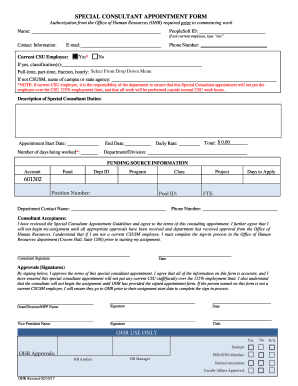
E-mail: Current CSU Employee: Yes* Phone Number: No If yes, classification(s): from drop-down From Drop Downmenu Menu Full-time, part-time, fraction, hourly: Select If not CSUSM, name of campus or state agency: *NOTE: if current CSU employee, it is the responsibility of the department to ensure that this Special Consultant appointment will not put the employee over the CSU 125% employment limit, and that all work will be performed outside normal CSU work.

How it works

  1. Open form

    Open form follow the instructions

  2. Easily sign form

    Easily sign the form with your finger

  3. Share form

    Send filled & signed form or save

How to fill out the CSUSM Special Consultant Appointment Form online

Filling out the CSUSM Special Consultant Appointment Form is an essential step for individuals looking to serve as consultants within the California State University system. This guide provides clear, step-by-step instructions to navigate the form smoothly and efficiently.

Follow the steps to fill out the form correctly

  1. Click the ‘Get Form’ button to access the form and open it in your preferred editor.
  2. In the 'Name' section, provide your full name as it appears on official documents.
  3. Enter your PeopleSoft ID. If you are not a current employee, type 'n/a' in this field.
  4. Fill in your contact information, including your email and phone number.
  5. Indicate whether you are a current CSU employee by selecting 'Yes' or 'No'. If you select 'Yes', specify your classification(s) from the dropdown menu.
  6. Select your employment type from the options provided (full-time, part-time, fraction, or hourly) using the drop-down menu.
  7. If you are not affiliated with CSUSM, provide the name of the campus or state agency you are associated with.
  8. Describe the specific consultant duties you will perform in the designated section.
  9. Input the appointment start and end dates, ensuring they are accurate.
  10. Fill in your daily rate and the number of days you plan to work.
  11. Complete the department/division field and ensure the total amount reflects your daily rate multiplied by the number of days worked.
  12. Provide funding source information, including account details, fund, department ID, program, class, and project as needed.
  13. Sign the form to indicate that you have reviewed and accepted the terms of the appointment, and provide the date of your signature.
  14. Collect all necessary approvals from your department, including signatures from the Dean/Director and Vice President, ensuring all information is accurate.
  15. After all signatures are obtained, save your changes, and choose to download, print, or share the completed form as required.

Complete your CSUSM Special Consultant Appointment Form online today to ensure timely processing and approvals.

Get form

Experience a faster way to fill out and sign forms on the web. Access the most extensive library of templates available.
Get form

Related content

Job Details
Dec 19, 2025 — The anticipated start date for this position is Fall 2026. It's important...
Learn more
Special Consultant Appointment Form
• Submit the fully signed Special Consultant Appointment Form to Human Resources (Craven...
Learn more

Related links form

Purchaser Engineer Submitted To Reference Approval Construction... AN ORDINANCE OF THE CITY OF IOWA COLONY, TEXAS, ADOPTING AND +Monica Michael, LPC, LLC William Christian Lewis

Questions & Answers

Get answers to your most pressing questions about US Legal Forms API.

Contact support

A consultant provides expert advice and guidance tailored to your specific needs. They assess your situation, identify challenges, and suggest actionable solutions. Through the CSUSM Special Consultant Appointment Form, you can engage with a consultant who will help you navigate your unique circumstances effectively.

A consultant letter is a formal document outlining the recommendations or findings from your consultant meeting. This letter serves as a record of your discussions and the advice given. It can also outline the next steps you should take, often referred through the CSUSM Special Consultant Appointment Form.

At a consultant appointment, you discuss your specific needs and goals with the consultant. They will evaluate your situation, provide insights, and recommend next steps. This process is designed to ensure that your experience with the CSUSM Special Consultant Appointment Form yields the best possible outcome.

A consulting appointment is a meeting where clients discuss their needs with an expert. During this appointment, you can clarify your concerns and receive professional guidance. Using the CSUSM Special Consultant Appointment Form can streamline this process, making it easier for both you and the consultant.

To prepare for your consultant appointment, gather all necessary documents related to your case. Clearly outline your goals and questions to maximize the efficiency of the meeting. This preparation will help the consultant understand your situation better and provide tailored advice through the CSUSM Special Consultant Appointment Form.

Get This Form Now!

Use professional pre-built templates to fill in and sign documents online faster. Get access to thousands of forms.
Get form
If you believe that this page should be taken down, please follow our DMCA take down processhere.
Get CSUSM Special Consultant Appointment Form
Get form
  • Adoption
  • Bankruptcy
  • Contractors
  • Divorce
  • Home Sales
  • Employment
  • Identity Theft
  • Incorporation
  • Landlord Tenant
  • Living Trust
  • Name Change
  • Personal Planning
  • Small Business
  • Wills & Estates
  • Packages A-Z
  • Affidavits
  • Bankruptcy
  • Bill of Sale
  • Corporate - LLC
  • Divorce
  • Employment
  • Identity Theft
  • Internet Technology
  • Landlord Tenant
  • Living Wills
  • Name Change
  • Power of Attorney
  • Real Estate
  • Small Estates
  • Wills
  • All Forms
  • Forms A-Z
  • Other Templates
  • Legal Hub
  • About Us
  • Help Portal
  • Legal Resources
  • Blog
  • Affiliates
  • Contact Us
  • Delete My Account
  • Site Map
  • Industries
  • Forms in Spanish
  • Localized Forms
  • State-specific Forms
  • Forms Kit
  • Real Estate Handbook
  • All Guides
  • Notarize
  • Incorporation services
  • For Consumers
  • For Small Business
  • For Attorneys
  • USLegal
  • FormsPass
  • pdfFiller
  • signNow
  • altaFlow
  • DocHub
  • Instapage
Form Packages
  • Adoption
  • Bankruptcy
  • Contractors
  • Divorce
  • Home Sales
  • Employment
  • Identity Theft
  • Incorporation
  • Landlord Tenant
  • Living Trust
  • Name Change
  • Personal Planning
  • Small Business
  • Wills & Estates
  • Packages A-Z
Form Categories
  • Affidavits
  • Bankruptcy
  • Bill of Sale
  • Corporate - LLC
  • Divorce
  • Employment
  • Identity Theft
  • Internet Technology
  • Landlord Tenant
  • Living Wills
  • Name Change
  • Power of Attorney
  • Real Estate
  • Small Estates
  • Wills
  • All Forms
  • Forms A-Z
  • Other Templates
Customer Service
  • Legal Hub
  • About Us
  • Help Portal
  • Legal Resources
  • Blog
  • Affiliates
  • Contact Us
  • Delete My Account
  • Site Map
  • Industries
  • Forms in Spanish
  • Localized Forms
  • State-specific Forms
  • Forms Kit
Legal Guides
  • Real Estate Handbook
  • All Guides
Prepared for you
  • Notarize
  • Incorporation services
Our Customers
  • For Consumers
  • For Small Business
  • For Attorneys
Our Sites
  • USLegal
  • FormsPass
  • pdfFiller
  • signNow
  • altaFlow
  • DocHub
  • Instapage
Social Media
Call us now toll free:
+1 833 426 79 33
As seen in:
© Copyright 1999-2026 airSlate Legal Forms, Inc. 17 Station Street, Suite 303, Brookline, MA 02445
  • Your Privacy Choices
  • Terms of Service
  • Privacy Notice
  • Content Takedown Policy
  • Bug Bounty Program