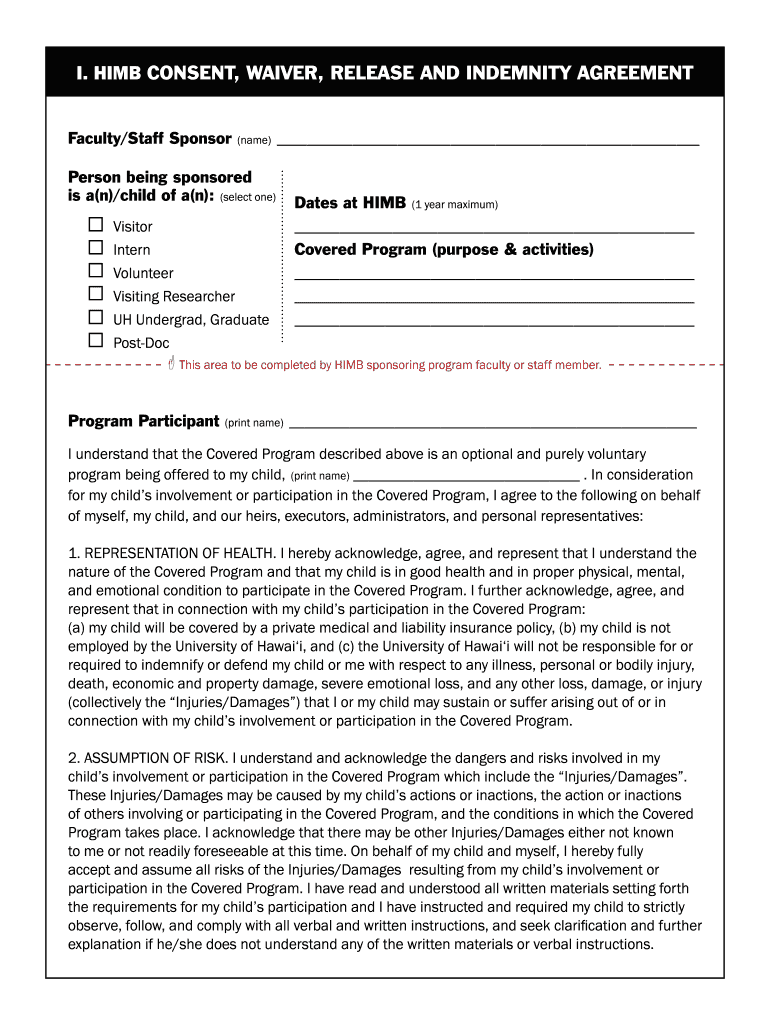
R before being allowed on the island. This includes visitors, interns, volunteers, visiting researchers and University of Hawai i non-employee undergraduates, graduates & post-docs. University Council has reviewed and approved two separate forms an adult waiver and a youth waiver (for those under age 18). There are three sections: I. Consent, Waiver, Release, and Indemnity Agreement II. Medical Consent Form III. Emergency Contact Information. All non-employees must fill out section one. If.
Loading

Open form follow the instructions

Easily sign the form with your finger

Send filled & signed form or save
How to fill out the HIMB Youth Waiver online
The HIMB Youth Waiver is an essential document for all non-employees, including youth participants, visiting the Hawai‘i Institute of Marine Biology (HIMB). This guide will provide you with clear, step-by-step instructions to complete the waiver directly online, ensuring a smooth and efficient process.
Follow the steps to fill out the HIMB Youth Waiver online.
- Press the ‘Get Form’ button to access the HIMB Youth Waiver and open it for editing.
- Fill out the section titled 'Faculty/Staff Sponsor' with the name of the person sponsoring the youth participant.
- Select the relationship of the person being sponsored; options include Visitor, Intern, Volunteer, Visiting Researcher, or University of Hawai‘i Undergrad, Graduate, and Post-Doc.
- In the area designated for Dates at HIMB, indicate the time span for which the waiver is applicable (maximum of one year).
- Provide the specific purpose and activities related to the Covered Program in the 'Covered Program' section.
- Complete the 'Representation of Health' by confirming that the child is in good health and has the necessary insurance coverage.
- Acknowledge the inherent risks associated with the program by reading and understanding the provided information.
- Review the 'Waiver and Release' section, ensuring that you are aware of the implications of signing the waiver for both you and your child.
- Authorize the consent for photographic or video documentation related to the program in the 'Photo, Video and Sound Recording Release and Consent' section.
- Complete the medical consent form by indicating your child's health insurance details and providing permission for emergency treatment.
- Fill out the Emergency Contact Information with the relevant contact details for both the parent/legal guardian and physician.
- Once all sections are completed, save your changes, download a copy, print it for your records, or share via email as needed.
Complete the HIMB Youth Waiver online now to ensure a safe and enjoyable experience.
Experience a faster way to fill out and sign forms on the web. Access the most extensive library of templates available.
Related content
Jan 15, 2025 — The Economic Development program is the first of eleven major programs in...
ALL non-employees spending time on HIMB property must submit a waiver before being allowed...
Get answers to your most pressing questions about US Legal Forms API.
What is a standard waiver form?
A standard waiver form is a legal document that outlines an individual's agreement to relinquish certain rights, typically concerning liability. The HIMB Youth Waiver is a well-crafted example, as it includes essential components such as the identification of risk factors, an acknowledgment section, and signatures of guardians. Utilizing a standardized waiver ensures that all legal requirements are met and protects both the participant and the organization.
How to write up a waiver form?
Writing up a waiver form involves identifying the risks associated with an activity and clearly stating what is being waived. In the case of the HIMB Youth Waiver, it should outline all pertinent details, including the activities involved and the acknowledgment of risks. It's crucial to use clear language so that parents and guardians understand exactly what they are consenting to.
How to fill up a waiver form?
Filling up a waiver form requires careful attention to detail. Start by reading the instructions on the HIMB Youth Waiver to fully understand what you are agreeing to. Provide your personal information, including name and contact details, along with the names of any minors you are waiving rights for, and make sure to sign and date the document where indicated.
What is an example of a waiver?
A waiver is a document that indicates a person acknowledges and accepts certain risks, thus preventing the entity from being held liable for those risks. The HIMB Youth Waiver serves as an excellent example, as it protects organizations offering youth activities by ensuring that parents understand the potential risks involved. Completing this waiver helps create a safer environment for both participants and organizers.
What is an example of waiving?
Waiving occurs when an individual voluntarily gives up a legal right or claim. For instance, if a parent signs the HIMB Youth Waiver, they agree not to hold the organization liable for any unforeseen injuries during activities. This process allows individuals or organizations to conduct events with reduced risk due to the acknowledgment of potential hazards.
Why is the Marines cut off at age 28?
The age cutoff for joining the Marines at 28 years old is established to maintain a young and vigorous force. However, the HIMB Youth Waiver offers flexibility for those who are slightly older but still meet the necessary physical and mental requirements. If you believe you can contribute to the Marines, reach out to a recruiter to discuss potentially qualifying for a waiver.
Does the Marine Corps do waivers?
Yes, the Marine Corps does offer waivers for various disqualifications, including age. It is essential to discuss your specific situation with a Marine recruiter, who can provide guidance on the waiver process. Utilizing the HIMB Youth Waiver may also improve your eligibility for enlistment, depending on your circumstances.
Can I join the Marines at 42 years old?
Joining the Marines at 42 years old requires a specific age waiver. Most conventional enlistment age limits might not accommodate this, but the HIMB Youth Waiver could be the solution you need. Consult with a recruiter to explore your options and begin the waiver application process.
How to get an age waiver for Marines?
To acquire an age waiver for the Marines, start by discussing your situation with a recruiter. They will explain the criteria and necessary steps to apply for the waiver. Leveraging the HIMB Youth Waiver can be beneficial as it specifically addresses age limitations, potentially enabling you to meet enlistment standards.
How can I get a waiver for the army?
Getting a waiver for the Army involves submitting a request through your recruiter. The recruiter will assist you in gathering the necessary documents and information required for the waiver. Utilizing the HIMB Youth Waiver can enhance your chances of waiving specific disqualifying factors such as age, allowing you to pursue your military aspirations.
Use professional pre-built templates to fill in and sign documents online faster. Get access to thousands of forms.
If you believe that this page should be taken down, please follow our DMCA take down process here.