Loading
Get Workforce 180 Restoring Futures Employer Intake 2019-2026
How it works
-

Open form follow the instructions
-

Easily sign the form with your finger
-

Send filled & signed form or save
How to fill out the Workforce 180 Restoring Futures Employer Intake online
Filling out the Workforce 180 Restoring Futures Employer Intake form is a crucial step for employers looking to engage with workforce programs. This guide provides you with clear, step-by-step instructions to help you complete the form efficiently and accurately.
Follow the steps to successfully complete the employer intake form.
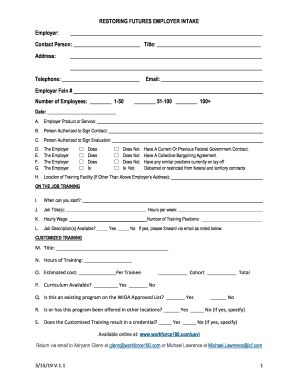
- Click the ‘Get Form’ button to access the form and open it for editing.
- Begin by filling out the employer's name in the designated field at the top of the form.
- Provide the contact person's name and title in the specified sections.
- Input the employer's address, including street, city, state, and zip code.
- Enter the telephone number and email address of the contact person.
- Fill in the Employer Fein number and select the number of employees by checking the appropriate box.
- Include the current date in the designated section.
- Describe the employer's product or service in the provided area.
- List the name of the person authorized to sign the contract and evaluation documents.
- Indicate whether the employer has a current or previous federal government contract, a collective bargaining agreement, any similar positions currently on layoff, or if they are debarred or restricted from federal contracts by checking the appropriate boxes.
- If training facilities are located somewhere other than the employer's address, provide that information.
- Indicate when training can start by entering the date.
- Fill out the job title(s) and indicate the hours worked per week.
- Provide the hourly wage and number of training positions available.
- Answer whether job descriptions are available and forward them via email if applicable.
- For customized training, provide the title, hours of training, estimated cost per trainee, and indicate if the curriculum is available.
- Specify if the program is on the WIOA approved list and if it has been offered in other locations.
- Indicate whether the customized training results in a credential, providing specifics if applicable.
- Once all sections are completed, save the changes, and download or print the form for your records. You can also share it through email to the specified addresses.
Complete your Workforce 180 Restoring Futures Employer Intake form online today.
To reenter the workforce successfully, start with a positive mindset and a clear action plan. Assess your skills, update your resume, and explore job openings tailored to your strengths. The Workforce 180 Restoring Futures Employer Intake can assist you in this journey, offering resources and support to help you achieve your employment goals.