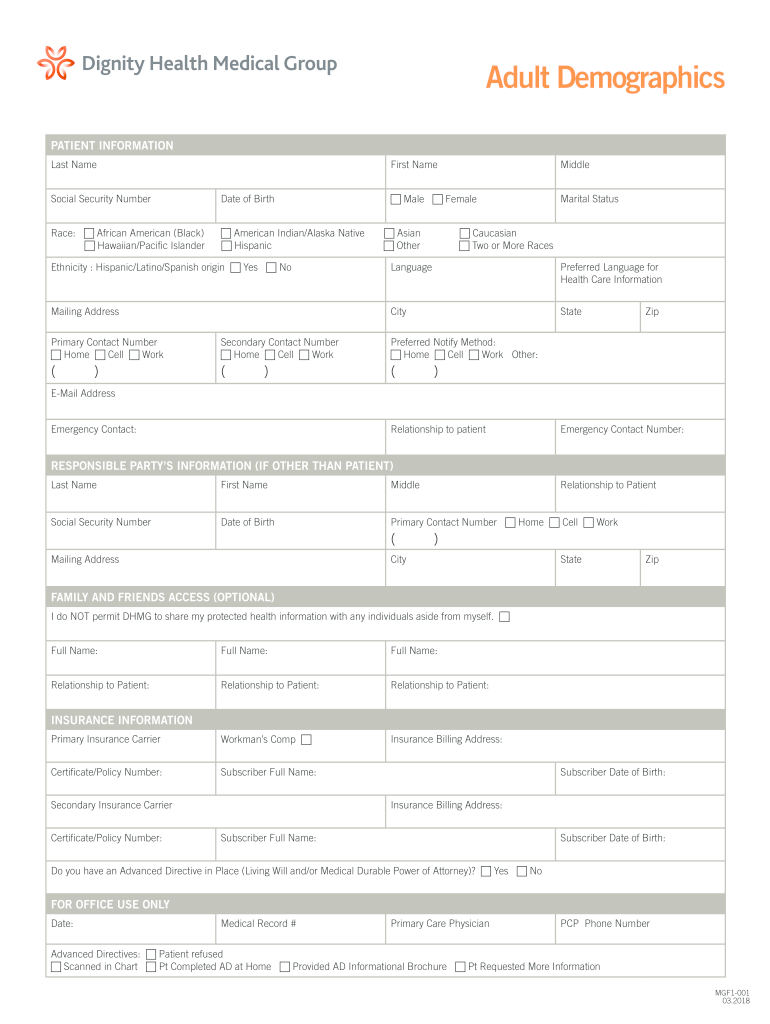
Panic First Name Middle Male Female Marital Status Asian Other Caucasian Two or More Races Ethnicity : Hispanic/Latino/Spanish origin Yes No Language Preferred Language for Health Care Information Mailing Address City State Primary Contact Number Home Cell Work Secondary Contact Number Home Cell Work Preferred Notify Method: Home Cell Work Other: ( ( ( ) ) Zip ) E-Mail Address Emergency Contact: Relations.
Loading

Open form follow the instructions

Easily sign the form with your finger

Send filled & signed form or save
How to fill out the Dignity Health MGF1-001 online
This guide provides comprehensive instructions for users on how to properly fill out the Dignity Health MGF1-001 form online. By following these steps, you can easily ensure that all required information is accurately provided.
Follow the steps to complete the Dignity Health MGF1-001 form online.
- Press the ‘Get Form’ button to access the document and open it for filling out.
- Begin by entering the patient’s information, including their last name, first name, middle name, and social security number. It is essential to provide accurate details in these fields.
- Indicate the patient's preferred language for health care information and provide the mailing address, including city, state, and zip code.
- Fill out the emergency contact details, including their name, relationship to the patient, and contact information.
- If the responsible party is different from the patient, complete that section with their details, similar to the patient's information provided earlier.
- For Family and Friends Access, indicate whether you permit Dignity Health Medical Group to share your protected health information with others. If yes, provide the full names and relationships of those individuals.
- Complete the insurance information fields, including primary and secondary insurance carriers and their respective policy numbers.
- Lastly, consider the question regarding Advanced Directives and answer accordingly. This information is critical for your healthcare preferences.
- Once you have filled out all necessary sections, save any changes made, and choose to download, print, or share the completed form as needed.
Start filling out the Dignity Health MGF1-001 form online today for a smooth documentation experience.
Experience a faster way to fill out and sign forms on the web. Access the most extensive library of templates available.
Related content
The use of pharmacist-led diabetes care plans has been shown to reduce diabetes- related...
Get answers to your most pressing questions about US Legal Forms API.
How do I reset my employee portal password?
To reset your employee portal password for Dignity Health, you need to click on the 'Forgot Password?' option on the login screen. Enter your work email address, and you will receive a reset link. Once you establish a new password, you can enjoy seamless access to all the resources provided by Dignity Health MGF1-001.
How do I unlock my dignity health account?
If your Dignity Health account is locked, you can unlock it by visiting the login page and selecting 'Forgot Password?' You will receive instructions to reset your password via email. Restoring your access can help you use the Dignity Health MGF1-001 features without delay.
What is reset password and forgot password?
A reset password function allows users to create a new password when they forget their current one. The 'forgot password' link on the login page initiates this process. Both features are vital for maintaining security while enabling uninterrupted access to Dignity Health MGF1-001 services.
How do I reset my dignity health password?
To reset your Dignity Health password, go to the login page and select 'Forgot Password?'. By entering your email or username, you will receive a link to reset your password. Once you set a new password, you can log in to access your Dignity Health MGF1-001 account efficiently.
How to reset net health password?
To reset your net health password, visit the login page and click on the 'Forgot Password?' link. This will direct you to a page where you can enter your registered email or username. Follow the instructions sent to your email to create a new password, ensuring your access to the Dignity Health MGF1-001 features.
How do I request medical records from Dignity Health Arizona General Hospital?
To request your medical records from Dignity Health Arizona General Hospital, you need to fill out a release form available on their website. Ensure you include pertinent information such as your name, date of birth, and the specific details related to Dignity Health MGF1-001. Once completed, submit the form as instructed to receive your records promptly.
How do I email Dignity Health Arizona General Hospital?
To email Dignity Health Arizona General Hospital, you can visit their official website where you will find a contact page. Use the provided email form to submit your inquiry directly. Be sure to include relevant details about your request, especially if it relates to the Dignity Health MGF1-001 feature. This will help the hospital staff address your concern promptly.
How many locations does Dignity Health have?
Dignity Health has numerous locations across the United States, providing a wide range of healthcare services. The exact number can vary as they continuously expand their reach. For the latest information on specific locations, it’s best to consult the Dignity Health MGF1-001 website or contact customer service.
Is Dignity Health owned by the Catholic Church?
Our eight Dignity Health Southern California hospitals have all been recognized for our quality of care, safety, and service, primary care offices, premier surgery centers, technologically advanced imaging centers, outpatient services, and comprehensive home health services.
What is the principle of human dignity?
Universal human dignity is a fundamental principle of human rights. It is from the inherent dignity of the human person that our rights derive. No drug law, policy, or practice should have the effect of undermining or violating the dignity of any person or group of persons.
Use professional pre-built templates to fill in and sign documents online faster. Get access to thousands of forms.
If you believe that this page should be taken down, please follow our DMCA take down process here.