Your documents in person to an authorized Human Resources location. See page 7 in this packet. Please read the List of Acceptable Documents on page 3 of the federal I-9 form. You must show one original document from List A, or two original documents, one from List B and one from List C. Note: You cannot use two documents from the same list to meet U.S. Department of Homeland Security employment eligibility verification. Expired and photocopies of documents are not acceptable per federal law. In.
Loading
Open form follow the instructions
Easily sign the form with your finger
Send filled & signed form or save
How to fill out the ASU Payroll Packet Forms online
This guide provides a step-by-step approach to successfully completing the ASU Payroll Packet Forms online. By following these instructions, users can ensure they fill out their paperwork accurately and efficiently.
Follow the steps to complete the ASU Payroll Packet Forms online.
- Press the ‘Get Form’ button to access the payroll packet forms and open them in your designated online editor.
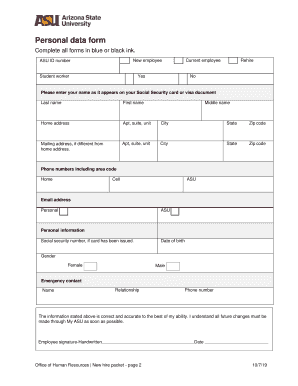
- Fill out the Personal Data Form with all required information, including your name as it appears on your Social Security card and your address details.
- For U.S. citizens and permanent residents, read, sign, and date the Public Employee or Officer Loyalty Oath on the indicated page.
- If you are a graduate assistant or student worker, review the Tax Withholding for Student Wages section and the Graduate and Undergraduate Student Employment Guidelines, making sure to keep both documents for your records.
- Sign and date the Conditions of Employment Form, which outlines responsibilities and confirms your understanding of employment terms.
- Follow the instructions provided in the Form I-9 section to complete your I-9 documentation as mandated.
- Review the New Health Insurance Marketplace Coverage Options information and assess your eligibility.
- After your first day, ensure you complete your state of Arizona (A-4) and Federal (W-4) forms online via the payroll system.
- For direct deposit of your paycheck, complete the necessary information in the online payroll system.
- After making all changes and reviewing your responses, save your changes. Options to download, print, or share the completed form will be available.
Complete your ASU Payroll Packet Forms online today to streamline your onboarding process.
Experience a faster way to fill out and sign forms on the web. Access the most extensive library of templates available.
Related content
Packet. The packet can be found on the secure employer area of the ASRS website on the...
Payroll packet and I-9 form · Background check · ASU ID number · Building access and...
Report on Form 10-K) may require us to pay substantial damages or penalties including...
Get answers to your most pressing questions about US Legal Forms API.
Is ASU online the same as ASU?
ASU Online offers the same high-quality education and services as Arizona State University. While the delivery method may differ, the payroll processes remain consistent. By using the ASU Payroll Packet Forms, online students can also access vital payroll information easily.
How can I find my payroll ID?
Finding your payroll ID is important for accessing various payroll tools. You can check the ASU Payroll Packet Forms for guidelines on where to locate your ID. If you still have questions, the payroll office is available to help.
How to generate payroll reports?
Generating payroll reports is straightforward with the right tools. The ASU Payroll Packet Forms include essential resources to assist you in this process. By following the provided instructions, you can create detailed reports that meet your needs.
How do I look up my payroll?
You can look up your payroll information by accessing the ASU Payroll Packet Forms. This page provides essential links and directives to help you find your payroll details. If you need additional help, consider reaching out to the payroll office for assistance.
How to find employee payroll?
To locate your employee payroll information, visit the ASU Payroll Packet Forms for guidance. The forms and resources available can help you navigate through the payroll system. If you encounter any challenges, don't hesitate to reach out to the HR department for support.
What is the payroll provider for Arizona State University?
Arizona State University partners with a reliable payroll provider to ensure accurate and timely payment. You can learn more about their payroll services through the ASU Payroll Packet Forms. This resource will guide you on any necessary forms and procedures needed for payroll management.
How to get payroll information?
To obtain payroll information, you can visit the ASU Payroll Packet Forms page. Here, you will find detailed instructions on accessing your payroll records. If you need further assistance, consider contacting the payroll office directly for personalized support.
What is ASU Direct Deposit?
ASU Direct Deposit is a service that allows employees to receive their paychecks directly into their bank accounts. This process is set up using the ASU Payroll Packet Forms, which require your banking information. By choosing Direct Deposit, you ensure timely access to your funds without the hassle of cashing physical checks.
How to raise an IT request at ASU online?
To raise an IT request online at ASU, navigate to the ASU IT helpdesk portal. Simply log in with your credentials and select the appropriate service category. Fill out the necessary details regarding your issue or request, then submit it for assistance. Utilizing ASU Payroll Packet Forms may also help you in certain IT-related inquiries.
How do I set up Direct Deposit on?
If you are looking to set up Direct Deposit, the process remains the same across ASU's platforms. Start with the ASU Payroll Packet Forms, fill them out with your banking details, and ensure all information is accurate. Submit the forms to initiate the setup and enjoy seamless payment transfers.
Use professional pre-built templates to fill in and sign documents online faster. Get access to thousands of forms.
If you believe that this page should be taken down, please follow our DMCA take down process here.
This form is available in several versions. Select the version you need from the drop-down list below.