
Open form follow the instructions

Easily sign the form with your finger

Send filled & signed form or save
How to fill out the DVMH New Client/Patient Information Form online
Completing the DVMH New Client/Patient Information Form online is an essential step in establishing care for your pet. This guide will provide you with clear, step-by-step instructions to navigate the form effectively.
Follow the steps to complete the form accurately.
- Click ‘Get Form’ button to access the online form and open it in the form editor.
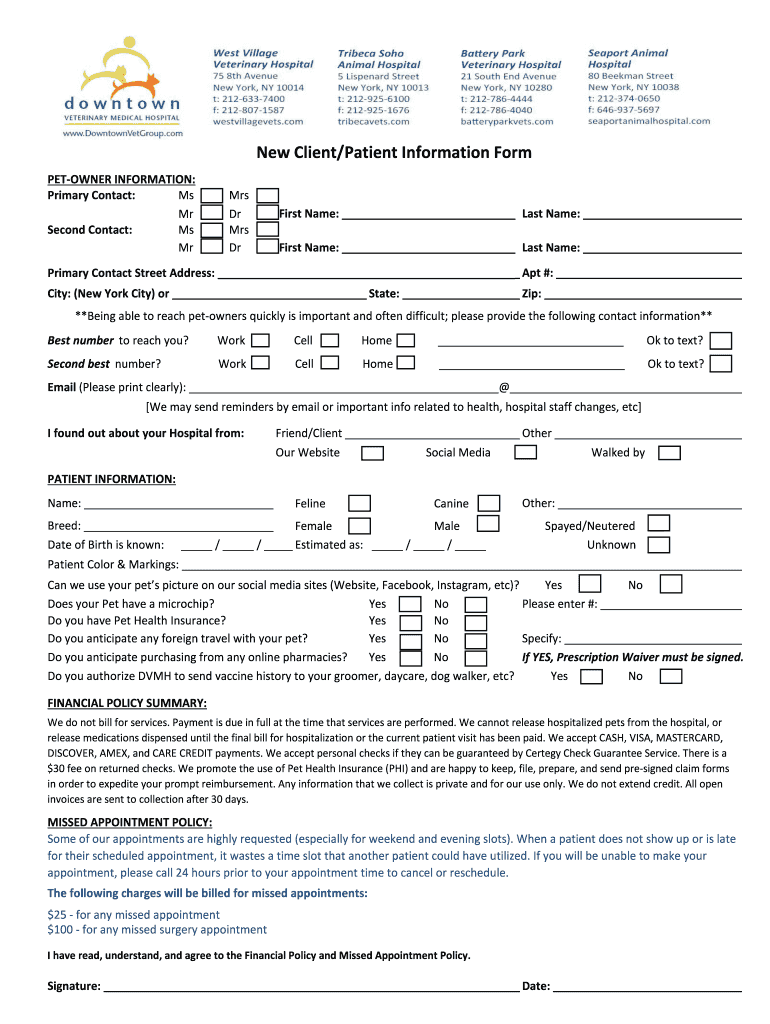
- Begin by entering your primary contact information. Select the appropriate title (Ms, Mr, Dr, etc.) and fill in your first and last name as the primary contact. Then, provide the same details for a second contact.
- Enter your street address, including apartment number if applicable. Specify the city (New York City or another city), state, and zip code to ensure accurate location information.
- Provide the best phone number for contact, selecting the appropriate category: work, cell, or home. Indicate if you are okay to receive texts. Repeat this step for a second contact number.
- Fill in your email address clearly, as it will be used for reminders and important health information.
- Indicate how you found out about the DVMH Hospital by checking the relevant options (Friend/Client, Website, Social Media, or Walked by). Provide details where appropriate.
- Next, move to the patient information section. Fill in your pet's name, select if they are feline or canine, and provide their breed.
- Specify your pet's gender and date of birth. If the exact date is unknown, provide an estimated date.
- Indicate if your pet is spayed or neutered, and provide their color and markings.
- Choose whether you permit DVMH to use your pet’s picture on social media platforms. If yes, provide the necessary details.
- Answer whether your pet has a microchip, and indicate if you have pet health insurance, specifying details if applicable.
- Respond to inquiries about potential foreign travel with your pet and purchasing from online pharmacies, noting that a prescription waiver may be required.
- Authorize DVMH to send vaccine history to your pet's groomer, daycare, or dog walker by selecting yes or no.
- Review the financial policy summary and missed appointment policy. Confirm your understanding by providing your signature and date.
- Once you have completed all sections, save your changes. You may also download, print, or share the completed form as needed.
Complete your forms online to streamline your pet's visit!
Experience a faster way to fill out and sign forms on the web. Access the most extensive library of templates available.
Related content
Dalian Vitup Healthcare will: 1) provide assistance with business management; 2) provide...
Is very noticeable at the State Savings. Bank the co-operation among the various...
Get answers to your most pressing questions about US Legal Forms API.
How do you write client information?
Writing client information involves capturing essential data accurately and comprehensively. Use the DVMH New Client/Patient Information Form as a guide to structure your entries. Include vital contact details, service requirements, and any additional notes that might be useful. Ensure clarity in your writing to facilitate seamless communication.
How to create a client information sheet?
A client information sheet can be easily developed by using the DVMH New Client/Patient Information Form as a foundation. Start by listing pertinent details such as contact information and service preferences. Make this information clear and accessible, ensuring it meets your specific needs. This sheet ultimately aids in better client management.
How to create a patient information form?
Creating a patient information form should begin with considering what key details you need. The DVMH New Client/Patient Information Form provides a comprehensive template to help you collect the necessary data. Focus on gathering information like medical history and current medications. This organized approach streamlines patient care and communication.
How to fill a client form?
To fill out a client form effectively, start with the DVMH New Client/Patient Information Form to guide you. Enter clear and concise information in each field, covering personal information and any relevant specifics. Review each section to ensure you haven't overlooked any details. The more accurate your form, the better the service you can expect.
What is a client information form?
A client information form is a document designed to collect vital information about clients or patients. The DVMH New Client/Patient Information Form serves this purpose by gathering essential details that help service providers understand client needs. This form aids in creating a comprehensive profile for each client. Accurate forms lead to better service experiences.
How to fill a client information form?
Filling a client information form is straightforward when you use the DVMH New Client/Patient Information Form. Begin by entering basic personal details such as name and contact information. Next, include specific information related to the services required. Double-check the entries to make sure everything is accurate and complete.
What is the correct way to document client information?
Documenting client information correctly is essential for maintaining accurate records. Start by using the DVMH New Client/Patient Information Form to ensure you collect all necessary details. Be thorough, and verify the information for accuracy. This process facilitates better communication and service delivery.
How do I send a client a form to fill out?
To send a client a form, utilize digital tools for efficiency. With the DVMH New Client/Patient Information Form, you can easily share it via email or a secure link. Alternatively, offer a printable version if the client prefers to fill it out by hand.
Use professional pre-built templates to fill in and sign documents online faster. Get access to thousands of forms.
If you believe that this page should be taken down, please follow our DMCA take down process here.