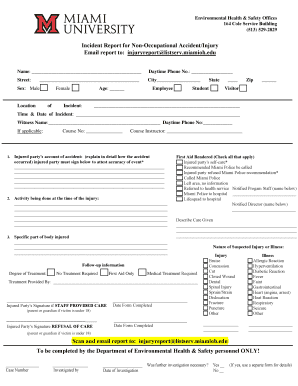
Get Miami University Incident Report For Non-occupational Accident/injury
How it works
-

Open form follow the instructions
-

Easily sign the form with your finger
-

Send filled & signed form or save
How to fill out the Miami University Incident Report For Non-Occupational Accident/Injury online
This guide provides clear, step-by-step instructions for completing the Miami University Incident Report for Non-Occupational Accident/Injury. Whether you are a student, employee, or visitor, accurate reporting is crucial for documenting incidents effectively.
Follow the steps to complete the incident report accurately.
- Click ‘Get Form’ button to obtain the form and open it in the editor.
- Begin filling out the report by entering the name of the injured party in the designated field.
- Provide the daytime phone number for the injured party to ensure contact availability.
- Complete the address section by filling in the street, city, state, and zip code of the injured party.
- Indicate the sex of the injured party by selecting either Male or Female, and clarify their role by selecting Employee, Student, or Visitor.
- Specify the location of the incident clearly to aid in understanding where it occurred.
- Record the time and date of the incident accurately in the given field.
- If there was a witness, provide the witness's name and daytime phone number.
- For any applicable course, enter the course number and the name of the course instructor.
- Detail the injured party's account of the accident in the provided space, ensuring to alter the text as necessary to reflect exact occurrences accurately.
- Describe the activity being done at the time of the injury in the section provided.
- Identify the specific part of the body that was injured in the given section.
- Select the appropriate first aid rendered options, checking all that apply, and document care given wherever applicable.
- Indicate the nature of the suspected injury or illness by marking the relevant boxes, also specifying the degree of treatment required.
- The injured party should sign in the designated area if staff provided care or indicate refusal of care.
- Complete the witness’s information, including their account and signature, if available.
- If you are the report filer, provide your details, account of the incident, and signature.
- Finalize the form by reviewing all entries for accuracy, then save changes, download, print, or share the completed report as necessary.
Complete your incident report online today for a swift and efficient documentation process.
The non-emergency number for Miami University allows students and staff to report issues that do not require immediate emergency assistance. It supports the university community by facilitating the filing of a Miami University Incident Report for Non-Occupational Accident/Injury. You can reach out through this number for concerns regarding campus safety or to get guidance on how to proceed with incident reporting. Having this number handy ensures that you can effectively communicate your needs without causing unnecessary alarm.
Industry-leading security and compliance
-
In businnes since 199725+ years providing professional legal documents.
-
Accredited businessGuarantees that a business meets BBB accreditation standards in the US and Canada.
-
Secured by BraintreeValidated Level 1 PCI DSS compliant payment gateway that accepts most major credit and debit card brands from across the globe.