Loading
Form preview
  • US Legal Forms
  • Other Templates
  • Industry Forms
  • Industry Academic Forms
  • Uab Sts Participant Contact Form 2018

Get Uab Sts Participant Contact Form 2018-2026

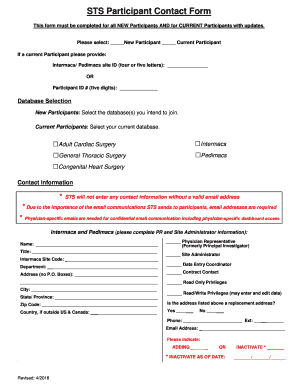
T Participant please provide: Intermacs/ Pedimacs site ID (four or five letters): OR Participant ID # (five digits): Database Selection New Participants: Select the database(s) you intend to join. Current Participants: Select your current database. Intermacs Pedimacs Adult Cardiac Surgery General Thoracic Surgery Congenital Heart Surgery Contact Information * STS will not enter any contact information without a valid email address * Due to the.

How it works

  1. Open form

    Open form follow the instructions

  2. Easily sign form

    Easily sign the form with your finger

  3. Share form

    Send filled & signed form or save

How to fill out the UAB STS Participant Contact Form online

Completing the UAB STS Participant Contact Form online is essential for both new and current participants. This guide provides step-by-step instructions to ensure you fill out the form accurately and efficiently.

Follow the steps to fill out the UAB STS Participant Contact Form.

  1. Click ‘Get Form’ button to access the form and open it in the editor.
  2. Select your status as either a New Participant or a Current Participant by checking the appropriate box.
  3. If you are a Current Participant, provide your Intermacs/Pedimacs site ID or Participant ID number in the specified fields.
  4. For New Participants, select the database(s) you intend to join from the list provided. Current Participants should indicate their current database.
  5. Complete the contact information section, ensuring to include a valid email address. This is crucial for communications from STS.
  6. Fill in the fields for your name, title, and the Intermacs Site Code if applicable. Designate your role by checking the relevant boxes such as Physician Representative or Site Administrator.
  7. Complete the address section, avoiding P.O. Boxes, specifying your city, state/province, and zip code.
  8. Indicate if the address provided is a replacement address and fill in the country if outside the U.S. and Canada.
  9. Provide your phone number and extension, along with your email address.
  10. Specify if you are adding or inactivating your contact information. If inactivating, provide the effective date.
  11. Once all information is completed and verified, save your changes, and consider downloading or printing the form for your records.

Complete your UAB STS Participant Contact Form online today.

Get form

Experience a faster way to fill out and sign forms on the web. Access the most extensive library of templates available.
Get form

Related content

Interagency Registry for Mechanically Assisted...
Jan 21, 2020 — Intermacs is a North American registry of data for adults who received an...
Learn more
Clinical Research | Cardiovascular Disease
We are actively participating in a number of clinical trials and national registries. Our...
Learn more

Related links form

Camfrogpro Time4care App Not Working Aerotek Time And Expense Glencoe Business And Personal Finance Pdf

Questions & Answers

Get answers to your most pressing questions about US Legal Forms API.

Contact support

The STS database is an extensive collection of data related to thoracic surgery outcomes, encompassing a wide range of procedures. It serves as a tool for quality improvement and research, enabling surgeons to benchmark their performance. By using the UAB STS Participant Contact Form, surgeons can contribute their data and benefit from the insights generated by this rich database.

The registry for open heart surgery is a specific database that tracks heart surgery procedures and their results. This registry aims to improve surgical techniques, patient safety, and overall outcomes by analyzing collected data. By completing the UAB STS Participant Contact Form, healthcare professionals can submit their cases, enriching the data that drives advancements in this field.

In surgery, STS stands for the Society of Thoracic Surgeons, a leading organization dedicated to advancing surgical care through data collection and research. This organization plays a pivotal role in setting quality standards for thoracic surgery. Utilizing the UAB STS Participant Contact Form allows members to engage with STS initiatives and contribute to improving surgical outcomes.

The adult cardiac surgery database is a specialized repository that collects data on surgeries performed on adult patients. It provides insights into surgical outcomes, helps measure success rates, and informs clinical practices. The UAB STS Participant Contact Form serves as a gateway for healthcare providers to report their procedures, thereby enhancing this critical database.

The STS registry is a comprehensive database that stores information on various surgical procedures and outcomes. It allows healthcare providers to track performance metrics and improve patient care. By engaging with resources like the UAB STS Participant Contact Form, users can contribute valuable data to this registry, benefiting the surgical community.

The STS, or Security Token Service, plays a critical role in AWS by providing temporary credentials to users. This enables secure access to different AWS resources, enhancing the management of permissions. To optimize your experience with AWS through the UAB STS Participant Contact Form, it is essential to understand how it controls access and security in cloud environments.

STS registry abstraction refers to the process of simplifying access and interaction with the STS registry data. This allows various applications and services to efficiently retrieve and use crucial information. It plays a vital role in streamlining data operations while ensuring that users can easily fill out the UAB STS Participant Contact Form.

A customer service request form is a document used to officially record service requests from clients or participants. The UAB STS Participant Contact Form serves this purpose, allowing you to communicate your needs effectively. This form streamlines the process and helps us address your inquiries efficiently.

Making a service request is simple with the UAB STS Participant Contact Form. Complete the form by providing essential details about the service you need. Once your form is ready, submit it online, and our customer service team will promptly respond to your request.

Filling out the UAB STS Participant Contact Form is straightforward. Start by entering your personal information, followed by the details of the service you require. Completing each section step by step will help you avoid mistakes and ensure that your request is properly understood.

Get This Form Now!

Use professional pre-built templates to fill in and sign documents online faster. Get access to thousands of forms.
Get form
If you believe that this page should be taken down, please follow our DMCA take down processhere.
Get UAB STS Participant Contact Form
Get form
  • Adoption
  • Bankruptcy
  • Contractors
  • Divorce
  • Home Sales
  • Employment
  • Identity Theft
  • Incorporation
  • Landlord Tenant
  • Living Trust
  • Name Change
  • Personal Planning
  • Small Business
  • Wills & Estates
  • Packages A-Z
  • Affidavits
  • Bankruptcy
  • Bill of Sale
  • Corporate - LLC
  • Divorce
  • Employment
  • Identity Theft
  • Internet Technology
  • Landlord Tenant
  • Living Wills
  • Name Change
  • Power of Attorney
  • Real Estate
  • Small Estates
  • Wills
  • All Forms
  • Forms A-Z
  • Other Templates
  • Legal Hub
  • About Us
  • Help Portal
  • Legal Resources
  • Blog
  • Affiliates
  • Contact Us
  • Delete My Account
  • Site Map
  • Industries
  • Forms in Spanish
  • Localized Forms
  • State-specific Forms
  • Forms Kit
  • Real Estate Handbook
  • All Guides
  • Notarize
  • Incorporation services
  • For Consumers
  • For Small Business
  • For Attorneys
  • USLegal
  • FormsPass
  • pdfFiller
  • signNow
  • altaFlow
  • DocHub
  • Instapage
Form Packages
  • Adoption
  • Bankruptcy
  • Contractors
  • Divorce
  • Home Sales
  • Employment
  • Identity Theft
  • Incorporation
  • Landlord Tenant
  • Living Trust
  • Name Change
  • Personal Planning
  • Small Business
  • Wills & Estates
  • Packages A-Z
Form Categories
  • Affidavits
  • Bankruptcy
  • Bill of Sale
  • Corporate - LLC
  • Divorce
  • Employment
  • Identity Theft
  • Internet Technology
  • Landlord Tenant
  • Living Wills
  • Name Change
  • Power of Attorney
  • Real Estate
  • Small Estates
  • Wills
  • All Forms
  • Forms A-Z
  • Other Templates
Customer Service
  • Legal Hub
  • About Us
  • Help Portal
  • Legal Resources
  • Blog
  • Affiliates
  • Contact Us
  • Delete My Account
  • Site Map
  • Industries
  • Forms in Spanish
  • Localized Forms
  • State-specific Forms
  • Forms Kit
Legal Guides
  • Real Estate Handbook
  • All Guides
Prepared for you
  • Notarize
  • Incorporation services
Our Customers
  • For Consumers
  • For Small Business
  • For Attorneys
Our Sites
  • USLegal
  • FormsPass
  • pdfFiller
  • signNow
  • altaFlow
  • DocHub
  • Instapage
Social Media
Call us now toll free:
+1 833 426 79 33
As seen in:
© Copyright 1999-2026 airSlate Legal Forms, Inc. 17 Station Street, Suite 303, Brookline, MA 02445
  • Your Privacy Choices
  • Terms of Service
  • Privacy Notice
  • Content Takedown Policy
  • Bug Bounty Program