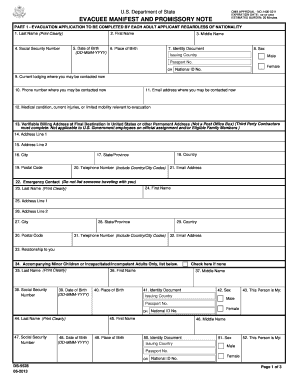
U.S. Department of StateOMB APPROVAL NO.14050211 EXPIRATION DATE: xxxxxxxx ESTIMATED BURDEN: 20 MinutesEVACUEE MANIFEST AND PROMISSORY NOTEPART 1 EVACUATION APPLICATION TO BE COMPLETED BY EACH ADULT.
Open form follow the instructions
Easily sign the form with your finger
Send filled & signed form or save
How to fill out the DS-5528 online
The DS-5528 form, known as the evacuee manifest and promissory note, is essential for individuals seeking evacuation assistance. This guide provides clear, step-by-step instructions on how to efficiently complete the DS-5528 online.
Follow the steps to effectively complete the DS-5528
- Press the ‘Get Form’ button to access the DS-5528 form and open it in your preferred editor.
- Begin by completing Part 1, where each adult applicant must provide their last name, first name, and middle name clearly. Ensure accuracy as this information is critical.
- Enter your Social Security number followed by your date of birth and place of birth in the respective fields. Use the format DD-MMM-YYYY for the date.
- Indicate the identity document you will use, including either your passport number or national ID number along with the issuing country.
- In the current lodging section, provide the address where you can be contacted, followed by your phone number and email address.
- If applicable, detail any medical conditions or limitations that might be relevant to your evacuation.
- Fill in your billing address at the final destination in the United States. This should not be a Post Office Box and must include all relevant address lines, city, state/province, postal code, and country.
- Provide your emergency contact information. Ensure that the individual you list is not traveling with you.
- If you have accompanying minor children or individuals unable to act on their own behalf, list their details in the provided sections clearly.
- Move to Part 2 to read and acknowledge the promissory note and repayment agreement, ensuring you understand the terms and implications of your evacuation.
- Complete all necessary signature blocks, ensuring your name is printed, and you sign and date the document.
- Finally, review all filled information for accuracy before finalizing your form. You can then save the changes, download, print, or share the completed DS-5528.
Complete your documents online for a smooth evacuation process.
Experience a faster way to fill out and sign forms on the web. Access the most extensive library of templates available.
Related content
DS-5528. *Retyping your name in this box using a digital device is as acceptable as...
May 30, 2025 — KM/DS is located on SIPRNET at https://jrockmdsbpm.js.mil/bizflow...
Nov 25, 2016 — Problem/Condition: Since 1969, CDC has conducted abortion surveillance to...
Get answers to your most pressing questions about US Legal Forms API.
How to file DS-261?
Filing the DS-261 involves accessing the online application through the Consular Electronic Application Center. This form serves as a choice of address and agents for communication regarding your visa application. After completing it, you should submit the DS-261 online and keep a copy for your records. Using services like USLegalForms can help clarify the necessary steps and requirements for filing.
Who fills out the DS-260 form?
The DS-260 form is typically filled out by visa applicants seeking to enter the United States. In cases involving children or dependents, a parent or guardian may complete the form on their behalf. It's vital to ensure that all information is accurate and complete to avoid delays during processing.
What is the DS-260 process?
The DS-260 process begins with filling out the form online, where you provide personal, travel, and background information. After submission, you will need to attend an interview at a U.S. consulate or embassy, where your application is reviewed. Upon approval, you receive your visa, allowing entry to the United States. For a streamlined experience, consider using USLegalForms for relevant resources.
How long does it take for DS-260 to be approved?
The approval time for the DS-260 varies by case and can depend on several factors, such as the specific consulate and your individual situation. On average, you may anticipate a processing time ranging from a few weeks to several months. It's crucial to stay updated on your application's status through the consulate’s official channels.
How to file DS-260?
To file the DS-260, you must complete the online application through the Consular Electronic Application Center. After filling out the required information, you need to submit it electronically. Once submitted, you should print the confirmation page for your records. Utilizing platforms like USLegalForms can simplify this process by providing clear guidance and instructions.
How to get to the DS DLC?
To reach the DS DLC, ensure that you have successfully installed the add-on from your game platform. After this, simply follow the in-game prompts leading you to the DS-5528 entry point. This straightforward method allows you to immerse yourself in new and engaging content, making your gaming experience more enjoyable.
Where does the DS1 DLC start?
The DS1 DLC starts from a designated area within the game world, often marked on the map. Make sure that you have met all the prerequisites required to access this content. The launch point allows you to dive deep into the DS-5528 experience, filled with unique quests and adventures waiting for you.
How to get DS-160 filled form?
To fill out the DS-160 form, visit the official U.S. government website where the form is hosted. You can navigate through the user-friendly interface that guides you step-by-step. If you encounter difficulties, USLegalForms provides comprehensive resources to help you complete the DS-160 efficiently, simplifying your application process.
How do I get into the DLC area?
Getting into the DLC area typically involves following specific in-game instructions. Once you have the DLC installed, look for the entry point mentioned in your game guide or map. Engaging with the DS-5528 will enhance your gameplay, offering new challenges and features designed to elevate your experience.
How to access Ringed City DLC?
Accessing the Ringed City DLC is similar to the DS DLC process. Start by ensuring that you have the DLC installed through your game client. After installation, head to the main game menu and look for the related content section, where you can seamlessly enter the Ringed City area. Enjoy discovering all the surprises waiting for you within the DS-5528 experience.
Use professional pre-built templates to fill in and sign documents online faster. Get access to thousands of forms.
If you believe that this page should be taken down, please follow our DMCA take down process here.
This form is available in several versions. Select the version you need from the drop-down list below.