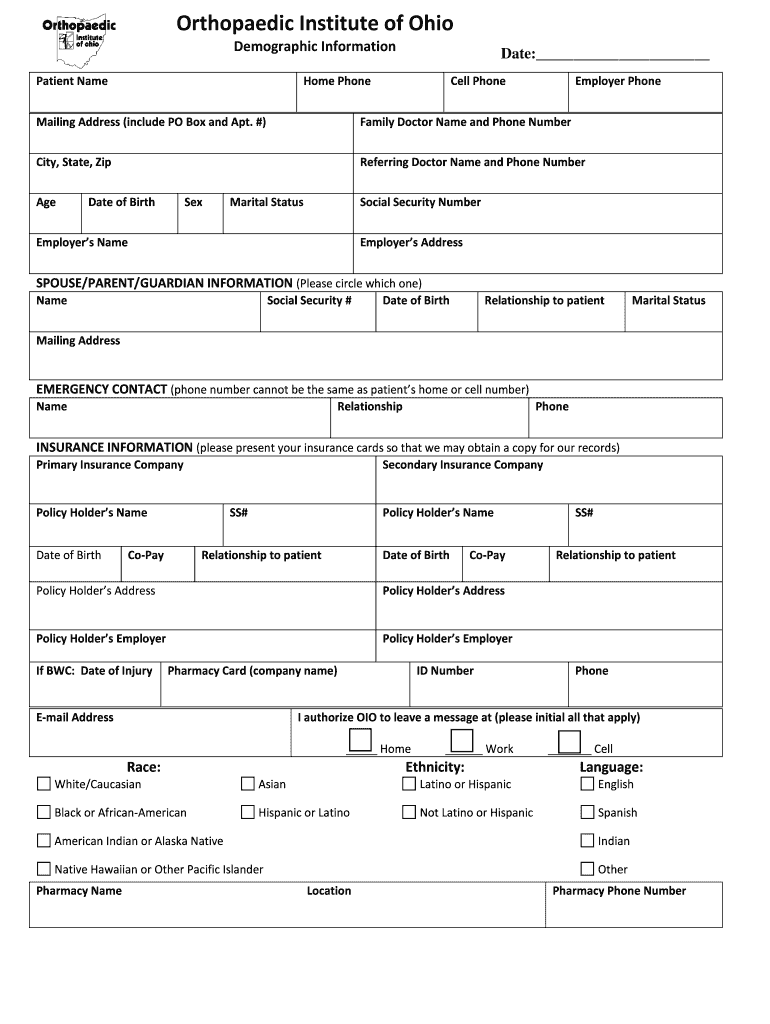
Or Name and Phone Number City, State, Zip Referring Doctor Name and Phone Number Age Date of Birth Sex Marital Status Social Security Number Employer s Name Employer s Address SPOUSE/PARENT/GUARDIAN INFORMATION (Please circle which one) Name Social Security # Date of Birth Relationship to patient Marital Status Mailing Address EMERGENCY CONTACT (phone number cannot be the same as patient s home or cell number) Name Relationship Phone INSURANCE INFORMATION (please present.
Loading

Open form follow the instructions

Easily sign the form with your finger

Send filled & signed form or save
How to fill out the OH Orthopaedic Institute Patient Registration Forms online
Filling out the OH Orthopaedic Institute Patient Registration Forms online is an essential step to ensure that your medical needs are accurately addressed. This guide provides clear instructions to help you complete the forms efficiently and correctly.
Follow the steps to fill out the OH Orthopaedic Institute Patient Registration Forms online.
- Click the ‘Get Form’ button to obtain the form and open it in the editing interface.
- Begin by entering your demographic information, including your full name, date of birth, and contact details such as home and cell phone numbers.
- Provide your mailing address, including any PO Box or apartment number, along with your city, state, and zip code.
- Fill in your family doctor’s name and phone number, as well as the name and contact number for the referring doctor.
- Indicate your age, sex, marital status, and social security number, as well as your employer’s name and address.
- Complete the section for spouse, parent, or guardian information, specifying the relationship to the patient.
- Input your emergency contact's name and phone number, ensuring it is different from the patient’s home or cell numbers.
- Fill in insurance information, including primary and secondary insurance companies, policy holders’ details, and co-pay amounts.
- Provide your pharmacy information, including the name, location, and phone number, along with your email address.
- Review the authorization and consent sections, confirming your understanding and authorizing necessary communications.
- Complete any additional questions related to referral and pre-certification processes required by your insurance.
- Finally, review your responses for accuracy and clarity, then save changes, download, or print the completed form.
Start filling out your OH Orthopaedic Institute Patient Registration Forms online today for a seamless healthcare experience.
Experience a faster way to fill out and sign forms on the web. Access the most extensive library of templates available.
Related content
Sep 4, 2024 — Provider Eligibility and Enrollment · Complete the CMH Provider...
We offer pre-registration for inpatient and outpatient stays and procedures. The process...
Jan 1, 2021 — The Provider Manual is a reference tool that contains eligibility...
Use professional pre-built templates to fill in and sign documents online faster. Get access to thousands of forms.
If you believe that this page should be taken down, please follow our DMCA take down process here.