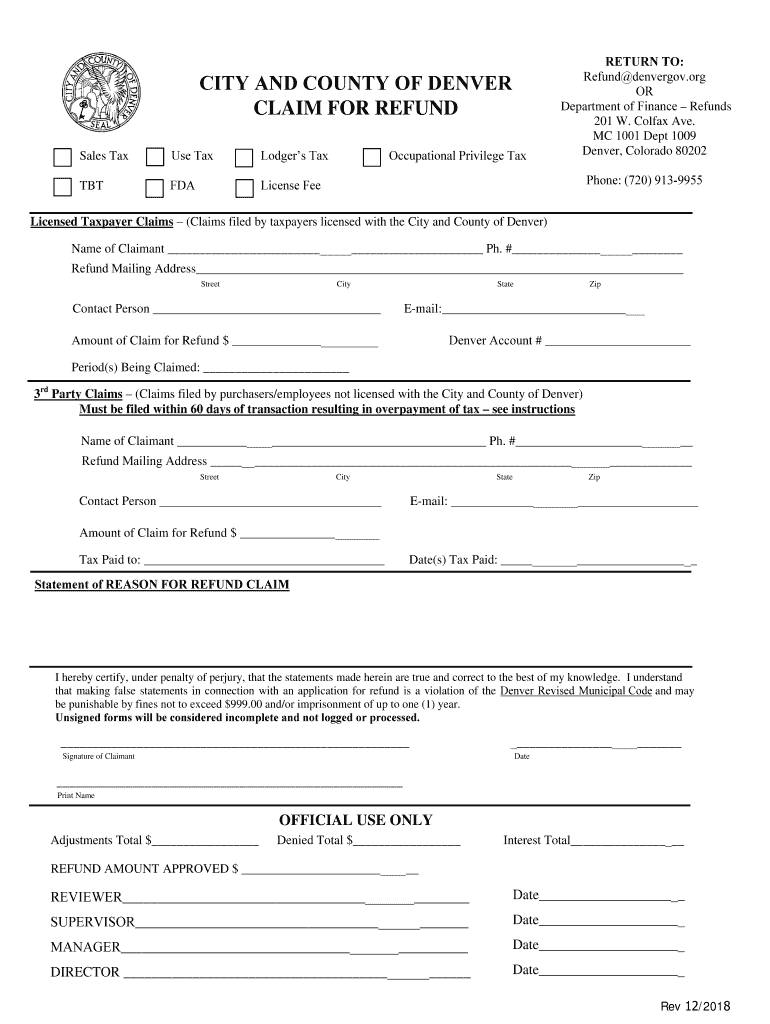
Ds 201 W. Colfax Ave. MC 1001 Dept 1009 Denver, Colorado 80202 Phone: (720) 913-9955 Licensed Taxpayer Claims (Claims filed by taxpayers licensed with the City and County of Denver) Name of Claimant Ph. # Refund Mailing Address Street City Contact Person State Zip E-mail:.
Loading

Open form follow the instructions

Easily sign the form with your finger

Send filled & signed form or save
How to fill out the CO Claim For Refund Form - Denver City & County online
Filing a CO Claim For Refund Form for the City and County of Denver can be straightforward when you follow the proper steps. This guide provides clear, step-by-step instructions to help you accurately complete the form online, ensuring all necessary information is included for your refund request.
Follow the steps to accurately fill out the CO Claim For Refund Form
- Click ‘Get Form’ button to obtain the form and open it for editing.
- Begin by identifying the type of claim you are submitting. Complete the section for licensed taxpayer claims if you hold a tax license with the City of Denver, or the section for 3rd party claims if you are not a licensed taxpayer.
- Fill in the 'Name of Claimant' field with your full name and provide a valid phone number.
- Enter the refund mailing address, including street, city, state, and zip code.
- Designate a contact person and provide their email address for correspondence regarding the claim.
- Document the 'Amount of Claim for Refund' with the amount you are requesting to be refunded.
- If applicable, provide your Denver account number and specify the period(s) being claimed.
- For 3rd party claims, fill in the 'Tax Paid to' field and the 'Date(s) Tax Paid' to establish the applicable transactions.
- Include a clear 'Statement of Reason for Refund Claim' outlining the justification for your request.
- Sign and date the form, ensuring that all information is accurate to the best of your knowledge. Unsigned forms will be considered incomplete.
- After completing the form, review all information for accuracy. Save changes, download a copy for your records, and print the form if necessary.
- Submit the form electronically or by mail to the appropriate address, ensuring all required documentation is attached to avoid delays.
Complete your CO Claim For Refund Form online today to ensure a smooth processing of your refund request.
Experience a faster way to fill out and sign forms on the web. Access the most extensive library of templates available.
Related content
Step 1: Review the instructions and documentation requirements based on tax type prior to...
GENERAL INFORMATION: A purchaser's/buyer's claim for refund is submitted by a buyer when...
This form should be completed for all claims for refund of Denver sales, use, lodger's and...
Get answers to your most pressing questions about US Legal Forms API.
How to claim Colorado TABOR refund?
To claim your Colorado TABOR refund, you need to complete the CO Claim For Refund Form - Denver City & County, which is specifically tailored for such claims. This form requires basic information about your tax contributions and eligibility to receive the refund. Make sure to review the requirements closely to ensure your application is successful. If you need further assistance, uslegalforms provides resources to help you navigate the process smoothly.
What is 1099-G Colorado refund?
The 1099-G form related to Colorado refunds reports any state tax refunds you received during the year. This information may affect your federal tax return, so it is essential to recognize how it interacts with other financial elements. You can request any necessary refunds, including the 1099-G, through the CO Claim For Refund Form - Denver City & County. For more information on managing this form, consider visiting uslegalforms.
Where's my refund in Denver, CO?
To check the status of your refund in Denver, CO, begin by confirming the submission of your CO Claim For Refund Form - Denver City & County. You can often track the progress online or by contacting the local tax authority directly. If your refund has been delayed, uslegalforms can assist in clarifying the process and help you understand the requirements for a seamless experience. Keeping track of these details ensures you stay informed about any updates.
How do I get the $750 government payment in Colorado?
To receive the $750 government payment in Colorado, you must meet specific eligibility requirements, including residency and income thresholds. Apply for this payment using the CO Claim For Refund Form - Denver City & County, which helps manage your claim effectively. Being proactive in submitting this form can significantly speed up the review process. For tailored assistance, you can explore resources available through uslegalforms.
Why haven't I gotten my Colorado refund yet?
If you have not received your Colorado refund, it may be due to incomplete documentation or a backlog in processing. It's essential to verify that you submitted the CO Claim For Refund Form - Denver City & County correctly and included all necessary attachments. You can follow up with the relevant city department for updates on your claim. If you're experiencing difficulties, consider using uslegalforms to streamline your inquiry and get assistance.
Who is eligible for the Colorado sales tax refund?
Eligibility for the Colorado sales tax refund typically includes individuals and businesses that have overpaid sales tax. To claim this refund, you will need to provide proof of your overpayment using the CO Claim For Refund Form - Denver City & County. If you are unsure about your eligibility or the process, uslegalforms can guide you through the necessary steps and requirements. It's important to check the latest guidelines to ensure you meet all criteria.
What form is the Colorado refund?
In Colorado, the standard form for requesting refunds is the CO Claim For Refund Form - Denver City & County. This specific form is designed for residents of Denver and allows you to claim various types of refunds, such as sales tax overpayments. Completing this form accurately ensures that your request is recognized and processed swiftly. You can obtain this form through the official Denver city website or uslegalforms platform.
What is the form for the refund check?
The CO Claim For Refund Form - Denver City & County is crucial for requesting a refund check from tax overpayments or other eligible refunds. This form allows you to formally submit your request to the appropriate municipal authority. By ensuring that you fill it out correctly, you can expedite the processing of your refund. Always make sure to attach any required documentation to support your request.
How does Colorado issue tax refunds?
Colorado issues tax refunds through a structured process that starts with filing the correct form, such as the CO Claim For Refund Form - Denver City & County. The processing time can vary based on the complexity of your claim. Keeping track of your submission helps you follow up efficiently if necessary.
How do I claim my Colorado rebate?
To claim your Colorado rebate, you should complete the CO Claim For Refund Form - Denver City & County. Ensure that you have all required documentation, including your tax returns and any necessary identification. After filling out the form, submit it through the appropriate channels, whether by mail or electronically, to process your claim efficiently.
Use professional pre-built templates to fill in and sign documents online faster. Get access to thousands of forms.
If you believe that this page should be taken down, please follow our DMCA take down process here.