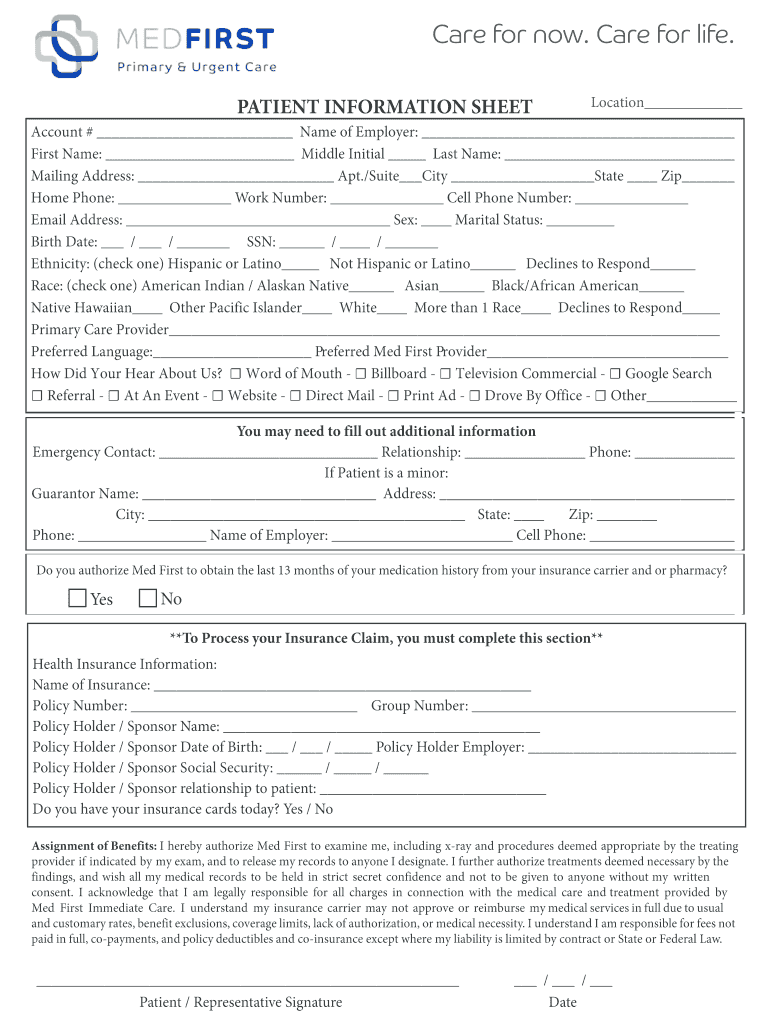
Middle Initial Last Name: Mailing Address: Apt./Suite City State Zip Home Phone: Work Number: Cell Phone Number: Email Address: Sex: Marital Status: Birth Date: / / SSN: / / Ethnicity: (check one) Hispanic or Latino Not Hispanic or Latino.
Loading

Open form follow the instructions

Easily sign the form with your finger

Send filled & signed form or save
How to fill out the MedFirst Patient Information Sheet online
The MedFirst Patient Information Sheet is a crucial document for collecting important details about users who seek care. This guide provides clear and detailed instructions to help you fill out the form online effectively and efficiently.
Follow the steps to complete the MedFirst Patient Information Sheet.
- Click ‘Get Form’ button to obtain the form and open it in the editor.
- Begin by filling in the location where you are seeking care and your account number if applicable. This ensures your information is linked to the correct records.
- Next, enter your full name including your first name, middle initial, and last name. Accurate names ensure identification in medical records.
- Provide your mailing address, including any apartment or suite number, city, state, and zip code. This information may be used for correspondence or billing.
- Fill in your home phone number, work number, and cell phone number. At least one form of contact is essential for communication.
- Include your email address for electronic communications and updates regarding your care.
- Indicate your sex and marital status. This information can assist your healthcare provider in understanding your demographic profile.
- Enter your birth date and social security number. These details are crucial for identification and insurance processing.
- Select your ethnicity and race by checking the appropriate boxes. This data can be important for health studies and understanding population health.
- Provide your primary care provider’s name and your preferred language for communication. This helps staff in addressing your needs more effectively.
- Share how you heard about MedFirst by selecting from the provided options. This feedback can help improve outreach and services.
- Fill in the emergency contact section, including their name, relationship to you, and phone number. This is important for any unforeseen emergencies.
- If you are a minor, complete the guarantor section with the necessary details of the responsible party, including their contact information.
- Respond to the question regarding authorization for MedFirst to access your medication history by selecting yes or no.
- Complete the health insurance information section, including the name of the insurance provider, policy number, and any other required details.
- Review the assignment of benefits statement, ensuring you understand your responsibilities regarding payment and insurance claims.
- Sign and date the form, either as a patient or representative, confirming all information provided is accurate.
- Finally, save your changes and consider downloading, printing, or sharing the completed form as needed.
Start completing your MedFirst Patient Information Sheet online today for a smoother healthcare experience.
Experience a faster way to fill out and sign forms on the web. Access the most extensive library of templates available.
Related content
The FAA MedXPress system allows anyone requiring an FAA Medical Certificate or Student...
Take a patient's medical history. Update charts and patient information to show current...
For patients: When the Normal Pressure LED (green) comes on to indicate the pressure is...
Get answers to your most pressing questions about US Legal Forms API.
How to access patient information?
To access patient information, you should contact the relevant healthcare provider’s office or utilize an online patient portal that features the MedFirst Patient Information Sheet. Ensure you have proper identification and, if necessary, written consent from the patient. Following these steps will help you gain the access you need while respecting legal guidelines and maintaining confidentiality.
How do most patients access health information?
Most patients now access their health information through secure online portals provided by their healthcare providers. These portals often include a digital version of the MedFirst Patient Information Sheet, allowing patients to view their medical history, lab results, and treatment plans. Furthermore, some patients prefer to request paper copies during office visits or via direct communication with their healthcare providers for convenience.
Where do you go to access the patient data sheet?
You can access the MedFirst Patient Information Sheet through your hospital's electronic health record system or by consulting with the healthcare staff directly. Many facilities offer online patient portals where individuals can log in to view their information securely. If in doubt, ask a nurse or administrative representative who can guide you to the correct location where this information is housed.
How to get information on a patient in the hospital?
To obtain information on a patient in the hospital, you can request access to the MedFirst Patient Information Sheet through authorized hospital staff. Ensure you have the necessary identifiers, such as patient name and date of birth, to facilitate the process. Hospital personnel will guide you through their data access procedures, ensuring that you respect patient privacy and confidentiality at all times.
Who can have access to patient information?
Access to the MedFirst Patient Information Sheet is typically allowed for healthcare professionals directly involved in a patient's care. This includes doctors, nurses, and administrative staff who require the information to provide treatment or manage billing. Additionally, patients have the right to access their own information, ensuring transparency in their healthcare journey. Always follow privacy regulations to protect sensitive data.
How to make a patient information sheet?
Creating a MedFirst Patient Information Sheet involves gathering essential patient data, including personal details, medical history, and treatment plans. Start by using a clear layout that features all relevant sections for easy navigation. You can utilize templates available on platforms like uslegalforms to ensure compliance and accuracy in documentation. This approach not only saves time but also enhances the quality of patient care.
How to fill a patient referral form?
Filling a patient referral form requires accurate patient information, which can be gathered using the MedFirst Patient Information Sheet. Ensure you have all necessary details such as the referring physician's information, patient demographics, and the reason for the referral. Following these steps will streamline the referral process and enhance patient care.
How to write patient information?
To write patient information, focus on clarity and precision. Use the MedFirst Patient Information Sheet to guide you in capturing essential health details. Organize the data logically, covering personal and medical information to ensure healthcare providers can rely on it during consultations.
How to get patients to fill out forms?
To encourage patients to fill out forms, simplify the process with the MedFirst Patient Information Sheet. Explain the importance of their information and how it aids in their care. Providing assistance while they complete the forms can also create a supportive environment that motivates patients to participate.
How to write a patient information sheet?
Writing a patient information sheet involves gathering relevant data and structuring it clearly. Use the MedFirst Patient Information Sheet template, as it guides you in capturing necessary details effectively. Aim for clarity, ensuring that each section contains accurate and concise information, especially regarding health and treatment.
Use professional pre-built templates to fill in and sign documents online faster. Get access to thousands of forms.
If you believe that this page should be taken down, please follow our DMCA take down process here.