Loading
Get Case Ih Pm-14338 2009-2026
How it works
-

Open form follow the instructions
-

Easily sign the form with your finger
-

Send filled & signed form or save
How to fill out the Case IH PM-14338 online
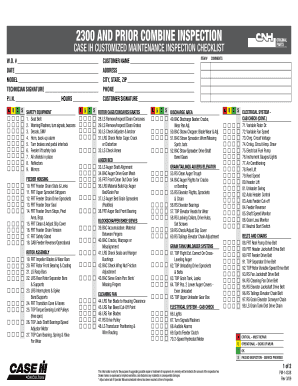
Filling out the Case IH PM-14338 form is essential for ensuring your combine inspection is thorough and accurate. This guide will walk you through each section of the form, providing clear instructions to help you complete it online.
Follow the steps to efficiently complete the inspection form.
- Press the ‘Get Form’ button to access the Case IH PM-14338 and open it in your preferred editor.
- Begin by entering the work order number in the designated field. This number helps track your inspection services.
- Fill in the date of the inspection, which provides a timestamp for the service performed.
- In the model section, specify the model of the equipment being inspected. Accurate model information is crucial for relevant inspections.
- The technician signature area must be signed by the technician performing the inspection to validate the work completed.
- Provide the product identification number (P.I.N.) and the number of operating hours, which are important for service records.
- Proceed to fill each item in the checklist according to the inspection performed. Indicate the condition using the categories provided: Critical, Operational, OK, or Passed Inspection.
- For any comments regarding particular items inspected, utilize the comment fields provided next to the checklist.
- Lastly, enter the customer’s name, address, city, state, zip code, and phone number. This information identifies who the inspection was performed for.
- Once you have filled out all required fields, you can save changes, download the completed form, print it, or share it as necessary.
Complete your inspection documentation online to ensure efficiency and accuracy.