Loading
Get Mn Clinical Testing And Submission Form 2019-2026
How it works
-

Open form follow the instructions
-

Easily sign the form with your finger
-

Send filled & signed form or save
How to fill out the MN Clinical Testing And Submission Form online
This guide provides clear and detailed instructions on filling out the MN Clinical Testing And Submission Form online. Designed for a wide audience, this resource will help users navigate the form efficiently.
Follow the steps to complete the form accurately.
- Click ‘Get Form’ button to access the form and open it in the editor.
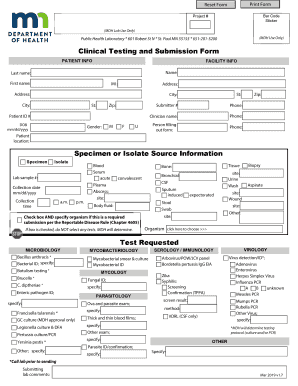
- Complete the patient information section. Enter the patient's name, address, date of birth, and gender. Ensure that all fields are filled out accurately to avoid delays.
- Fill out the facility information. Include the name and phone number of the facility, as well as the clinician responsible for the submission.
- Provide details about the specimen or isolate source. Specify the type of specimen, collection date, and time, along with any relevant lab sample numbers.
- Select the appropriate tests required for the specimen from the options provided. If instructed not to select any tests, check the designated box.
- Include submitting lab comments if necessary. This section allows for additional information or instructions related to the submission.
- Review all the information you have entered. Make sure all fields are complete and accurate.
- Once you have finished filling out the form, save your changes. You may also choose to download, print, or share the completed form as needed.
Complete your MN Clinical Testing And Submission Form online today.
Infectious-disease diagnostics is the procedure by which the causative agent of an infectious disease is identified and often characterized.