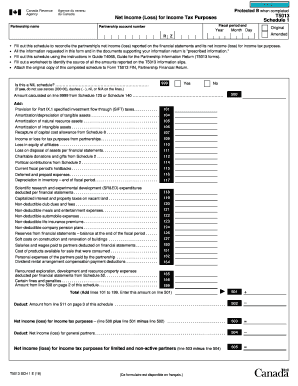
Clear DataProtected B when completedT5013 Schedule 1Net Income (Loss) for Income Tax Purposes Partnership nameFiscal period endPartnership account numberYearR Month DayOriginal AmendedZFill out this.

How it works
  • Open form

    Open form follow the instructions

  • Easily sign form

    Easily sign the form with your finger

  • Share form

    Send filled & signed form or save

How to fill out the Canada T5013 SCH 1 E online

Completing the Canada T5013 SCH 1 E form is essential for accurately reporting a partnership's net income or loss for income tax purposes. This guide provides clear instructions to help users complete the form efficiently and correctly when filing online.

Follow the steps to fill out the Canada T5013 SCH 1 E online.

  1. Click ‘Get Form’ button to obtain the form and open it in the editor.
  2. In the first section, enter the partnership name, fiscal period end, partnership account number, and the year of the return. This information is critical for identifying the partnership and its tax obligations.
  3. Complete the section regarding whether this schedule is a NIL schedule. If this is the case, do not use zeroes, dashes, or the term 'N/A' in the lines of the form.
  4. Accurately calculate the total net income (loss) for income tax purposes based on the figures reported throughout the form, including deductions and other adjustments.
  5. After completing all necessary fields and ensuring accuracy, you can save changes, download, print, or share the form as needed to finalize the filing.

Complete your Canada T5013 SCH 1 E filing online today for accurate tax reporting.

Get form

Experience a faster way to fill out and sign forms on the web. Access the most extensive library of templates available.

Related content

EX-1

Terms which are capitalized in this Schedule [A] and not otherwise defined shall have the...

Learn more
Required Parent Tax Documentation 2025-2026

Then, you must submit the 2023 Canadian T5013(s) and T2125(s) for each business/farm via...

Learn more
Questions & Answers

Get answers to your most pressing questions about US Legal Forms API.

Contact support

What does schedule 1 mean in Canada?

Schedule 1 refers to the form used for calculating federal tax credits in Canada. It is an integral part of your tax return, helping to accurately assess the taxes you owe on your taxable income. Understanding Schedule 1 is important, and leveraging US Legal Forms can provide you with insights and tools to simplify your tax preparation experience.

To obtain a proof of income statement, you can request it from your employer, who may issue a T4 slip detailing your earnings. Alternatively, if you are a self-employed individual, you can prepare and issue invoices or statements that showcase your income. Utilizing US Legal Forms, you can find templates and guides for creating your proof of income documentation accurately.

Schedule 1 is a tax form that helps individuals calculate their federal non-refundable tax credits. It is essential for determining the amount of tax you owe based on your income. Understanding this form is critical when filing your taxes, and US Legal Forms can provide detailed explanations and templates to assist you in the process.

Submitting Schedule 1 is generally required if you are calculating federal tax owed based on taxable income. This form allows you to determine your non-refundable tax credits. To make sure you complete all necessary forms correctly, including the Canada T5013 SCH 1 E, you might find it beneficial to use tools available on US Legal Forms.

You can find the T1 tax form on the Canada Revenue Agency's website, where it is available for download. Ensure you select the correct version for the tax year you are filing. If you prefer a more user-friendly process, consider using US Legal Forms, which provides easy access to tax forms and a wealth of resources to aid in your filing.

To access a copy of your tax return online, log into your CRA My Account. This secure portal allows you to view and download various tax documents, including your return. If you have trouble navigating the system, US Legal Forms offers support and can help you understand necessary steps to retrieve your documents effectively.

You can obtain the TD1 form from the Canada Revenue Agency's (CRA) official website. It is available for download and printing. Additionally, local tax preparation offices often provide printed copies for your convenience. If you need specific guidance, consider exploring resources on the US Legal Forms platform, which can direct you to the right forms.

Reporting foreign partnership income involves identifying it as foreign income on your tax return. You should report the income on your T1 form and include any relevant information from foreign partnership documents you received. Properly addressing this foreign income is essential for compliance and may relate to your Canada T5013 SCH 1 E reporting. The uslegalforms platform offers guidance for handling these complex situations effectively.

When reporting T5008 on your Canadian tax return, you'll need to include the information regarding securities transactions in your T1 submission. This slip documents any capital gains or losses you may have incurred. Accurate reporting affects your overall tax calculations, including those related to Canada T5013 SCH 1 E. Using uslegalforms can help by providing a clear structure on how to incorporate this slip into your tax return.

Yes, you can file your tax return by yourself in Canada. The process involves gathering your income slips, such as T5013 and others, completing your T1 form, and submitting it to the Canada Revenue Agency. Many Canadians find that using resources from uslegalforms helps simplify their filings by offering detailed instructions and templates to follow.

Get This Form Now!

Use professional pre-built templates to fill in and sign documents online faster. Get access to thousands of forms.

If you believe that this page should be taken down, please follow our DMCA take down process here.

Get Canada T5013 SCH 1 E