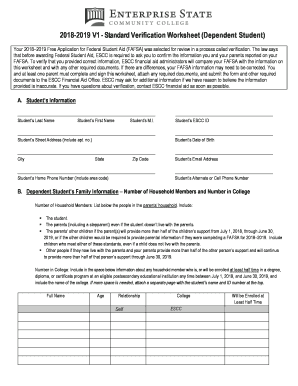
Get Escc V1 - Standard Verification Worksheet (dependent Student) 2018
How it works
-

Open form follow the instructions
-

Easily sign the form with your finger
-

Send filled & signed form or save
How to fill out the ESCC V1 - Standard Verification Worksheet (Dependent Student) online
Completing the ESCC V1 - Standard Verification Worksheet (Dependent Student) is an important step in the financial aid verification process. This guide will provide clear and comprehensive instructions to assist users in filling out the form accurately online.
Follow the steps to successfully complete the verification worksheet.
- Click ‘Get Form’ button to access the worksheet and open it in your online editor.
- Begin with section A, which requires entering the student’s personal information such as last name, first name, middle initial, street address, city, state, zip code, and contact numbers. Ensure all information is accurate and reflects current details.
- Proceed to section B to report family information. Indicate the total number of household members, including all parents, siblings, and any other individuals living with the household who receive more than half of their support from the student’s parents. Then record the number of household members who will be enrolled in college during the academic year.
- In section C, focus on student income verification. If you or your spouse filed a tax return, check the appropriate box and try to use the IRS Data Retrieval Tool (IRS DRT). If you cannot use the DRT, you must obtain a tax return transcript from the IRS and provide that information.
- If you or your spouse did not file a tax return, complete the non-filer information in section C. Indicate if neither had employment in 2016 or list all employers along with the corresponding income earned. Include copies of any W-2 forms.
- Section D will require you to input your parents' income information similarly to section C. Follow the same guidelines regarding tax filers and non-filers, making sure to document all necessary income sources.
- Finally, complete section E by having both the student and one parent sign and date the worksheet. Confirm the accuracy of the information reported and do not forget to keep a copy for your records.
- Once the worksheet is completed, you can save changes, download the document, print it, or share it with the ESCC Financial Aid Office as instructed.
Complete your ESCC V1 - Standard Verification Worksheet online today to ensure your financial aid process continues smoothly.
Get form
ID.me verifies your student status through a secure online process that checks your enrollment details against educational institutions. This service simplifies the verification process, making it quicker and easier for you. When using ID.me, you provide essential information, and they handle the confirmation, which can assist you in completing the ESCC V1 - Standard Verification Worksheet (Dependent Student) with verified proof. This integration helps streamline the overall verification experience.