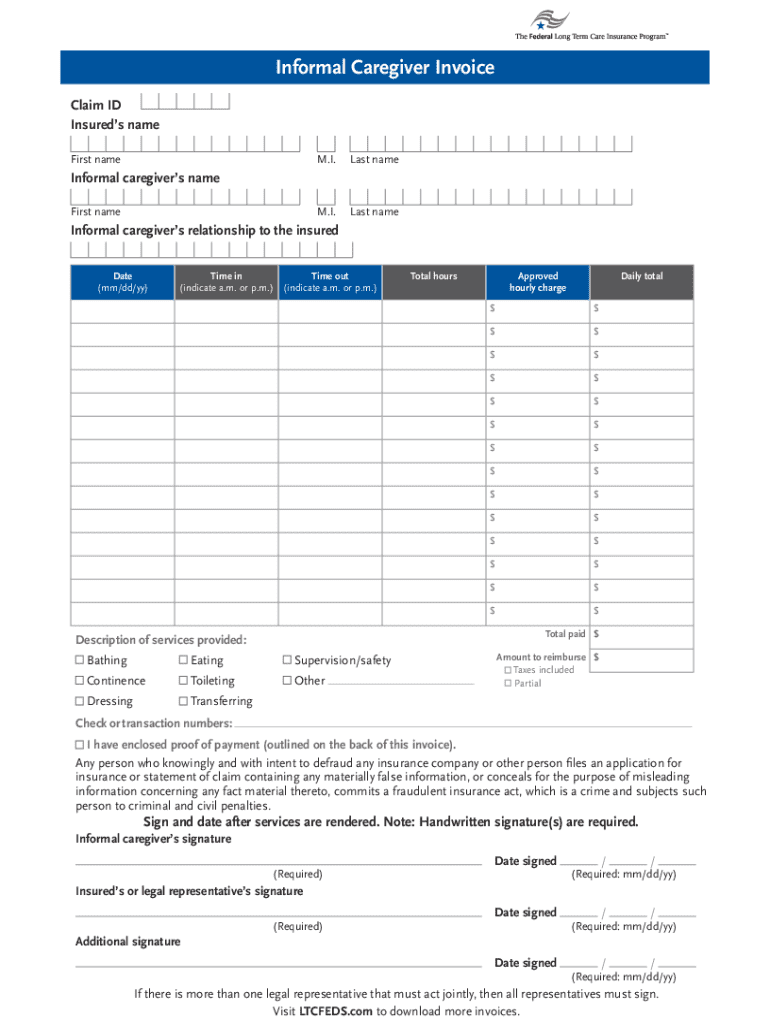
Me out for that calendar day. Include a.m. and/or p.m., and round time to the nearest quarter hour. 4. Enter the total hours, approved hourly charge (per plan of care), and daily total for each date of service. 5. Enter the total reimbursement amount requested. 6. Mark an X in the correct box for each activity of daily living service provided per line. f Please note: Eating refers to providing assistance with getting food into the insured s mouth or assistance with a feeding tube or intr.
Loading

Open form follow the instructions

Easily sign the form with your finger

Send filled & signed form or save
How to fill out the LTCFEDS Informal Caregiver Invoice online
The LTCFEDS Informal Caregiver Invoice is a crucial document for caregivers seeking reimbursement for services rendered. Filling it out correctly ensures that caregivers receive the compensation they deserve for their important work.
Follow the steps to complete the LTCFEDS Informal Caregiver Invoice accurately.
- Click ‘Get Form’ button to access the invoice document online.
- Enter the insured’s claim ID and name along with the informal caregiver’s name in the designated fields.
- For each date of service, enter one date per line in the appropriate section.
- Fill in the time in and time out for each calendar day, ensuring you specify a.m. or p.m. and round the time to the nearest quarter hour.
- Calculate and enter the total hours worked for each date and the approved hourly charge, then determine the daily total for that specific date.
- Sum all daily totals and enter the total reimbursement amount requested at the end of the section.
- Indicate the services provided by marking an ‘X’ in the box for each activity of daily living, including options such as bathing and eating. Remember that eating refers to direct assistance, not meal preparation.
- Document the check or transaction number corresponding to each date of service and attach the necessary proof of payment as specified—this may include canceled checks, eStatements, or money orders.
- Sign and date the invoice as the informal caregiver after services have been rendered, ensuring no photocopied signatures are used.
- The insured or their legal representative must also sign and date the invoice, and if the same individual is representing both parties, an additional signature from a third party is required.
- Review all entries for accuracy, ensuring all signatures are present, and then save changes, download, print, or share the completed form according to your preferences.
Complete your LTCFEDS Informal Caregiver Invoice online today to ensure timely reimbursement for your services.
Experience a faster way to fill out and sign forms on the web. Access the most extensive library of templates available.
Related content
Instructions. 1. Enter the insured's claim ID and name, as well as the Informal...
by G Selassie · 2025 — 28 With fewer providers, beneficiaries may rely on informal...
Get answers to your most pressing questions about US Legal Forms API.
How to do an informal invoice?
To do an informal invoice, gather all necessary information, such as contact details and service descriptions. Clearly lay out the charges and include a total amount due. Using the LTCFEDS Informal Caregiver Invoice can help you organize this information effectively and assure accurate communication.
How to write an invoice request?
An invoice request should be direct and polite. Start with a brief introduction stating your relationship with the recipient, followed by a clear request for the required invoice. Highlight the services rendered under the LTCFEDS Informal Caregiver Invoice to provide context and ensure timely processing.
How to do a simple invoice?
To do a simple invoice, focus on clarity and brevity. Begin by listing your name and the client's name, followed by the services you offered and the respective prices. Ensure the total amount due is clearly displayed. Utilizing a template like the LTCFEDS Informal Caregiver Invoice can simplify this process further.
How to make an invoice for an unregistered person?
When making an invoice for someone not officially registered, include all basic information such as their name and contact details. Clearly describe the services provided and use the LTCFEDS Informal Caregiver Invoice format to maintain consistency. This approach helps establish a clear record for both parties involved.
How to create an informal invoice?
Creating an informal invoice is straightforward. Start by including your name, contact information, and the client's details. Next, list the services rendered along with their costs, and conclude with the total amount due. If you're using the LTCFEDS Informal Caregiver Invoice, templates are available to streamline your invoicing process.
What is an informal invoice?
An informal invoice is a simple document that outlines the services provided and their associated costs without formal requirements. It serves as a proof of transaction in situations like personal caregiving. For caregivers using LTCFEDS Informal Caregiver Invoice, it provides clarity to both the caregiver and the recipient regarding payment agreements.
How to write an invoice for accommodation?
When writing an invoice for accommodation, be specific about the type of lodging and the duration of stay. Include relevant dates, costs, and any additional services provided. This clarity helps in processing the invoice efficiently, especially for LTCFEDS Informal Caregiver Invoice submissions.
How to fill out an invoice example?
To fill out an invoice example, start with your information at the top, followed by the client's details. Describe the services rendered, including the quantity and rate. Finally, review any payment instructions and the final total, making sure it aligns with typical LTCFEDS Informal Caregiver Invoice standards.
Use professional pre-built templates to fill in and sign documents online faster. Get access to thousands of forms.
If you believe that this page should be taken down, please follow our DMCA take down process here.
This form is available in several versions. Select the version you need from the drop-down list below.