Loading
Get Csu Cdip Student Enrollment Verification Form (sevf) 2018
How it works
-

Open form follow the instructions
-

Easily sign the form with your finger
-

Send filled & signed form or save
How to fill out the CSU CDIP Student Enrollment Verification Form (SEVF) online
Completing the CSU CDIP Student Enrollment Verification Form (SEVF) online is essential for students seeking funding for their doctoral programs. This guide will provide clear and detailed instructions on how to accurately fill out each section of the form to ensure your submission is accepted.
Follow the steps to successfully complete the form.
- Click the ‘Get Form’ button to obtain the form and open it in the editor.
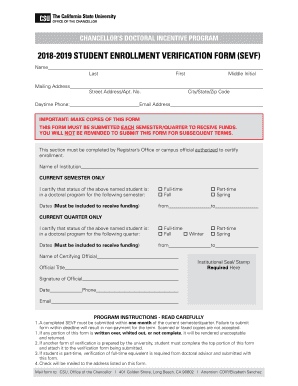
- Begin by filling out your personal information at the top of the form. Enter your last name, first name, and middle initial. Ensure that all names are spelled correctly as this will be used for verification purposes.
- Provide your mailing address, including street address, apartment number (if applicable), city, state, and zip code. Make sure this address is current, as funds will be mailed here.
- Enter your daytime phone number and email address to ensure you can be contacted if necessary regarding your funding.
- Read the important reminders carefully. This form must be submitted each semester or quarter to receive funds, and it's your responsibility to ensure it is submitted on time.
- In the section designated for the Registrar's Office or an authorized campus official, the institution's name should be provided. Ensure this information is accurate as it certifies your enrollment.
- Indicate whether you are enrolled full-time or part-time for the current semester or quarter. Check the appropriate box for either Fall or Spring semester or Fall, Winter, or Spring quarter.
- Fill in the dates that reflect your enrollment period. These dates are crucial for funding eligibility, so ensure they are complete and accurate.
- The certifying official will need to provide their name, title, phone number, and email address. This ensures that the verification process can be completed if any issues arise.
- Lastly, the certifying official must sign and date the form, and apply the institutional seal or stamp as required.
- Once all sections are complete and reviewed for accuracy, save your changes. You can then download the form, print it for physical submission, or share it as needed.
Complete your CSU CDIP Student Enrollment Verification Form online today for timely processing!
Get form
Experience a faster way to fill out and sign forms on the web. Access the most extensive library of templates available.
You can check your enrollment date at UCF by logging into your student portal or contacting the registrar’s office directly. The registrar will have your complete enrollment history, including your start date. If relevant, be sure to mention the CSU CDIP Student Enrollment Verification Form (SEVF) for any specific inquiries you may have.
Get This Form Now!
Use professional pre-built templates to fill in and sign documents online faster. Get access to thousands of forms.