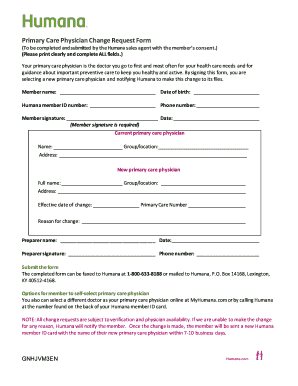
Ian is the doctor you go to first and most often for your health care needs and for guidance about important preventive care to keep you healthy and active. By signing this form, you are selecting a new primary care physician and notifying Humana to make this change to its files. Member name: Date of birth: Humana member ID number: Phone number: Member signature:.
Open form follow the instructions
Easily sign the form with your finger
Send filled & signed form or save
How to fill out the Humana GNHJVM3EN online
Filling out the Humana GNHJVM3EN form is essential for changing your primary care physician. This guide will walk you through each step to ensure a smooth and efficient process.
Follow the steps to complete the form accurately.
- Click ‘Get Form’ button to access the form and open it in the editor.
- Begin by entering the member's name, date of birth, Humana member ID number, and phone number in the designated fields. Make sure this information is accurate for proper identification.
- Provide the member's signature and the date in the corresponding fields. Remember, the signature is required to authorize the change.
- In the 'Current primary care physician' section, fill in the name, group/location, and address of the current physician.
- In the 'New primary care physician' section, enter the full name, group/location, and address of the new physician you wish to select.
- Indicate the effective date of the change in the provided space along with the primary care number if applicable.
- Lastly, state the reason for the change in the specified area to provide context for the shift.
- If someone else is filling out the form on behalf of the member, that individual's name, date, signature, and phone number must be completed in the 'Preparer' section.
- Review all entries to ensure that every field is filled clearly and accurately.
- Once completed, you can save the changes, download, print, or share the form as necessary.
Complete your documents online today to ensure a seamless transition to your new primary care physician.
Experience a faster way to fill out and sign forms on the web. Access the most extensive library of templates available.
Related content
"Atlas de Geografía Humana" constitutes a critique of the much vaunted notion of a ... 32...
This approach will lead to better understanding of heterogeneity in tumors and to better...
For generating siRNA that is required for the RNAse III needed ... RNAs with complementary...
Get answers to your most pressing questions about US Legal Forms API.
When to submit a corrected claim?
You should submit a corrected claim as soon as you identify an error in your original submission. Timeliness is key to ensure coverage and payment are not affected under your Humana GNHJVM3EN plan. Ideally, initiate the correction process as soon as you receive feedback from Humana regarding the initial claim. Keep in mind that there may be deadlines for submitting these corrections, so act promptly.
What is the submission code for a corrected claim?
The submission code for a corrected claim can vary based on the specifics of your claim and your policy. It is recommended to check the Humana guidelines or contact customer support for the exact code relevant to your Humana GNHJVM3EN policy. Having this code ensures that your corrected claim is processed properly. Always include it on your submission form to expedite the review process.
How to submit a corrected claim to Humana?
To submit a corrected claim, first obtain the necessary forms from Humana. Clearly indicate that the claim is a correction and provide full details of the original submission along with your Humana GNHJVM3EN information. Completing the form accurately is essential, as any mistakes can delay processing. Lastly, send the corrected claim to the appropriate address.
What is the claims address for Humana?
The claims address for Humana can usually be found on their official website or by contacting their customer service. It is important to send your claims to the right location to ensure timely processing. Make sure to include your Humana GNHJVM3EN information in the correspondence to avoid any mix-ups. Verify the address regularly, as it may change.
How do I submit a corrected claim to Humana?
Submitting a corrected claim to Humana is a straightforward process. First, access the correct forms on the Humana website and fill them out with the accurate information. Make sure to include your original claim number, and any relevant details regarding your Humana GNHJVM3EN coverage. Afterward, send your corrected claim to the claims address specified by Humana.
How do I resubmit a Medicare claim?
To resubmit a Medicare claim, gather the necessary documentation including the original claim, any additional information, and your Humana GNHJVM3EN details. Then, use the appropriate forms to accurately fill out your resubmission. Ensure that you provide any missing information to avoid delays. Finally, send the completed form to the correct claims address provided by Humana.
What is the timely filing limit?
The timely filing limit refers to the specific period allowed for filing claims with insurance providers like Humana GNHJVM3EN. For most cases, this limit is set at 90 days from the date services were provided. It's important to be aware of these limits to maximize your reimbursements. Using tools available on platforms like US Legal Forms can help you keep track of deadlines and manage your claims efficiently.
What is the timely filing limit to submit claims to Humana?
When submitting claims to Humana GNHJVM3EN, you typically have a 90-day window from the date of service to file. Meeting this deadline is essential for ensuring that your claims are processed without delays. If you miss this limit, your claims may be denied or delayed, which can impact your revenue. Utilizing platforms like US Legal Forms can streamline your claims processing and help you stay organized.
How do I check my Humana benefits?
You can check your Humana benefits by logging into your MyHumana account online or using their mobile app. The platform provides easy access to your plan details, coverage options, and available resources. Keeping tabs on your benefits will help you make informed decisions regarding your Humana GNHJVM3EN plan.
Does Humana have an app?
Yes, Humana offers a user-friendly mobile app that allows you to manage your health benefits conveniently. Through the app, you can view your plan, check your balance, and access wellness resources. Downloading the app can enhance your experience as you navigate your Humana GNHJVM3EN benefits.
Use professional pre-built templates to fill in and sign documents online faster. Get access to thousands of forms.
If you believe that this page should be taken down, please follow our DMCA take down process here.