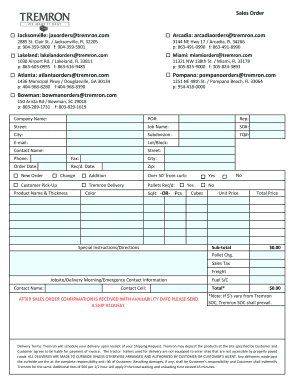
863-491-0990 f: 863-491-8990 Lakeland: lakelandorders tremron.com Miami: miamiorders tremron.com 1030 Airport Rd. / Lakeland, FL 33811 p: 863-603-0995 f: 863-616-9485 11321 NW 138th St. / Miami, FL 33178 p: 305-825-9000 f: 305-824-3893 Atlanta: atlantaorders tremron.com Pompano: pompanoorders tremron.com 1436 Municipal Pkwy / Douglasville, GA 30134 p: 404-968-8280 f:404-968-8390 1251 NE 48th St. / Pompano Beach, FL 33064 p: 954-418-0000 Bowman: bowmanorders tremron.com 150 Arista Rd /.
Open form follow the instructions
Easily sign the form with your finger
Send filled & signed form or save
How to fill out the Tremron Sales Order online
Completing the Tremron Sales Order online is a straightforward process that helps ensure your order is accurately captured and processed. This guide provides detailed instructions for each section of the sales order form to facilitate a smooth experience.
Follow the steps to complete the sales order form accurately.
- Click ‘Get Form’ button to obtain the Tremron Sales Order form and open it in your preferred web-based document editor.
- Begin by entering your company name in the designated field. This identifies the entity placing the order.
- Next, provide a purchase order number (PO#) if applicable. This will help with tracking and aligning your order.
- Fill in the representative's name associated with the order in the 'Rep' field to clarify who is managing this transaction.
- Input the street address where the order should be delivered, followed by the city and zip code.
- Specify the job name related to the order, which can assist in organizing work processes.
- Complete the sales order number (SO#) field, if required, for your records.
- Provide necessary details regarding the subdivision and lot/block to ensure the delivery is correctly aligned with project requirements.
- Input the required email address for confirmations and communications regarding the order.
- List the contact person's name, phone number, and fax number to ensure smooth communication.
- Indicate the order date and the required date for delivery, which helps manage scheduling effectively.
- Select whether this is a new order, change, or addition by marking the appropriate option.
- Provide details for your product selection, including product name, thickness, color, and required square footage (SqFt) or pieces.
- Enter any special instructions or directions that may aid in processing your order.
- Review all entered details carefully to ensure accuracy, then save changes to your form.
- Once satisfied, you can download, print, or share the completed Tremron Sales Order form for submission.
Get started now by completing your Tremron Sales Order online to ensure timely processing.
Experience a faster way to fill out and sign forms on the web. Access the most extensive library of templates available.
Related content
Dec 31, 2005 — TREMRON, INC.; DEP VS. AG. DESOTO. DEP05-1579. 9/16/2005 SHORT-FORM...
Jul 9, 2007 — Tremron had contracted with Mr. Vetter to purchase a 10 acre subdivided...
Get answers to your most pressing questions about US Legal Forms API.
Who will issue a sales order?
A sales order is usually issued by the sales department or the individual responsible for processing orders within a company. In your case, the process is simplified through the Tremron Sales Order templates provided by US Legal Forms. This ensures clarity and efficiency in the issuing process.
Who prepares a sales order?
Typically, a sales order is prepared by the sales team or customer service representatives. They gather the required information about the transaction, ensuring everything is accurate. At US Legal Forms, we equip your team with easy-to-use templates to streamline this process.
How do I ask for a sales order?
To request a Tremron Sales Order, you should communicate directly with your sales representative or the relevant department. Clearly outline the products or services you need and any specific details that may be relevant. After your request, expect them to provide you with a formal order for confirmation.
How to generate a sales order?
To generate a Tremron Sales Order efficiently, begin by using our comprehensive forms available at US Legal Forms. Select the sales order template that suits your needs, input the required information, and the system will generate a formatted order ready for your use. Save or print it directly from the platform.
How to get a sales order?
Obtaining a Tremron Sales Order is easy with US Legal Forms. You can create one directly through our user-friendly platform. Simply access the sales order template, customize it with your specific details, and download the finalized document for your records.
How to enter a sales order?
Entering a Tremron Sales Order is straightforward. First, log into your account on our platform. Navigate to the sales order section, and fill out the necessary fields, including the product details, customer information, and quantities. Review your entry for accuracy and then submit.
How to fulfill a Sales Order?
To fulfill a Sales Order, start by verifying the items listed against your inventory. Once confirmed, package the products, and prepare any necessary shipping documents. With a Tremron Sales Order, you can track orders more effectively, ensuring that each customer receives their goods on time.
How to fill out a sale order?
Filling out a sale order requires you to accurately enter the customer's information, item details, and payment instructions. It's important to double-check the data for any potential mistakes. Using a Tremron Sales Order ensures you capture every essential element for a smooth transaction.
Use professional pre-built templates to fill in and sign documents online faster. Get access to thousands of forms.
If you believe that this page should be taken down, please follow our DMCA take down process here.