Get Bsa District Commissioner And Assistant District Commissioner Onboarding Progress Record 2018-2026
How it works
-

Open form follow the instructions
-

Easily sign the form with your finger
-

Send filled & signed form or save
How to fill out the BSA District Commissioner and Assistant District Commissioner Onboarding Progress Record online
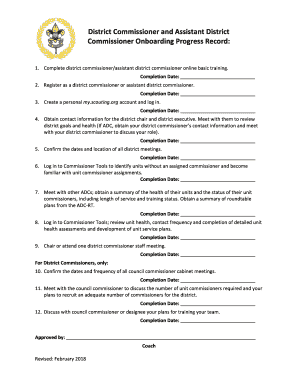
The BSA District Commissioner and Assistant District Commissioner Onboarding Progress Record is a vital document that guides new district commissioners and assistant district commissioners through their onboarding process. This guide offers clear, step-by-step instructions on how to effectively complete this form online.
Follow the steps to successfully complete your onboarding progress record
- Click the ‘Get Form’ button to obtain the form and open it in your document editor.
- Complete the first section by filling in the completion date for the online basic training specific to your role as a district commissioner or assistant district commissioner.
- In the next section, provide the completion date for your registration as either a district commissioner or assistant district commissioner.
- Record the completion date for creating and logging into your personal my.scouting.org account in the designated field.
- Gather the contact information for the district chair and district executive. Schedule a meeting with them to review the district goals and health. If you are an assistant district commissioner, also record the completion date of your meeting with your district commissioner to discuss your role.
- Confirm the dates and location of all district meetings and record the completion date for this task.
- Log into Commissioner Tools to identify units that lack an assigned commissioner and familiarize yourself with unit commissioner assignments. Note the completion date in the corresponding field.
- Meet with other assistant district commissioners. Obtain a summary of the health of their units and the status of their unit commissioners, including their length of service and training status. Collect a summary of roundtable plans from the assistant district commissioner for roundtables. Document the completion date.
- Log back into Commissioner Tools; review unit health, contact frequency, and the completion of detailed unit health assessments and develop unit service plans. Enter the completion date.
- Chair or attend at least one district commissioner staff meeting, and record the completion date.
- For district commissioners only: Confirm the dates and frequency of all council commissioner cabinet meetings and document the completion date.
- Meet with the council commissioner to discuss the number of unit commissioners needed and your recruitment plans. Record the completion date.
- Discuss your training plans for your team with the council commissioner or their designee. Ensure the completion date is noted.
- Once all fields are completed, ensure that all information is accurate. You can then save the changes, download, print, or share the form as needed.
Complete the onboarding progress record online today to ensure a smooth transition into your new role.
Commissioners are essential for fostering effective communication and support within the Scouting community. They help resolve issues, promote engagement, and ensure that leaders have the resources they need. The BSA District Commissioner And Assistant District Commissioner Onboarding Progress Record serves as an excellent tool for tracking commissioners' contributions and enhancing their impact.