Get Plu Maxim F003 2016-2026
How it works
-

Open form follow the instructions
-

Easily sign the form with your finger
-

Send filled & signed form or save
How to fill out the PLU Maxim F003 online
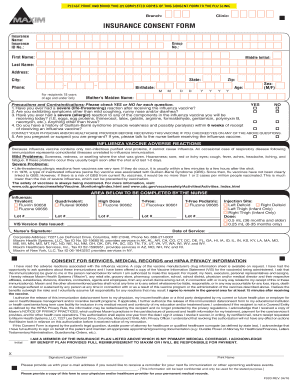
The PLU Maxim F003 is an insurance consent form for receiving an influenza vaccine. This guide will provide you with a clear step-by-step process to fill out the form accurately and comprehensively.
Follow the steps to successfully complete the PLU Maxim F003 online.
- Click ‘Get Form’ button to obtain the form and open it in the editor.
- Begin filling in your insurance details. Enter your insurance name, insurance ID number, and group number in the respective fields.
- Complete your personal information. Provide your first name, middle initial, last name, address, city, state, ZIP code, contact number, birthdate, age, and sex.
- If you are completing this form for a recipient aged 18 years or under, provide the mother’s maiden name.
- Address the precautions and contraindications section. For each question regarding prior reactions, symptoms, and medical history, check 'YES' or 'NO' as appropriate.
- Contact your physician if you checked 'YES' for any of the precautions.
- Read the section on influenza vaccine adverse reactions carefully. Understand the potential mild and severe problems associated with the vaccine.
- For the nurse's section, leave the fields for the influenza type, lot number, and signature blank as this will be completed by a healthcare provider.
- Fill in the 'Consent for Services, Medical Records, and HIPAA Privacy Information' section. Ensure you read and understand the terms regarding the vaccine and information disclosure.
- Provide your signature or that of your legal guardian, print your name, and include the date of signing.
- If desired, enter your email address for reminders about future immunizations or wellness events.
- Review all entries for accuracy before proceeding to save changes, download, print, or share the completed form.
Complete your PLU Maxim F003 form online to ensure your flu immunization process is efficient and secure.
The opposition process for EUIPO involves several steps that allow parties to challenge the registration of a trademark. If you believe the PLU Maxim F003 trademark conflicts with your brand or rights, you can file an opposition within three months of the publication of the trademark application. This ensures that you have a fair chance to protect your interests. Using the USLegalForms platform can simplify this process, offering guidance and resources to effectively navigate trademark opposition.