Loading
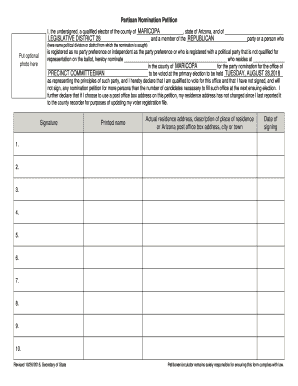
Get Az Partisan Nomination Petition - Maricopa County 2015-2026
How it works
-

Open form follow the instructions
-

Easily sign the form with your finger
-

Send filled & signed form or save
How to fill out the AZ Partisan Nomination Petition - Maricopa County online
Filling out the AZ Partisan Nomination Petition for Maricopa County online is a straightforward process that ensures your nomination is submitted correctly. This guide provides step-by-step instructions to help you navigate each section of the petition efficiently.
Follow the steps to complete your petition accurately.
- Click the ‘Get Form’ button to retrieve the AZ Partisan Nomination Petition. This will open the document in your preferred editor.
- Begin by filling in the details in the first section, which identifies you as a qualified elector. Write your name, the county you reside in, and specify your legislative district, such as ‘Legislative District 28’.
- Indicate your political party affiliation. If you are a member of a party, write its name in the designated space. If applicable, state that you are registered as 'no party preference' or independent.
- Nominate the individual you are supporting for the office of 'Precinct Committeeman' by writing their name and residence address in the spaces provided.
- Specify the date of the primary election, ensuring it matches the upcoming election schedule.
- Affirm your qualifications to vote for this office by declaring that you have not signed and will not sign any nomination petitions for more candidates than necessary for this election.
- If you choose to use a post office box for your address, confirm that your residence address has not changed since your last update to the county recorder.
- Sign the petition in the designated area and print your name clearly below your signature.
- Provide your actual residence address or a description of your residence location if you are using a post office box address.
- Complete the date of signing next to your signature.
- If you are the circulator of the petition, ensure that you fill out the circulator’s section, including your printed name, address, and the signatures collected.
- Once all sections are completed, review the form for accuracy. Save your changes, and then proceed to download, print, or share the finalized petition as needed.
Complete your AZ Partisan Nomination Petition online today to ensure your voice is heard in the election.
Voter Registration Statistics – July 2023 * Party NameRegistered VotersPercentRepublican1,445,12734.42%Democratic1,260,65930.02%Libertarian33,7380.80%No Labels8,5050.20%2 more rows