We use cookies to improve security, personalize the user experience, enhance our marketing activities (including cooperating with our marketing partners) and for other business use.
Click "here" to read our Cookie Policy. By clicking "Accept" you agree to the use of cookies. Read less
Read more
Accept
Loading
Form preview
  • US Legal Forms
  • Form Library
  • Miscellaneous Forms
  • Multi-State Miscellaneous Forms
  • Canada Grey Bruce Public Health Fridge/freezer Temperature Log

Get Canada Grey Bruce Public Health Fridge/freezer Temperature Log

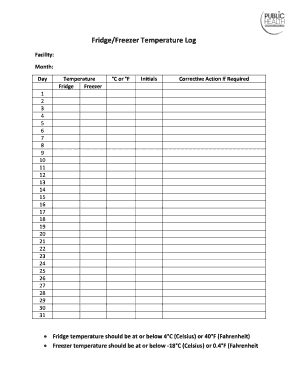
27 28 29 30 31 Fridge temperature should be at or below 4 C (Celsius) or 40 F (Fahrenheit) Freezer temperature should be at or below -18 C (Celsius) or 0.4 F (Fahrenheit.

How it works

  1. Open form

    Open form follow the instructions

  2. Easily sign form

    Easily sign the form with your finger

  3. Share form

    Send filled & signed form or save

How to fill out the Canada Grey Bruce Public Health Fridge/Freezer Temperature Log online

This guide will assist you in accurately completing the Canada Grey Bruce Public Health Fridge/Freezer Temperature Log online. Proper documentation of temperature readings is essential for maintaining food safety and compliance with health regulations.

Follow the steps to successfully complete the temperature log.

  1. Click the ‘Get Form’ button to access the temperature log and open it in your chosen editor.
  2. Begin by entering the facility name in the designated field. Ensure the name reflects the establishment where the log will be utilized.
  3. Next, input the current month and day in the respective fields. Make sure to use the correct numerical format.
  4. For each day of the month, record the fridge temperature in either degrees Celsius (°C) or degrees Fahrenheit (°F). Use the specified areas corresponding to each date.
  5. Similarly, enter the freezer temperature for each respective day. Be mindful that the freezer temperature should be at or below -18°C (Celsius) or 0°F (Fahrenheit).
  6. After entering the temperature readings, you will find a section for initials. Initial the entries to validate that the readings were taken by you or the appropriate individual.
  7. If any temperature readings fall outside the required ranges, document any corrective action taken in the provided space next to the respective entry. This step is crucial for records and future reference.
  8. Once you have filled out all required fields and made any necessary corrections, review the document for accuracy.
  9. Finally, save your changes, and choose whether to download, print, or share the completed form as needed.

Complete your temperature logs online to ensure compliance and maintain food safety.

Get form

Experience a faster way to fill out and sign forms on the web. Access the most extensive library of templates available.
Get form

Related content

FDA Food Code
public health protection to ensure that food at retail and foodservice is safe are...
Learn more
[PDF] NEEDLE TIPS January 2004 - Immunization...
Vaccine Temperature Logs in Fahrenheit and Celsius. ... St. Paul Ramsey County Public...
Learn more
San Jose, California - Wikipedia
San Jose officially San José, is the cultural, financial, and political center of Silicon...
Learn more

Related links form

Petty Cash Policy - Monroegroupcommunity.com Allergy And Anaphylaxis Emergency Plan Form Student College Recommendation Brag Sheet - Princeton High ... 2017 Dog Registration Form Counter.doc

Questions & Answers

Get answers to your most pressing questions about US Legal Forms API.

Contact support

You can monitor your freezer temperature using a standalone thermometer or advanced temperature monitoring devices. Many of these devices can alert you to temperature changes via smartphone apps, allowing you to take immediate action if necessary. Incorporating a Canada Grey Bruce Public Health Fridge/Freezer Temperature Log into your monitoring process can enhance your temperature tracking efforts.

Yes, recording freezer temperature is essential, especially in settings where food safety standards are critical. Keeping a log helps you identify any temperature changes that could affect food quality. Utilizing a Canada Grey Bruce Public Health Fridge/Freezer Temperature Log ensures you maintain accurate records, providing peace of mind and compliance with health regulations.

You can record fridge temperature using a thermometer or a temperature logging device. Simply place the thermometer inside the fridge, wait for a few minutes to get an accurate reading, and write it down. Using a Canada Grey Bruce Public Health Fridge/Freezer Temperature Log helps maintain consistent records, which is crucial for food safety compliance.

To monitor your freezer temperature remotely, you can use smart temperature logging devices that connect to your Wi-Fi network. These devices allow you to receive real-time notifications and view temperature data through an app or web interface. By integrating a Canada Grey Bruce Public Health Fridge/Freezer Temperature Log, you can ensure your food remains safe, and you can quickly respond to any temperature fluctuations.

According to suggestions found on Reddit, the fridge temperature should ideally be between 0 to 4 degrees Celsius, and the freezer at approximately -18 degrees Celsius. These are widely accepted standards for maintaining food safety. Using a Canada Grey Bruce Public Health Fridge/Freezer Temperature Log can help you comply with these recommendations effectively. Engaging with communities can provide you additional insights and tips.

The ideal temperature for your fridge should be between 0 to 4 degrees Celsius, while your freezer should maintain a temperature of around -18 degrees Celsius. Regularly checking these temperatures ensures food safety and quality. Utilizing a Canada Grey Bruce Public Health Fridge/Freezer Temperature Log can make tracking these readings simple and efficient. It’s an essential tool for anyone wanting to manage food storage correctly.

In Canada, the recommended fridge temperature typically ranges from 0 to 4 degrees Celsius. This ensures that your food stays fresh and safe. Utilizing a Canada Grey Bruce Public Health Fridge/Freezer Temperature Log can help you monitor this temperature effectively. Keeping track of these changes is essential for food safety.

Temperature readings for all refrigerator units should be recorded daily to maintain compliance with food safety protocols. It's best to note the temperature at the same time each day, such as at opening or closing hours. This practice aligns with the recommendations in the Canada Grey Bruce Public Health Fridge/Freezer Temperature Log, ensuring consistent monitoring.

Setting your refrigerator freezer temperature involves finding the temperature control, which might be a dial or digital panel. Adjust it to 4°C for the fridge and -18°C for the freezer. Regular monitoring ensures you abide by the guidelines laid out in the Canada Grey Bruce Public Health Fridge/Freezer Temperature Log.

A refrigerator freezer should typically be set at 4°C for the fridge and -18°C for the freezer compartment. These temperatures help safely store food and beverages, reducing spoilage and foodborne illnesses. Proper temperature settings are essential as highlighted in the Canada Grey Bruce Public Health Fridge/Freezer Temperature Log.

Get This Form Now!

Use professional pre-built templates to fill in and sign documents online faster. Get access to thousands of forms.
Get form
If you believe that this page should be taken down, please follow our DMCA take down processhere.

Industry-leading security and compliance

US Legal Forms protects your data by complying with industry-specific security standards.
  • In businnes since 1997
    25+ years providing professional legal documents.
  • Accredited business
    Guarantees that a business meets BBB accreditation standards in the US and Canada.
  • Secured by Braintree
    Validated Level 1 PCI DSS compliant payment gateway that accepts most major credit and debit card brands from across the globe.
Get Canada Grey Bruce Public Health Fridge/Freezer Temperature Log
Get form
Form Packages
Adoption
Bankruptcy
Contractors
Divorce
Home Sales
Employment
Identity Theft
Incorporation
Landlord Tenant
Living Trust
Name Change
Personal Planning
Small Business
Wills & Estates
Packages A-Z
Form Categories
Affidavits
Bankruptcy
Bill of Sale
Corporate - LLC
Divorce
Employment
Identity Theft
Internet Technology
Landlord Tenant
Living Wills
Name Change
Power of Attorney
Real Estate
Small Estates
Wills
All Forms
Forms A-Z
Form Library
Customer Service
Terms of Service
Privacy Notice
Legal Hub
Content Takedown Policy
Bug Bounty Program
About Us
Blog
Affiliates
Contact Us
Delete My Account
Site Map
Industries
Forms in Spanish
Localized Forms
State-specific Forms
Forms Kit
Legal Guides
Real Estate Handbook
All Guides
Prepared for You
Notarize
Incorporation services
Our Customers
For Consumers
For Small Business
For Attorneys
Our Sites
US Legal Forms
USLegal
FormsPass
pdfFiller
signNow
airSlate WorkFlow
DocHub
Instapage
Social Media
Call us now toll free:
+1 833 426 79 33
As seen in:
  • USA Today logo picture
  • CBC News logo picture
  • LA Times logo picture
  • The Washington Post logo picture
  • AP logo picture
  • Forbes logo picture
© Copyright 1997-2025
airSlate Legal Forms, Inc.
3720 Flowood Dr, Flowood, Mississippi 39232
Form Packages
Adoption
Bankruptcy
Contractors
Divorce
Home Sales
Employment
Identity Theft
Incorporation
Landlord Tenant
Living Trust
Name Change
Personal Planning
Small Business
Wills & Estates
Packages A-Z
Form Categories
Affidavits
Bankruptcy
Bill of Sale
Corporate - LLC
Divorce
Employment
Identity Theft
Internet Technology
Landlord Tenant
Living Wills
Name Change
Power of Attorney
Real Estate
Small Estates
Wills
All Forms
Forms A-Z
Form Library
Customer Service
Terms of Service
Privacy Notice
Legal Hub
Content Takedown Policy
Bug Bounty Program
About Us
Blog
Affiliates
Contact Us
Delete My Account
Site Map
Industries
Forms in Spanish
Localized Forms
State-specific Forms
Forms Kit
Legal Guides
Real Estate Handbook
All Guides
Prepared for You
Notarize
Incorporation services
Our Customers
For Consumers
For Small Business
For Attorneys
Our Sites
US Legal Forms
USLegal
FormsPass
pdfFiller
signNow
airSlate WorkFlow
DocHub
Instapage
Social Media
Call us now toll free:
+1 833 426 79 33
As seen in:
  • USA Today logo picture
  • CBC News logo picture
  • LA Times logo picture
  • The Washington Post logo picture
  • AP logo picture
  • Forbes logo picture
© Copyright 1997-2025
airSlate Legal Forms, Inc.
3720 Flowood Dr, Flowood, Mississippi 39232