Loading
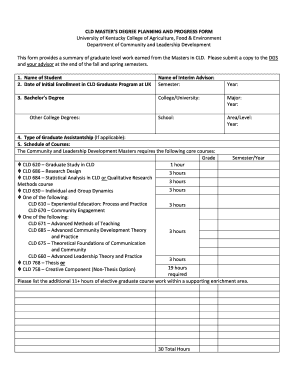
Get University Of Kentucky College Of Agriculture Cld Master’s Degree Planning And Progress Form
How it works
-

Open form follow the instructions
-

Easily sign the form with your finger
-

Send filled & signed form or save
How to fill out the University Of Kentucky College Of Agriculture CLD Master’s Degree Planning And Progress Form online
This guide is designed to assist users in successfully completing the University Of Kentucky College Of Agriculture CLD Master’s Degree Planning And Progress Form online. By following the outlined steps, users can ensure that all necessary information is accurately provided.
Follow the steps to complete the form online effectively.
- Press the ‘Get Form’ button to access the form and open it in your online editor.
- Begin by entering your full name in the 'Name of Student' field. Next, provide the name of your interim advisor in the corresponding section.
- Indicate the date of your initial enrollment in the CLD graduate program. Input the semester and year in the provided fields.
- Fill in your bachelor's degree information. Enter the name of the college or university you attended, your major, and the year you completed it. If applicable, provide details for other college degrees in the designated area.
- If you have a graduate assistantship, specify the type in the relevant section.
- In the 'Schedule of Courses' section, list the required core courses, including grades and semesters/years in which they were completed. Include additional elective graduate courses, ensuring that the total is at least 30 hours.
- Identify your advisory committee members by filling in their names in the appropriate fields, including the chair and any co-chair, as well as the outside member.
- Select your project type by circling either 'Thesis' or 'Creative Component.' Provide the project title and the dates for proposal defense and final project defense.
- Document any academic department functions you attended, alongside their names, dates, and speakers.
- Include details on university service activities, awards received, and teaching experience, formatted as specified.
- Indicate any planned absences during the program and specify the returning semester.
- Finally, sign the form, add your student ID, and have your advisor sign it as well.
- Once all information is accurately completed, save your changes. You can download, print, or share the form as needed.
Take the next step in your academic journey by filling out the CLD Master’s Degree Planning and Progress Form online today.
Industry-leading security and compliance
US Legal Forms protects your data by complying with industry-specific security standards.
-
In businnes since 199725+ years providing professional legal documents.
-
Accredited businessGuarantees that a business meets BBB accreditation standards in the US and Canada.
-
Secured by BraintreeValidated Level 1 PCI DSS compliant payment gateway that accepts most major credit and debit card brands from across the globe.