Loading
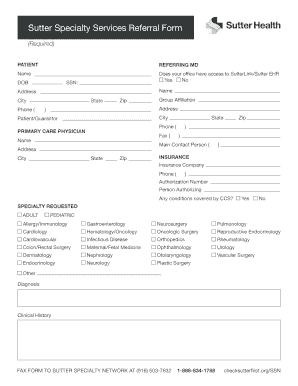
Get Sutter Health Sutter Specialty Services Referral Form
How it works
-

Open form follow the instructions
-

Easily sign the form with your finger
-

Send filled & signed form or save
How to fill out the Sutter Health Sutter Specialty Services Referral Form online
Filling out the Sutter Health Sutter Specialty Services Referral Form online can streamline the referral process for patients. This guide provides a step-by-step approach to ensure you complete the form accurately and efficiently.
Follow the steps to complete the online form successfully.
- Press the ‘Get Form’ button to access the referral form and open it in your preferred digital editor.
- In the 'Patient' section, provide the patient’s full name, date of birth (DOB), and social security number (SSN) to ensure accurate identification.
- Complete the 'Referring MD' section by entering the referring doctor's name, office address, city, state, zip code, and phone number. Indicate whether the office has access to SutterLink/Sutter EHR by selecting 'Yes' or 'No'.
- Fill out the 'Primary Care Physician' section with the name, address, city, state, and zip code of the primary care physician, along with their phone and fax numbers.
- In the 'Insurance' section, list the insurance company name, phone number, and authorization number. Specify the person authorizing the referral and indicate if there are any conditions covered by CCS by selecting 'Yes' or 'No'.
- Select the requested specialty from the list provided (e.g., Allergy/Immunology, Cardiology, etc.) and indicate whether the referral is for an adult or pediatric patient.
- Provide detailed information in the 'Diagnosis' and 'Clinical History' sections to help the specialist understand the patient's needs.
- After completing the form, save your changes. You can then download, print, or share the form as required.
Complete your Sutter Health Sutter Specialty Services Referral Form online today!
The email format for Sutter Health is generally firstname.lastname@sutterhealth. When sending inquiries about the Sutter Health Sutter Specialty Services Referral Form, it's helpful to follow this format to ensure your message reaches the right person. Moreover, clarity in your subject line can catch their attention and facilitate quicker responses to your requests.