Loading
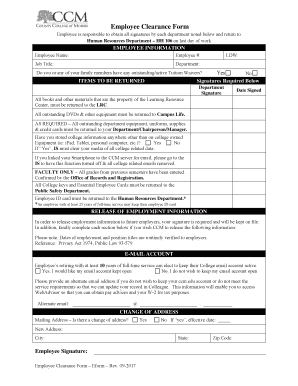
Get Ccm Employee Clearance Form 2017
How it works
-

Open form follow the instructions
-

Easily sign the form with your finger
-

Send filled & signed form or save
How to fill out the CCM Employee Clearance Form online
The CCM Employee Clearance Form is an essential document for employees concluding their service with the institution. This guide provides a clear and supportive approach to help users complete the form online accurately and efficiently.
Follow the steps to complete the form online effectively.
- Press the ‘Get Form’ button to access the CCM Employee Clearance Form and open it in the online editor.
- In the Employee Information section, provide your name, employee number, job title, department, and last day of work (LDW). Ensure all details are accurate.
- Indicate whether you or any family members have outstanding or active tuition waivers by selecting 'Yes' or 'No'.
- In the Items to be Returned section, ensure you have listed all books and materials belonging to the Learning Resource Center and returned any outstanding DVDs and equipment to Campus Life.
- Obtain the required signatures from the relevant departments, including the return of all outstanding equipment, uniforms, supplies, and credit cards to your Department/Chairperson/Manager.
- Answer the question regarding storing college information on non-college-owned equipment. If applicable, your media must be cleared of any college-related data.
- If you have linked your smartphone to the CCM server for email, visit IS to have this function turned off and remove all college-related emails.
- For faculty, confirm that all grades from previous semesters are entered, as certified by the Office of Records and Registration.
- Return all College keys and Essential Employee Cards to the Public Safety Department.
- Return your employee ID card to the Human Resources Department, noting that those with at least 25 years of full-time service may retain it.
- In the Release of Employment Information section, provide your signature for the release of employment details to potential employers.
- Decide whether to keep your College email account active if you have at least ten years of full-time service. Provide an alternate email address if you choose not to retain your college account.
- Indicate any change of address. If applicable, provide the new address, city, state, and zip code, along with the effective date.
- Finally, review all provided information for accuracy, save your changes, and choose to download, print, or share the form as necessary.
Complete your CCM Employee Clearance Form online to ensure a smooth transition from your role.
Get form
Experience a faster way to fill out and sign forms on the web. Access the most extensive library of templates available.
The HR clearance process is a systematic approach to verifying that an employee has completed all tasks before their departure. This typically includes returning company property, settling accounts, and signing necessary forms. The CCM Employee Clearance Form is instrumental in this process, helping to formalize all steps and ensure accountability for both the employee and the organization.
Get This Form Now!
Use professional pre-built templates to fill in and sign documents online faster. Get access to thousands of forms.