Loading
Get Ucla Health Form 520333 2013-2026
How it works
-

Open form follow the instructions
-

Easily sign the form with your finger
-

Send filled & signed form or save
How to fill out the UCLA Health Form 520333 online
Filling out the UCLA Health Form 520333 is an essential step in ensuring that your healthcare provider has the necessary information for your visit. This guide provides step-by-step instructions to help you complete the form efficiently and accurately online.
Follow the steps to complete the form seamlessly.
- Click ‘Get Form’ button to obtain the form and open it for editing.
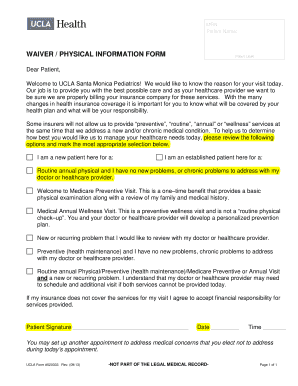
- Begin by entering your Medical Record Number (MRN) and full patient name at the top of the form.
- In the section labeled 'Reason for Visit', choose the applicable option that best describes the purpose of your appointment, whether you are a new patient or an established patient.
- Review the provided selections carefully and mark the appropriate box to indicate your situation, whether it is a routine physical, a Medicare preventive visit, or addressing a new or chronic issue.
- If applicable, acknowledge your financial responsibility by signing your name in the designated area, including the date and time of your signature.
- After ensuring all information is correct, save your changes. You have the option to download, print, or share the completed form as needed.
Complete your documents online for a smoother healthcare experience.
Filing a grievance with UCLA Health ensures that your concerns are acknowledged and addressed. Begin by reaching out to the patient relations team, who can assist you in the grievance process. You may also complete the UCLA Health Form 520333 to formalize your concerns. UCLA Health values patient feedback and is dedicated to addressing grievances to enhance overall patient experience.