Loading
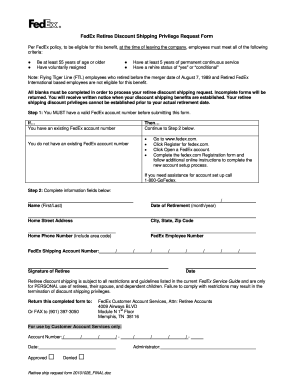
Get Fedex Retiree Discount Shipping Privilege Request Form 2010-2026
How it works
-

Open form follow the instructions
-

Easily sign the form with your finger
-

Send filled & signed form or save
How to fill out the FedEx Retiree Discount Shipping Privilege Request Form online
This guide provides step-by-step instructions for completing the FedEx Retiree Discount Shipping Privilege Request Form online. Ensuring that each section is filled out accurately will facilitate a smooth processing of your request.
Follow the steps to successfully complete your form online.
- Click ‘Get Form’ button to obtain the form and open it in your chosen editor.
- Complete the required fields including your name (first and last), date of retirement (month and year), home street address, city, state, and zip code.
- Provide your home phone number including the area code to ensure FedEx can reach you regarding your request.
- Enter your FedEx employee number and your FedEx shipping account number.
- Add your signature as the retiree and date the form to confirm your request.
- Review the completed form to ensure all fields are filled out correctly, as incomplete forms may be returned.
- Save your changes, and then you can download, print, or share the form as needed. Ensure the completed form is returned to the specified address or fax number.
Complete your FedEx Retiree Discount Shipping Privilege Request Form online today!
Related links form
Accessing FedEx discounts is straightforward when you know the right steps. Begin by completing the FedEx Retiree Discount Shipping Privilege Request Form if you are a retiree. After your approval, you'll have access to specially discounted shipping options, which can enhance your shipping experience and reduce costs.