Ow to tell us more about your request. Note that the use of a claim form, such as this Enrollee Prescription Drug Claim Form, is not required to receive a reimbursement. I did not use my prescription drug ID card Non-participating pharmacy (Please explain) Primary coverage is with another insurance carrier. Please provide explanation of benefits (EOB) or denial letter from the primary insurance carrier I was waiting for a d.
Loading

Open form follow the instructions

Easily sign the form with your finger

Send filled & signed form or save
How to fill out the Cigna 803127 online
Filling out the Cigna 803127 Enrollee Prescription Drug Claim Form is essential for users seeking reimbursement for covered prescription drug expenses. This guide provides a clear and detailed process to complete the form efficiently.
Follow the steps to fill out the Cigna 803127 form accurately.
- Click ‘Get Form’ button to obtain the form and open it in the editor.
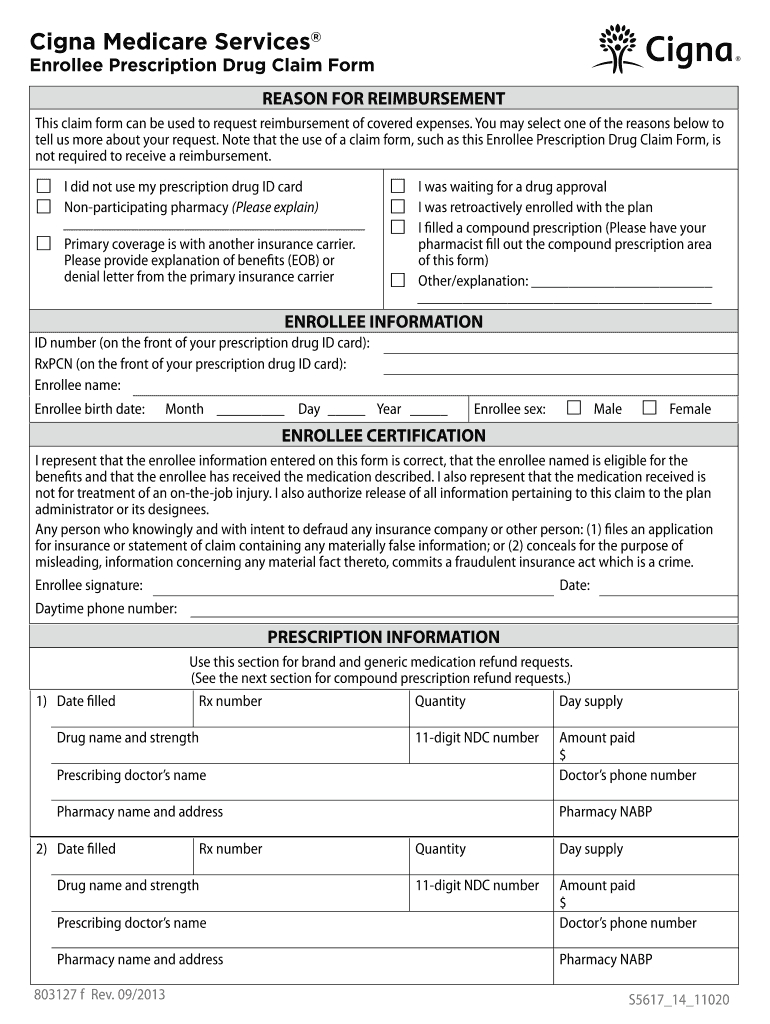
- Select the reason for reimbursement by checking one of the options provided. This could be due to not using the prescription drug ID card, using a non-participating pharmacy, primary coverage with another insurance, or other reasons. Provide any necessary explanations in the space given.
- Fill out the Enrollee Information section. Enter the ID number, RxPCN, name, birth date, and sex (choose either male or female). Make sure all details match those on your ID card.
- Complete the Enrollee Certification section, confirming that all the information provided is correct. Sign and date where indicated and include your daytime phone number for any follow-up.
- In the Prescription Information section, enter details for each medication for which you are seeking reimbursement. This includes the date filled, Rx number, quantity, day supply, drug name and strength, prescribing doctor’s name, amount paid, doctor’s phone number, pharmacy name and address, and pharmacy NABP number.
- If applicable, complete the Compound Prescription Information section. Your pharmacy should fill out this section for multi-ingredient compound prescriptions. Include details such as date filled, total amount paid, and ingredient information.
- Review the completed form to ensure all sections are filled out accurately. Claims missing information may be denied, so it's crucial to provide detailed information.
- Make copies of all prescription receipts and keep a copy of your completed form for your records.
- Once complete, mail the form to the Cigna Medicare Drug Plan Pharmacy Service Center at the address provided in the instructions.
- If you have questions or need assistance while filling out the form, contact your pharmacist or the customer service number on your prescription drug ID card.
Complete your Cigna 803127 form online today to ensure timely reimbursement for your prescription drug expenses.
Experience a faster way to fill out and sign forms on the web. Access the most extensive library of templates available.
Related content
Breakiron-Evans served as Vice President and General Auditor of CIGNA ... 803,127...
Get answers to your most pressing questions about US Legal Forms API.
How do I redeem my Cigna rewards?
Redeeming your Cigna rewards through Cigna 803127 is a straightforward process. Log into your Cigna account and navigate to the rewards section. Here, you will find options to view available rewards and instructions on how to redeem them. Follow the steps provided, and enjoy the benefits while maximizing your Cigna experience.
How do I download Cigna?
To download Cigna 803127, start by visiting the official website or app store for your device. Look for the Cigna app and click the download button. Ensure your device meets the necessary requirements to run the app smoothly. After downloading, simply follow the prompts to set up your account and access all features.
Use professional pre-built templates to fill in and sign documents online faster. Get access to thousands of forms.
If you believe that this page should be taken down, please follow our DMCA take down process here.
This form is available in several versions. Select the version you need from the drop-down list below.