Loading
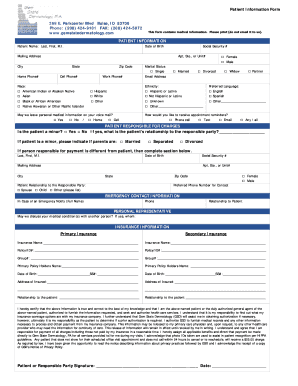
Get Gem State Dermatology Patient Information Form
How it works
-

Open form follow the instructions
-

Easily sign the form with your finger
-

Send filled & signed form or save
How to fill out the Gem State Dermatology Patient Information Form online
Completing the Gem State Dermatology Patient Information Form online is a straightforward process designed to collect essential information for your visit. Following this guide will help ensure that you provide all necessary details accurately and efficiently.
Follow the steps to fill out the form successfully
- Click ‘Get Form’ button to access the form and open it in your online editor.
- Begin with the patient information section. Fill in your name, date of birth, and social security number. Provide your current mailing address, including the city, state, and zip code. Include your contact numbers for home and cell as well.
- Next, indicate your race and ethnicity by checking the appropriate boxes provided on the form. This helps the practice understand its patient demographic.
- Provide your marital status and preferred language. Select how you would like to receive appointment reminders by checking your choice.
- If applicable, indicate whether the patient is a minor and complete the responsible party's information, including their relationship to the patient.
- Enter emergency contact information, including the contact's name, phone number, and relationship to the patient.
- Supply insurance information for both primary and secondary insurance providers. Include necessary details such as policy IDs, relationships to the patient, and the address of the insured.
- Read and agree to the certification statement provided at the end of the form. This signifies that the information you've provided is accurate to the best of your knowledge.
- Finally, review the completed form for accuracy and completeness. After verifying all the information is correct, save your changes, then download, print, or share the form as necessary.
Complete your document online today to ensure a smooth visit!