Get Utcvm Dls Bovine Pregnancy Test Form 2020-2026
How it works
-

Open form follow the instructions
-

Easily sign the form with your finger
-

Send filled & signed form or save
How to fill out the UTCVM DLS Bovine Pregnancy Test Form online
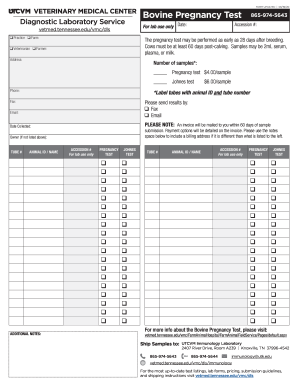
Filling out the UTCVM DLS Bovine Pregnancy Test Form online is a straightforward process that streamlines the submission of testing requests for cattle pregnancy assessment. This guide provides step-by-step instructions to ensure that you provide all necessary information accurately and efficiently.
Follow the steps to complete the form online.
- Press the ‘Get Form’ button to access the UTCVM DLS Bovine Pregnancy Test Form and open it in your preferred web browser.
- Fill in the 'Date' field with the current date of sample collection. This is important for tracking purposes.
- Enter the 'Practice' and 'Farm' details. These should include the name of your veterinary practice and the farm where the test samples are collected.
- Complete the 'Veterinarian' section with the name of the veterinarian overseeing the samples.
- In the 'Farmer' section, provide the name of the person responsible for submitting the samples.
- Fill out the 'Address' and 'Phone' sections for the farmer to ensure proper identification and communication.
- Indicate the number of samples being submitted in the 'Number of samples' field. Choose between pregnancy tests and Johnes tests, along with their corresponding costs.
- Make sure to provide the 'Date Collected' to indicate when the samples were taken. This must comply with the testing timeline.
- Select your preferred method of receiving results by filling in the 'Fax' or 'Email' options. Provide the relevant contact information.
- If necessary, include notes for billing in the 'ADDITIONAL NOTES' section, especially if the billing address varies from the addresses previously entered.
- Document the 'Animal ID' and corresponding 'Tube #' for each sample submitted to maintain clear identification throughout the testing process.
- Once you have filled in all necessary fields, review your entries for accuracy to prevent any delays or complications.
- Finally, save your changes and choose to download, print, or share the form to complete your submission.
Start filling out your UTCVM DLS Bovine Pregnancy Test Form online today to ensure timely testing.
Forming a pregnancy test, particularly using the UTCVM DLS Bovine Pregnancy Test Form, involves determining the key components required. Gather all necessary materials, then follow the standard process established by veterinary experts. By understanding how to formulate these tests, you can significantly streamline your herd’s health management. Your commitment to precision positively impacts your agricultural outcomes.