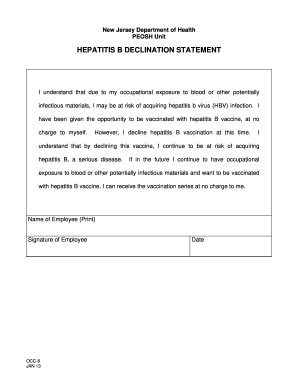
New Jersey Department of Health PEOSH UnitHEPATITIS B DECLINATION STATEMENTI understand that due to my occupational exposure to blood or other potentially infectious materials, I may be at risk of.
Open form follow the instructions
Easily sign the form with your finger
Send filled & signed form or save
How to fill out the NJ Form OCC-8 online
Filling out the NJ Form OCC-8 is an essential step for employees who wish to decline the hepatitis B vaccination. This guide will provide you with a clear, step-by-step process for completing this form online, ensuring you understand each component and its implications.
Follow the steps to complete the NJ Form OCC-8 online.
- Click the ‘Get Form’ button to acquire the NJ Form OCC-8 and open it for editing.
- Begin by entering your name in the designated field for the Name of Employee (Print). This should be your full legal name as recognized in your workplace.
- Next, provide your signature in the Signature of Employee section. You may use a digital signature if applicable, or draw your signature using a mouse or touchpad.
- In the Date field, input the current date. This is important as it signifies when the declination statement was completed.
- Review all the information entered to ensure accuracy. It is vital that your name, signature, and date are correct before finalizing the form.
- Once you have confirmed that all details are accurate, you can save your changes, download a copy for your records, or print the form directly.
- If needed, share the completed form with your employer or relevant department at your workplace to formally document your declination.
Complete your NJ Form OCC-8 online today to ensure your rights are protected regarding hepatitis B vaccination.
Experience a faster way to fill out and sign forms on the web. Access the most extensive library of templates available.
Related content
OCC-8. JAN 13. New Jersey Department of Health. PEOSH Unit. HEPATITIS B DECLINATION...
Use this form to request official verification of your current degree status for...
NOTE: For actions resulting from a Current Good Manufacturing Practice (CGMP) or. Quality...
Get answers to your most pressing questions about US Legal Forms API.
How to fill out form BSF186A?
Filling out form BSF186A requires you to enter your personal information and accurately describe the items being shipped. Include detailed descriptions along with their values, as this information is vital for customs processing. Correctly completing this form helps facilitate smooth customs clearance. If you need additional guidance, consider consulting resources related to NJ Form OCC-8.
How to fill out a withholding form?
To fill out a withholding form, you need to provide your personal identification information and specify your withholding preferences. Be sure to indicate your expected income levels and filing status accurately. This form helps determine how much tax is withheld from your paycheck. For clarity on related tax documents, you might find NJ Form OCC-8 helpful as a reference.
How to fill out BSF186A?
When filling out BSF186A, start by entering your personal and shipment details accurately. Provide clear descriptions of the items, including quantity and value. This form works to support your customs declaration and can prevent customs complications. For more assistance with such forms, consider referencing NJ Form OCC-8 for tips on completing paperwork efficiently.
What is the BSF186 form?
The BSF186 form is a staple document required for certain customs declarations, particularly for international shipments. It provides essential details about the shipment, including the nature of the goods and their intended use. Properly completing this form helps avoid delays at customs checkpoints. If you’re looking for guidance while completing documentation, NJ Form OCC-8 might also be a beneficial resource.
How to correctly fill out a customs form?
To fill out a customs form, start by gathering all necessary information, including your personal details and the contents of the shipment. Clearly describe each item, indicating the value and purpose of the shipment. Be sure to check the specific customs requirements for the destination country. Utilizing tools like NJ Form OCC-8 can help streamline the process and ensure compliance.
Where do I get NJ tax forms?
You can find NJ tax forms directly on the New Jersey Division of Taxation's official website. They have all the necessary forms, including NJ Form OCC-8, organized by category for your convenience. Alternatively, local tax offices and public libraries can assist you in accessing these forms.
How do I get covered tax forms in NJ?
Covered tax forms in NJ can be obtained through the New Jersey Division of Taxation’s resource center. It is vital to check for the latest updates on forms, such as NJ Form OCC-8, which could affect your tax submissions. For a streamlined experience, uslegalforms offers options to easily access and complete these forms.
How to get NJ tax records?
To retrieve your NJ tax records, start by filling out the appropriate request form on the New Jersey Division of Taxation's website. They facilitate accessing your information effectively, including records related to NJ Form OCC-8. For personalized support, consider visiting uslegalforms, where you can find additional resources.
How to get NJ tax forms?
NJ tax forms can be accessed online through the New Jersey Division of Taxation's website. Here, you can find a complete list of available forms, including NJ Form OCC-8. If you prefer printed forms, you can also visit local tax offices or libraries for assistance.
How do I get a copy of my NJ tax return?
To request a copy of your NJ tax return, you will need to submit Form TR-1 to the New Jersey Division of Taxation. It's important to include your identification details to easily locate your records. If you are missing any forms, like NJ Form OCC-8, you can also find assistance on the uslegalforms platform.
Use professional pre-built templates to fill in and sign documents online faster. Get access to thousands of forms.
If you believe that this page should be taken down, please follow our DMCA take down process here.