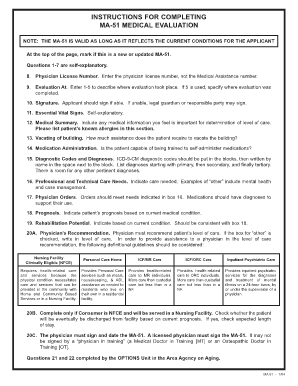
INSTRUCTIONS FOR COMPLETING MA-51 MEDICAL EVALUATION NOTE: THE MA-51 IS VALID AS LONG AS IT REFLECTS THE CURRENT CONDITIONS FOR THE APPLICANT At the top of the page, mark if this is a new or updated.
Open form follow the instructions
Easily sign the form with your finger
Send filled & signed form or save
How to fill out the PA DHS MA-51 online
Filling out the PA DHS MA-51 form online can seem overwhelming, but this guide will walk you through the process step by step. By following these instructions, you can ensure that all necessary information is provided for accurate processing.
Follow the steps to accurately complete the PA DHS MA-51 online.
- Click ‘Get Form’ button to obtain the form and open it in the editor.
- At the top of the page, indicate whether this is a new or updated MA-51 form by marking the appropriate option.
- Proceed to questions 1-7, which are straightforward and require basic information about the applicant.
- In question 8, enter the physician license number. Ensure that this is the correct number, as the Medical Assistance number should not be entered here.
- For question 9, evaluate where the medical evaluation took place and select a corresponding code from 1 to 5. If choosing option 5, specify the exact location.
- Question 10 requires the applicant’s signature. If the applicant is unable to sign, a legal guardian or responsible party may provide their signature instead.
- Complete question 11 by entering essential vital signs, which are self-explanatory.
- In question 12, provide a medical summary including any important medical information relevant for the determination of care levels. List known allergies here as well.
- For question 13, indicate how much assistance the patient requires in vacating the building during emergencies, selecting from independence to total assistance.
- Question 14 assesses whether the patient can be trained to self-administer medications. Answer accordingly.
- In question 15, input the ICD-9-CM diagnostic codes in the designated blocks, and clearly write out their names next to the blocks. Organize the list starting with primary diagnoses followed by secondary and tertiary ones.
- For question 16, outline the professional and technical care needs by checking all applicable categories, including therapy options and other care types.
- Question 17 asks for physician orders. Provide medication details, treatment plans, or rehabilitative services in this section, ensuring to include diagnoses supporting their use.
- In question 18, indicate the patient’s prognosis based on their current medical condition using the options provided.
- For question 19, evaluate the rehabilitation potential of the patient, selecting one option that best describes their current condition.
- In question 20A, the physician is required to recommend the patient's level of care by checking only one option. If checking 'other', write in the requested level.
- If the patient is NFCE and will be served in a nursing facility, complete question 20B to determine their expected length of stay regarding discharge.
- Question 20C mandates that a licensed physician signs and dates the MA-51 form, as it cannot be signed by a physician in training.
- Questions 21 and 22 are completed by the OPTIONS Unit in the Area Agency on Aging. Ensure any additional comments are attached on a separate sheet if necessary.
- Finally, review all fields for accuracy, then save changes, download a copy, print the document, or share it according to your needs.
Start filling out the PA DHS MA-51 online today to ensure timely processing of medical evaluations.
Experience a faster way to fill out and sign forms on the web. Access the most extensive library of templates available.
Related content
Prognosis. Indicate patient's prognosis based on current medical condition. 19...
PA 51-Request and Report State Mental Institutions. PA 52-Application-Foster ... PA...
Aug 8, 2006 — Software pack- ages may include functions related to pa- tient...
Get answers to your most pressing questions about US Legal Forms API.
What is the difference between Medicaid and medical assistance in PA?
In Pennsylvania, Medicaid and medical assistance refer to similar programs designed to support individuals with low income. However, Medicaid is the federal program, while medical assistance encompasses the state's implementation of Medicaid benefits. Understanding this distinction can help clarify the types of benefits you may qualify for. For comprehensive information on these programs, explore resources connected with PA DHS MA-51.
What is a PA-4 form for Medicaid?
The PA-4 form is essential for individuals applying for Medicaid benefits to provide information about their financial situation. Completing this form accurately is vital for determining eligibility and ensuring you receive the support you need. If you're navigating the Medicaid application process, you will find that various resources, including PA DHS MA-51, can simplify your journey.
What is the statute of repose in Pennsylvania?
The statute of repose in Pennsylvania establishes a time limit within which a claimant may bring a lawsuit based on a specific act or omission. Typically, it is a fixed period after the act occurs, regardless of when the harm is discovered. Understanding this statute is crucial for those pursuing legal action, as it dictates timelines. For more detailed guidance on legal matters, consider utilizing the resources provided by US Legal Forms.
What is the MA 51 form in Pennsylvania?
The MA 51 form is a key document used in Pennsylvania to assess an individual's eligibility for Medicaid benefits. Completing this form thoroughly ensures the state has the necessary information to evaluate health care needs. Additionally, having the right paperwork can expedite the application process. You may want to look into resources available through PA DHS MA-51 for assistance.
What is the maximum income to qualify for Medicaid in PA?
The maximum income to qualify for Medicaid in Pennsylvania can vary based on family size and specific program requirements. Generally, the income limit is set around 138% of the federal poverty level for most adults. Therefore, you should check the latest guidelines to ensure eligibility. Using tools like PA DHS MA-51 can assist in determining your qualification.
How to file PA annual report online?
Filing a Pennsylvania annual report online is straightforward; you need to log into the Commonwealth's designated business portal. After entering your business's specific information, follow the prompts to complete and submit the report electronically. Utilizing resources, such as those available through the PA DHS MA-51, can streamline your filing process, ensuring compliance with state regulations.
How to file for reciprocity in PA?
To file for reciprocity in Pennsylvania, you typically must submit an application along with any necessary documentation that aligns your qualifications with Pennsylvania standards. Different professions have distinct requirements, so it's essential to check with the relevant board or authority. Resources like the PA DHS MA-51 can help clarify what you need to successfully navigate these processes.
How to file a partition action in PA?
Filing a partition action in Pennsylvania involves several steps, including gathering documents that prove ownership and initiating a lawsuit in the appropriate court. You will need to complete the required forms, which can often be accessed through platforms like USLegalForms for convenience. Understanding how the PA DHS MA-51 might relate to property disputes can also lead you to appropriate assistance.
How do I apply for PA DHS?
To apply for PA DHS, you can visit your local county assistance office or apply online through the PA DHS website. Begin by gathering the required documents, such as proof of income and identification. Once you have everything ready, fill out the MA 51 form to kickstart your application. The PA DHS will review your submission and notify you of your eligibility status.
What is MA 51 form PA?
The MA 51 form is a document used in Pennsylvania to apply for medical assistance. This form helps you provide the necessary information to the PA DHS for your healthcare needs. By submitting the MA 51 form, you enable the county assistance office to determine your eligibility for medical benefits. It's essential to complete this form accurately to ensure a smooth application process.
Use professional pre-built templates to fill in and sign documents online faster. Get access to thousands of forms.
If you believe that this page should be taken down, please follow our DMCA take down process here.
This form is available in several versions. Select the version you need from the drop-down list below.