
Open form follow the instructions

Easily sign the form with your finger

Send filled & signed form or save
How to fill out the CA CEC-NRCI-LTO-01-E online
This guide offers a comprehensive overview of the CA CEC-NRCI-LTO-01-E form, designed to assist you in filling out the Certificate of Installation for outdoor lighting online. Follow the step-by-step instructions to ensure accurate completion.
Follow the steps to successfully complete the CA CEC-NRCI-LTO-01-E form.
- Click the ‘Get Form’ button to access the form and open it in the online editor.
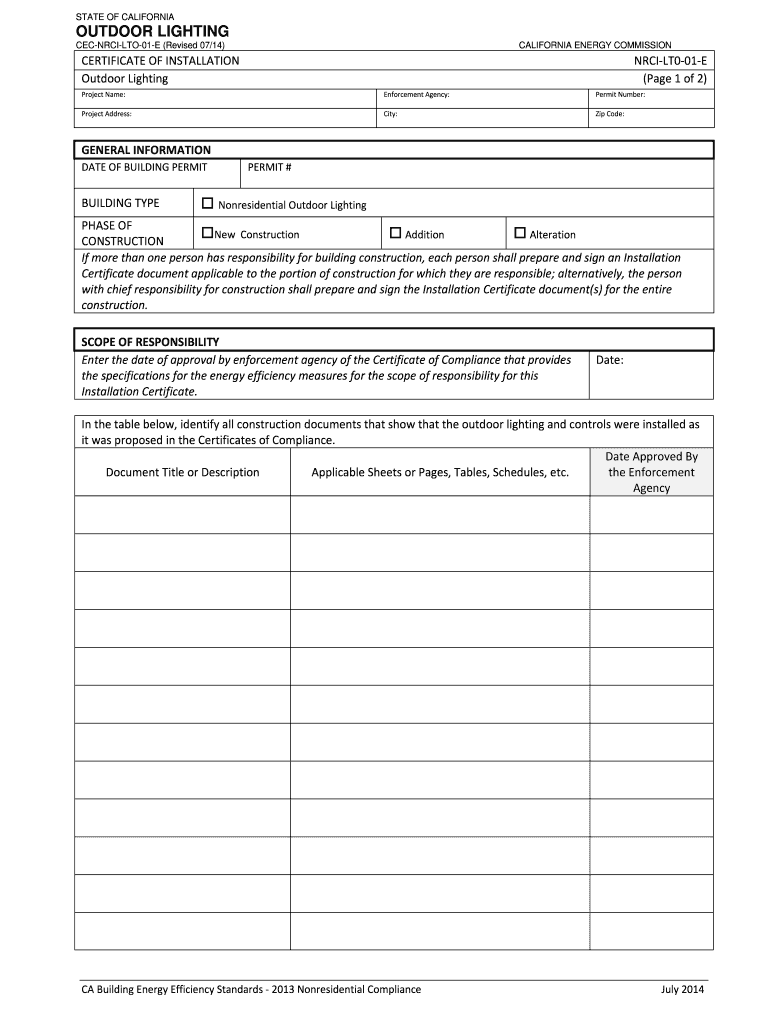
- Begin by entering the project name in the designated field. This should reflect the specific name of the lighting project for which the installation certificate is being filed.
- Input the project address, including the street, city, and zip code. Ensure all information is accurate as it relates to the project location.
- Fill in the enforcement agency responsible for inspecting the project. This is crucial for compliance and verification purposes.
- Provide the permit number associated with the project. This number is essential for tracking and confirming the permit issued for the lighting installation.
- Indicate the date of the building permit issued for the project. This allows for a timeline of approval and construction.
- Select the building type by checking the box that corresponds to 'Nonresidential Outdoor Lighting'.
- Choose the phase of construction applicable to your situation: 'New Construction', 'Addition', or 'Alteration'.
- Enter the date of approval for the Certificate of Compliance as provided by the enforcement agency, which outlines energy efficiency measures.
- Complete the table section by identifying all construction documents that confirm the outdoor lighting installation met the specified compliance requirements.
- Review the documentation author's declaration statement. Fill in the required personal details, including name, signature, company name, and date signed.
- Read and complete the responsible person's declaration statement, ensuring to sign and fill in your details, including name, title, and license number.
- After completing the form, review all entries for accuracy. Once confirmed, you can save the changes, download the document for your records, print it, or share it as required.
Complete your CA CEC-NRCI-LTO-01-E form online today to ensure compliance with your outdoor lighting installation.
Experience a faster way to fill out and sign forms on the web. Access the most extensive library of templates available.
Related content
CERTIFICATE OF INSTALLATION. This Certificate of Installation documents the installation...
NRCI-LTO-01-E is required for all outdoor lighting. CERTIFICATES OF ... The California...
Use professional pre-built templates to fill in and sign documents online faster. Get access to thousands of forms.
If you believe that this page should be taken down, please follow our DMCA take down process here.
This form is available in several versions. Select the version you need from the drop-down list below.