Loading
Form preview
  • US Legal Forms
  • Other Templates
  • Industry Forms
  • Industry Insurance & Medical Forms
  • Established Patient Treatment Form

Get Established Patient Treatment Form

How it works

  1. Open form

    Open form follow the instructions

  2. Easily sign form

    Easily sign the form with your finger

  3. Share form

    Send filled & signed form or save

How to fill out the Established Patient Treatment Form online

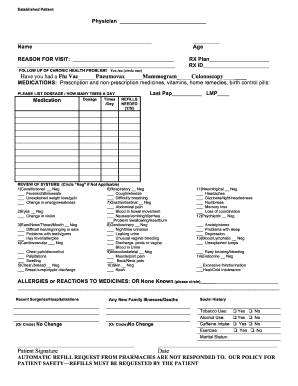
Filling out the Established Patient Treatment Form online can streamline your visit and ensure that healthcare providers have the necessary information for your treatment. This guide will walk you through each section of the form, providing clear instructions for completing it accurately and efficiently.

Follow the steps to complete the Established Patient Treatment Form online.

  1. Press the ‘Get Form’ button to access the form and open it in your preferred editor.
  2. Enter your name in the designated field, ensuring it is spelled correctly.
  3. Indicate your age in the corresponding space.
  4. Fill in the reason for your visit, being as specific as possible.
  5. In the RX plan section, note any medications you are currently taking.
  6. Provide your RX ID if applicable.
  7. Indicate whether you require a follow-up for a chronic health problem by circling 'Yes' or 'No'.
  8. List any vaccinations you have received such as a flu vaccine, pneumovax, mammogram, or colonoscopy.
  9. Complete the medications section by listing prescription and non-prescription medicines, including dosages and how many times a day you take them.
  10. Answer the questions regarding previous screenings and indicate if you need refills by circling 'Yes' or 'No'.
  11. Proceed to the review of systems section, circling 'Neg' for any symptoms that do not apply to you.
  12. In the allergies/reactions section, indicate if you have any known allergies or reactions to medicines.
  13. Mention any recent surgeries or hospitalizations, or circle 'No Change' if none apply.
  14. Provide any new family illnesses or deaths if applicable, or circle 'No'.
  15. Complete the social history section by indicating your tobacco, alcohol, and caffeine use, exercise habits, and marital status.
  16. Sign and date the form at the designated spaces.
  17. Once you have filled out the form, save your changes, then download, print, or share the completed document as needed.

Complete the Established Patient Treatment Form online today to ensure a smooth healthcare experience.

Get form

Experience a faster way to fill out and sign forms on the web. Access the most extensive library of templates available.
Get form

Related content

Evaluation and Management Services Guide - CMS
and plan the patient's immediate treatment and monitor the patient's health care...
Learn more
TREATMENT PLAN - NEW PATIENT FORM SERIES | Parker...
This Treatment Plan form provides the easiest way to organize, document, and communicate...
Learn more
Airway management - Wikipedia
Airway management includes a set of maneuvers and medical procedures performed to ... All...
Learn more

Related links form

Bsnl Enlistment Rules 2019 Formular F R Die Wohnsitzbest Tigung (PDF) 276 KB - SBB - Rafz Please PRINT Clearly ATA TAEKWONDO TOURNAMENT REGISTRATION FORM Family Information Sheet - Lazar & Schwartz

Questions & Answers

Get answers to your most pressing questions about US Legal Forms API.

Contact support

To create your own intake form, start by outlining the specific information you need from patients. You can use online platforms or software that specialize in form creation, such as US Legal Forms. By customizing an Established Patient Treatment Form, you can design a tailored intake experience that meets the unique needs of your practice while ensuring compliance.

When creating a form for others to fill out, prioritize clarity and user-friendliness. Begin with a simple layout, incorporate clear instructions, and include essential fields. Consider using an Established Patient Treatment Form as a base model, which provides structure and ensures you collect all necessary information from your patients efficiently.

To create an effective patient form, first determine what information is crucial for your practice and for the patients. Next, choose a form-building tool—such as US Legal Forms—to utilize pre-designed templates, which can save you time. By including an Established Patient Treatment Form, you ensure that all medical and personal data is systematically collected from each patient.

Creating a fillable form is easy with online form builders or document management systems. You simply start with a standard document, add interactive fields, and then save it in a digital format. Using an Established Patient Treatment Form as a fillable template can speed up the patient intake process and improve organization.

CPT code 99213 describes an office visit for an established patient that requires a lower level of complexity. It includes a problem-focused or expanded problem-focused history and examination. Utilizing an Established Patient Treatment Form can help ensure that all necessary details are captured for accurate billing when using this CPT code.

To create a patient form in Elation, you start by logging into your account and selecting the forms section. You can then use the existing templates or customize a new form that suits your practice's needs. Integrating an Established Patient Treatment Form into your Elation setup can streamline your patient intake process and enhance data collection efficiency.

CPT code 99214 refers to an office or other outpatient visit for an established patient where a detailed history and examination are conducted. This code typically reflects a visit involving moderate complexity and is often used for patients requiring ongoing management of conditions. For proper documentation, consider utilizing an Established Patient Treatment Form to ensure comprehensive capture of patient information.

Creating a patient form involves understanding the information needed from patients and structuring that in an organized manner. You can start by identifying the essential fields required, such as personal details and medical history. Once you have this outline, you can design the form using platforms like US Legal Forms that offer templates for an Established Patient Treatment Form.

Writing a patient file involves compiling comprehensive records of each visit, treatment plans, and any crucial notes. Use an Established Patient Treatment Form to systematically organize this information, ensuring clarity and ease of access for ongoing care management.

The CPT code for an established patient varies based on the level of care provided. Typically, these codes range from 99211 to 99215, depending on the complexity of the visit. Make sure to accurately document your services in the Established Patient Treatment Form to ensure proper billing.

Get This Form Now!

Use professional pre-built templates to fill in and sign documents online faster. Get access to thousands of forms.
Get form
If you believe that this page should be taken down, please follow our DMCA take down processhere.
Get Established Patient Treatment Form
Get form
  • Adoption
  • Bankruptcy
  • Contractors
  • Divorce
  • Home Sales
  • Employment
  • Identity Theft
  • Incorporation
  • Landlord Tenant
  • Living Trust
  • Name Change
  • Personal Planning
  • Small Business
  • Wills & Estates
  • Packages A-Z
  • Affidavits
  • Bankruptcy
  • Bill of Sale
  • Corporate - LLC
  • Divorce
  • Employment
  • Identity Theft
  • Internet Technology
  • Landlord Tenant
  • Living Wills
  • Name Change
  • Power of Attorney
  • Real Estate
  • Small Estates
  • Wills
  • All Forms
  • Forms A-Z
  • Other Templates
  • Legal Hub
  • About Us
  • Help Portal
  • Legal Resources
  • Blog
  • Affiliates
  • Contact Us
  • Delete My Account
  • Site Map
  • Industries
  • Forms in Spanish
  • Localized Forms
  • State-specific Forms
  • Forms Kit
  • Real Estate Handbook
  • All Guides
  • Notarize
  • Incorporation services
  • For Consumers
  • For Small Business
  • For Attorneys
  • USLegal
  • FormsPass
  • pdfFiller
  • signNow
  • altaFlow
  • DocHub
  • Instapage
Form Packages
  • Adoption
  • Bankruptcy
  • Contractors
  • Divorce
  • Home Sales
  • Employment
  • Identity Theft
  • Incorporation
  • Landlord Tenant
  • Living Trust
  • Name Change
  • Personal Planning
  • Small Business
  • Wills & Estates
  • Packages A-Z
Form Categories
  • Affidavits
  • Bankruptcy
  • Bill of Sale
  • Corporate - LLC
  • Divorce
  • Employment
  • Identity Theft
  • Internet Technology
  • Landlord Tenant
  • Living Wills
  • Name Change
  • Power of Attorney
  • Real Estate
  • Small Estates
  • Wills
  • All Forms
  • Forms A-Z
  • Other Templates
Customer Service
  • Legal Hub
  • About Us
  • Help Portal
  • Legal Resources
  • Blog
  • Affiliates
  • Contact Us
  • Delete My Account
  • Site Map
  • Industries
  • Forms in Spanish
  • Localized Forms
  • State-specific Forms
  • Forms Kit
Legal Guides
  • Real Estate Handbook
  • All Guides
Prepared for you
  • Notarize
  • Incorporation services
Our Customers
  • For Consumers
  • For Small Business
  • For Attorneys
Our Sites
  • USLegal
  • FormsPass
  • pdfFiller
  • signNow
  • altaFlow
  • DocHub
  • Instapage
Social Media
Call us now toll free:
+1 833 426 79 33
As seen in:
© Copyright 1999-2026 airSlate Legal Forms, Inc. 17 Station Street, Suite 303, Brookline, MA 02445
  • Your Privacy Choices
  • Terms of Service
  • Privacy Notice
  • Content Takedown Policy
  • Bug Bounty Program